

johnrellis
Legend
Nov 9, 2019 1:06 AM UTC
Released

P: Presence subpanel doesn't display properly for process version 2

The Presence subpanel of Develop's Basic panel doesn't display properly when the process version is 2:
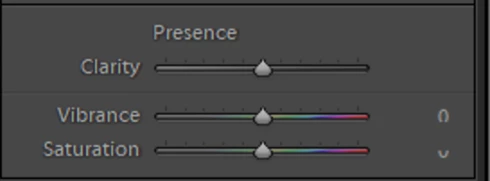
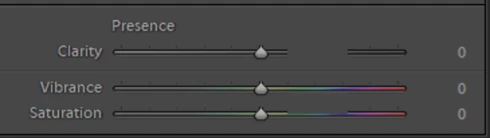


Tested on LR 9.0 / Windows 10.

It occurs with someone else using different graphics hardware and an up-to-date driver, so almost certainly not a driver issue:
https://community.adobe.com/t5/Lightroom-Classic/v9-0-for-Windows-not-displaying-Texture-or-Dehaze-Sliders/m-p/10726166#M162655

This topic is closed to new replies. Start a new post to keep the conversation going.

4 replies

johnrellis
Legend
Jun 16, 2020 8:42 PM UTC
The bug doesn't occur in my LR 9.3 / Windows 10. 
Translate
Rikk Flohr-Retired
Adobe Employee
Jun 16, 2020 1:14 PM UTC
Version 9.3, an update to Lightroom Classic, went live on June 15, 2020 and contains a fix for this issue. Please install the update and respond back if it does not cure the issue for you. Thank you for your patience!
Translate
Rikk Flohr: Adobe Photography Org
Rikk Flohr-Retired
Adobe Employee
Nov 9, 2019 4:48 PM UTC
I can repro in Windows 10. It is panel-width dependant. It also manifests in PV 1. I will log a bug for it. 
Translate
Rikk Flohr: Adobe Photography Org
Bob Somrak
Legend
Nov 9, 2019 1:29 AM UTC
Must be a Windows only issue.  Its correct on my Mac 
Translate
M4 Pro Mac Mini. 48GB