
Bob Somrak
Legend
April 16, 2018

P: Preset works all the time with raw files but only some of the time with a JPG file

  • April 16, 2018
  • 29 replies
  • 686 views

Lightroom 7.3 and osx 10.13.4

First, I would like to note that this is not the same as RAW and non-RAW specific presets.  In this case the preset does work with both RAW and JPG files, just not consistently.   

A preset in certain scenarios will work ALL the time with a RAW but only works SOME of the time with a JPG

Create a preset using the following method

Select photo and do a RESET so no settings are applied
Create a Preset called ZeroSaturation   (I think this can be any slider)
Save the preset with ONLY Saturation selected 
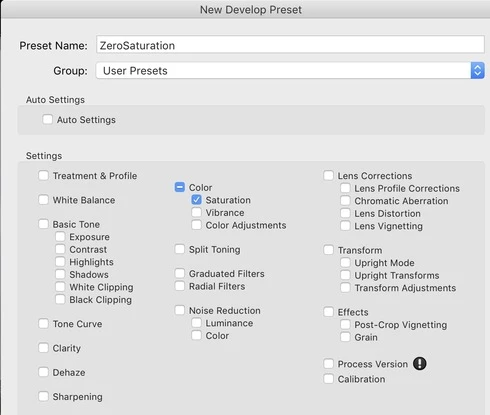


DO THE FOLLOWING WITH BOTH  RAW AND JPG FILES

Select photo
Do a RESET
Apply a Saturation that is not Zero
Apply the ZeroSaturation Preset.   (The Preset works with BOTH JPG and RAW)
Apply Dehaze
Apply Clarity
Select Dehaze
Apply the ZeroSaturation preset. (The Preset did NOT work the JPG)


History on RAW
As you can see the preset works all the time on the RAW.  When you execute the preset on the Dehaze step the history is cleared above Dehaze and the preset is executed and registered as a history step
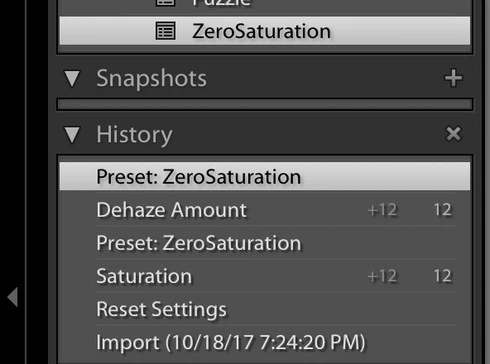

History on JPG.    
As you can see the preset works on the JPG when the saturation is not zero but it does not not execute when the saturation is zero.  When you select Dehaze and execute the preset the history above Dehaze is Not cleared and the preset is not registered in history.  APPARENTLY NOTHING HAPPENS.  
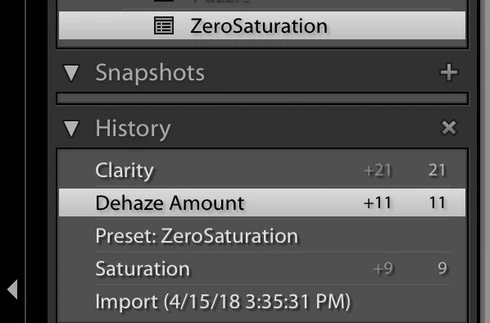


I realize Saturation is already ZERO and the preset is not needed but the the behavior should be the same for both JPG and RAW and the preset should execute and be registered in history when pressed..   The JPG behavior is very disconcerting to the user because NOTHING happens.

This topic has been closed for replies.

29 replies

Bob Somrak
Legend
June 21, 2018

Rikk

The behavior in the original post has changed in Lr 7.4 but it has changed for the worse.  Originally the behavior was correct for RAW files and random for non-RAW but now it is also random for RAW also and the behavior is VERY disconcerting to the user when they click a preset and nothing happens.  The issue is that if the settings in the Preset does not change any develop settings because the values are the same the preset will not execute.  In the following example the preset just changes the value of Clarity to +21.  If the clarity is not +21 the preset executes but if the value is already +21 it does NOTHING.  Its very disconcerting to the user to click a preset and not have it execute even though it changes nothing.  

This is a RAW file.  Same behavior on JPG and TIFF

Import file and change highlights and shadows


Select highlights and execute preset. "clarity 21"


change highlights and shadows again.   Select highlights and execute preset "clarity 21".  As you can see the preset is not executed.  


I think the preset should execute ALL the time to prevent the user from thinking something is wrong because NOTHING HAPPENS.

I appreciate your help on this.

M4 Pro Mac Mini. 48GB
Bob Somrak
Legend
April 25, 2018
Thanks Rikk. Appreciate your help on this.  
M4 Pro Mac Mini. 48GB
Rikk Flohr_Photography
Community Manager
April 25, 2018
Thanks for the update, Robert.  I am logging a bug on it. 
Rikk Flohr: Adobe Photography Org
Bob Somrak
Legend
April 24, 2018
Thanks for the reply Rikk
Yes, the behavior is still in 7.3.1.    A given preset will work all the time on RAW but but only SOMETIMES on JPG and further tests show they only work SOMETIMES on TIFF also.  When it quits working on JPG and TIFF files is when the preset setting are the same as in the file.  For instance, in the above examples the preset just sets the saturation to ZERO.  If the saturation is not zero it works on JPG and TIFF files so its not that the preset never works.  If the saturation is zero than it just doesn't execute.  It will execute on a RAW if the saturation is zero.  It is VERY disconcerting to the user when you press a preset and NOTHING happens and in this case where the preset is not file type specific it should work the same in both cases.  It is easy to create a repeatable condition to make this happen so it should be easy for the developers to isolate the cause.  Just follow the above steps.  Thanks again for your attention on this issue.  The new stuff with Profiles and Presets is GREAT and I guess this is just part of the growing pains.
M4 Pro Mac Mini. 48GB
Rikk Flohr_Photography
Community Manager
April 24, 2018
Do you still see the behavior in 7.3.1? 
Rikk Flohr: Adobe Photography Org
Bob Somrak
Legend
April 18, 2018
Thanks John for taking the time to confirm this. It’s an obscure bug and probably won’t get fixed but it is disconcerting when it happens.
M4 Pro Mac Mini. 48GB
johnrellis
Legend
April 18, 2018
I get the same results -- strange bug.
Bob Somrak
Legend
April 16, 2018
Thanks for the reply but that is not the case here.  All the files are process version 4 and you can create the above preset from a JPG and check SATURATION and PROCESS and the bug still happens. 

As you can see from the screen shots the Preset will work on  RAW all the time but it only works on the JPG some of the time.  Its not that the preset doesn't work on the JPG.   The behavior should be consistent.  Its very disconcerting to the user when you press a preset and nothing happens.
M4 Pro Mac Mini. 48GB
Inspiring
April 16, 2018
Hello, you must always check "Process Version" because some commands are only available on the latest versions!
Yves Crausaz, Suisse, retraité actif dans le monde de la photo et des arts graphiques.