
Known Participant
October 29, 2012

P: Problem with graphic background - wrong centering

  • October 29, 2012
  • 9 replies
  • 307 views

Hi everybody,

I've got problem with lightroom 4.2 with book module.

I had sent a book to blurb and I have a problem on the back cover. Blurb support recommends me to contact Adobe support.

Here is the problem description:

I apply a graphic background (the first choice of graphical backgroup in wedding tab) on my standard landscape and the back cover has a text area on the center of the page. I centered my text on my page.
When I received my book, I noticed that the graphic background is not centered with my text area.

I had a some contacts with blurb support but they can not solve the problem because they informed me that the problem comes from lightroom.

You can see on my screenshot that the text and the graphic background isn't centered. I suppose that the template of the front and back cover have a problem. The text area is centered with the bleed page and the graphical background is centered with entire page.
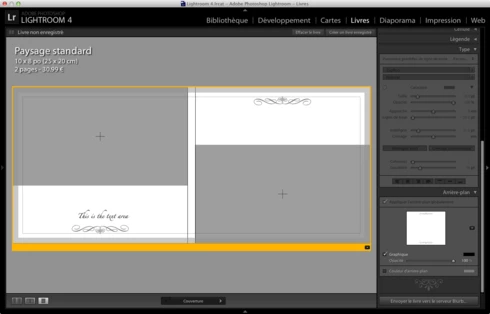


I hope you will be able to help me and blurb to solve this problem !

Cheers !

Christophe

This topic has been closed for replies.

9 replies

Legend
December 14, 2012
Thanks for reporting this. It's fixed in 4.3.
kichetof_Author
Known Participant
December 14, 2012
I've check on-screen and on the exported PDF and it's fixed !
dorin_nicolaescu
Inspiring
December 13, 2012
Did you check on-screen preview in the book module or the exported PDF?
kichetof_Author
Known Participant
December 13, 2012
Hello,

Good news !! The final version 4.3 fixed my problem !

Thank you !

kichetof_Author
Known Participant
November 9, 2012
Hi,

This problem isn't fixed in Lightroom 4.3RC.
I hope it will be fixed in final version !

Christophe
kichetof_Author
Known Participant
October 31, 2012
I added the background graphic at the end of creation and it seemed aligned with the text.
I did not think it could be a problem with the background graphic.

I hope an update to fix this problem soon.
dorin_nicolaescu
Inspiring
October 31, 2012
I have superimposed your Lightroom screenshot and the physical book, and both are misaligned.

So yes, you can blame the poorly designed template, but Lightroom seems to actually show what you will get.

Can't you see the text misalignment inside Lightroom's Book module?
kichetof_Author
Known Participant
October 31, 2012
Hello Dorin,

Here are two photographs of the finished book:


And a zoom:


I hope it can help you !

Cheers,
Christophe
dorin_nicolaescu
Inspiring
October 31, 2012
Can you post a photograph of your printed book, please?