
Legend
January 3, 2018

P: Publish service collection selection Bug

  • January 3, 2018
  • 8 Antworten
  • 486 Ansichten

Discovered a BUG with selections in Lightroom Publish collections:

When you select several photos within the Library Grid the first/most selected photo does not display as the brighter white colour in the grid, it does display correctly within the film strip.
(I checked back through several versions of LR: LR7.1, 2015.12 and LR5.71 on Windows 7 and they all have the same bug. Also LR7.1 using Windows 10 on 2nd computer has same problem.)

This only affects selections in Publish collections (tested Hard drive publish, Flickr and jfZenfolio collections)

Steps to reproduce:

  1.  In a Publish collection select first photo (different from the initially selected photo)
  2.  Use SHIFT key and select additional photos


Result the '1st' photo does not brighten to show it as the 'most selected'

It does work for the following:

  •  If you use CTRL key to make the multi-selection
  •  If you use the initially selected photo upon opening the collection as the first photo, then shift selection works ok   
  •  If photos are selected instead from the filmstrip it also works ok.
  •  Changing to a new most selected photo after the initial selection is made


In all cases the filmstrip does show correct selection status.

Here is a screen capture of the bug:
(photo in filmstrip circled in RED is showing as the 'most selected' while in the library grid the yellow circled photo looks like all of the others)
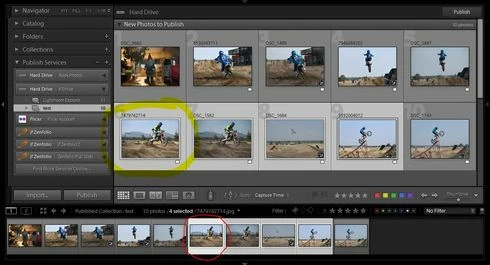


It can cause a little confusion while performing sync settings etc.

Dieses Thema wurde für Antworten geschlossen.

8 Antworten

Legend
July 9, 2019
Still occurs for me with 8.3.1 on Windows 7.
johnrellis
Legend
July 8, 2019
Still occurs in my LR 8.3.1 / Mac OS 10.14.5.  Here's a mini screen recording: https://www.dropbox.com/s/jixccwr0oq298x7/published-collection-selection-bug.2019-07-08.mov?dl=0
Rikk Flohr_Photography
Community Manager
July 8, 2019
@bruce4601099 Houstoun, 

Do you still see this bug manifest? I am no longer seeing this happen with 8.3.1. 
Rikk Flohr: Adobe Photography Org
RikkFlohr: Inactive
Inspiring
January 4, 2018
Bug is filed
Legend
January 3, 2018
I retested it on my Windows 10 laptop and the bug is present there. Though, I do recall it working ok there at least once??
But, that may be before I found out that if you open the collection and then immediately use whatever image is already selected as your start point then it works ok.
It does not not work correctly if you change to a new image before continuing with the rest of your selection.

Either way nice to see that the bug is exhibiting itself for other people and not a preferences glitch.
johnrellis
Legend
January 3, 2018
I don't have that capability (I can't sign the NDA :-<).
RikkFlohr: Inactive
Inspiring
January 3, 2018
I am not able to reproduce this on Windows 10 but am able to reproduce on Mac High Sierra. John, are you going to file the bug or should I?
johnrellis
Legend
January 3, 2018
I also observe this in my LR 7.1 / MacOS 10.12.6.