Inspiring
January 4, 2012

P: Publish Services doesn't display folder name correctly (French/Mac)

  • January 4, 2012
  • 18 replies
  • 544 views

Hi,

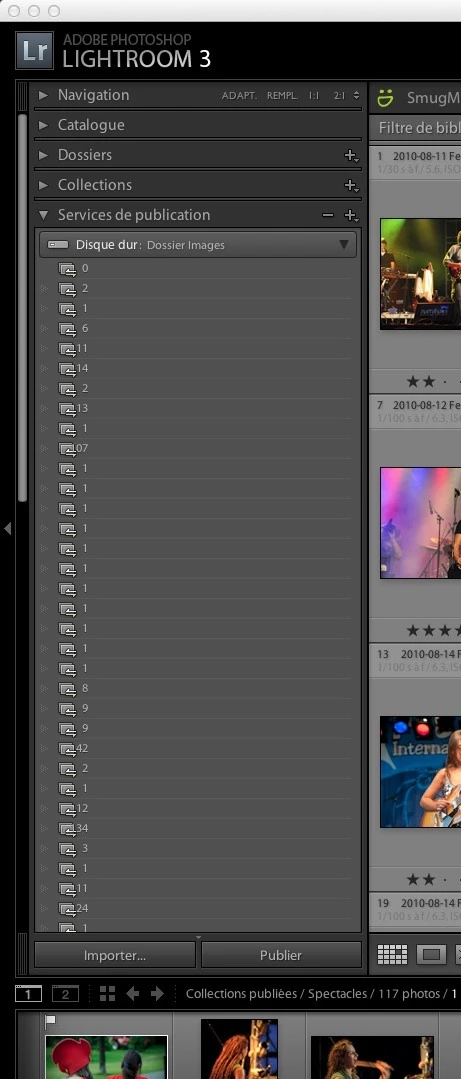
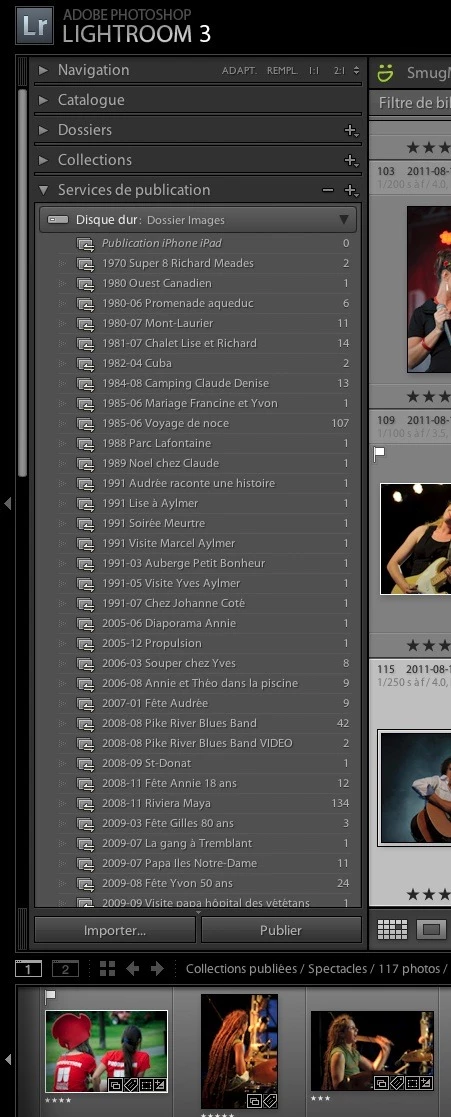
In LR, I have an intermittent problem where for Folders published to Hard Disk, the folder name sometimes is not visible, only the number of items in the folders. See the 2 attachments. I have to quit LR and restart the application to resolve the problem, until it happens again a few days later. My system is in french.

Is this a known bug?

Thanks,
This topic has been closed for replies.

18 replies

Inspiring
January 9, 2012
Hi...

I am publishing to my iMac internal HD.
Legend
January 9, 2012
Thanks Yvon,

One other question, is the drive you are publishing to a slower memory stick type device or a faster USB hard drive type device?
Victoria Bampton LR Queen
Community Expert
Community Expert
January 9, 2012
I've seen the same behaviour on either Flickr or Facebook Publish Services, when setting up new services. It may even have been both, but I was tracking another bug at the time so don't remember the details. I haven't managed to track down reproducible steps yet, but just in case it offers an additional clue...
Victoria - The Lightroom Queen
Inspiring
January 8, 2012
Well, it ended up being quite easy for me to find the way to reproduce the problem on my iMac and on an my MacBook Air. So 2 different computers running the latest MacOS X system and the latest Lightroom program.

Now, I'm french, and my system is in french. So I may not have the right terminology here in english...

See the attached image.

If the last time LR was quit, the Hard Disk publication folder was closed (i.e.: the triangle identified by the arrow in red in the attached image was pointing to the left), then the problem will happen the next time I open LR.

If the last time LR was quit, the Hard Disk publication folder was opened (i.e.: the triangle identified by the arrow in red in the attached image was pointing downward), then the problem will not happen the next time I open LR.

Hope this is clear. I'm surprised this has not been identified before by more people.

Legend
January 6, 2012
We're monitoring issues here. It would be helpful to track down steps to reproduce reliably so we can investigate.
Inspiring
January 6, 2012
Maybe I should report this to Adobe support? are they usually helpful for these types of issues?
Inspiring
January 4, 2012
I doubt it. Here is my setup: iMac 24 inch with 8Gb RAM. LR is installed on my Hard Disk. The catalog is on the same drive. The pictures are on an external firewire 800 drive.
Inspiring
January 4, 2012
That looks like a removable or remote storage device. Is this a case where the app is displaying the items before the device is 100% ready?