
Known Participant
June 10, 2013

P: Reset to Adobe defaults causes stack overflow error

  • June 10, 2013
  • 5 replies
  • 283 views

Trying to reset a photo to Adobe defaults (Shift key + Reset button) causes the following error:
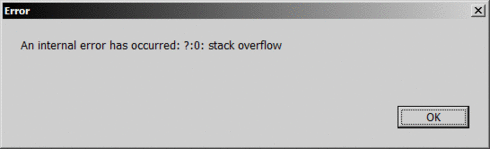


...and the photo is not reset.

Seems to happen for all kind of images, Canon CR2, JPEGs, ... etc. Normal reset seems to work OK.

This topic has been closed for replies.

5 replies

Adobe Employee
July 31, 2013
This has been fixed in the Release Candidate of Lightroom 5.2, available now at http://labs.adobe.com/technologies/li...
Inspiring
July 27, 2013
This error occurs on my Win 7 machine.
Inspiring
July 2, 2013


In develop module, when an image with an older process model (in this case 2003, but seems to be on all) is displayed, shift-click the RESET button and an error window is displayed, "An internal error has occurred. ?:0 stack overflow". Pressing Ok dismisses the error box clears and the process model is unchanged.

Repeatable. LR5, OSX 10.8.4.

Inspiring
June 12, 2013
In Lightroom 5, when attempting to "Reset (Adobe)" in the Develop module (by holding down Shift) a "stack overflow" error appears. This is reproducible every time one attempts this.

Adobe Employee
June 11, 2013
Thanks for reporting this. I was able to repro it and have logged a bug.