
Participant
July 23, 2015

P: Scroll bar not visible in the Book Module

  • July 23, 2015
  • 6 replies
  • 299 views

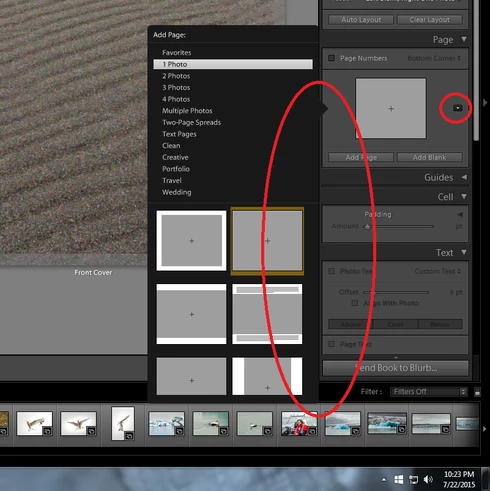
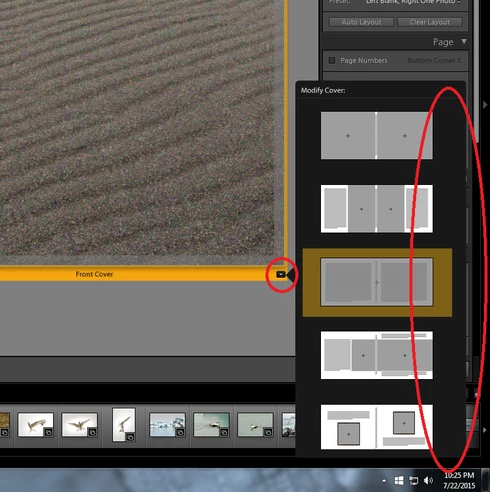
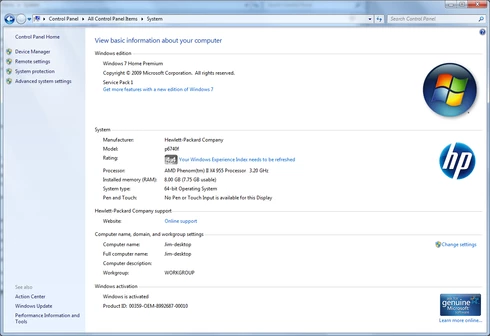
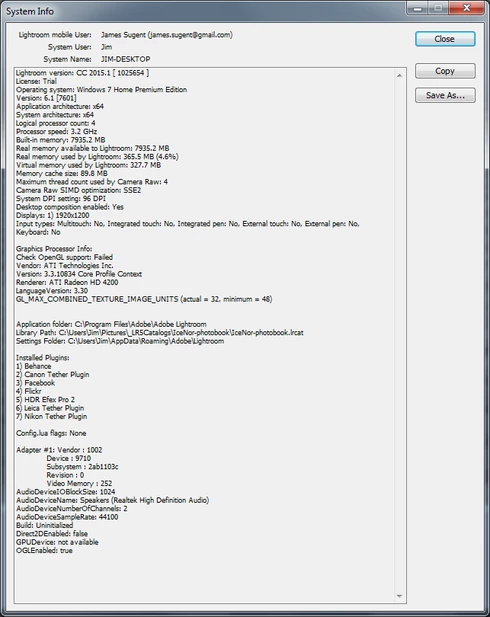
When trying to select a page layout in the book module of Lightroom, the pop-up menu to select the new layout is visible but the scroll bar is not. All of my Adobe apps are up to date. I am running Windows 7 Home Premium with SP1 installed; I have also installed all recent updates for the OS.


This topic has been closed for replies.

6 replies

Rikk Flohr_Photography
Community Manager
June 8, 2016
This should now be fixed as of the CC2015.6/6.6 update released today. You can find more details here: http://blogs.adobe.com/lightroomjournal/2016/06/lightroom-cc-2015-6-now-available.html
Rikk Flohr: Adobe Photography Org
Legend
February 16, 2016
I've logged a bug with the team. Thanks!
ssprengel
Inspiring
February 16, 2016

No version of LR 6 will have Dehaze.  It's only in CC until LR 7, assuming there will be a LR 7.

Inspiring
February 16, 2016


Lightroom 6 jan 2016 update has still not fixed problem in book module where the scrollbar does not highlight when trying to change page layout. Scroll bar although present is actually invisible and has no white highlight. Also why was Dehaze not included in update for LR6.4
ssprengel
Inspiring
July 31, 2015
A LR 6.1.1/2015.1.1 update was released a couple days ago. Are you running that version, yet, in case it's been fixed?

Otherwise, you can use the mouse-wheel to scroll that layout list, or there is actually a scrollbar on the right that happens to be the same color as the background so it is possible to scroll using it if you can guess where it is and click drag on it.
Participant
July 31, 2015
There is a similar issue with another user that was posted on 2015-05-03 by user Claudia Hereth.
Can this issue PLEASE be escalated?

http://feedback.photoshop.com/photosh...