

P:SDK: Invalid LrFolders representing "Imported Folders" pseudo-folder created by sync with LR Cloud
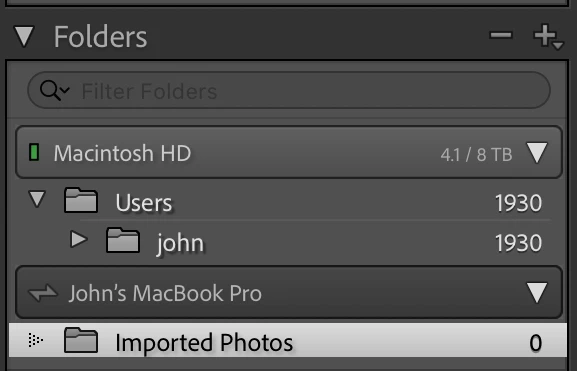
When Sync with LR Cloud downloads and imports photos from the cloud, it creates a pseudo-volume and psuedo-folder in the Folders panel representing the contents of the "Mobile Downloads.lrdata" folder containing the imported photos (e.g John's MacBook Pro > Imported Photos). When a plugin tries to access the pseudo-folder, the methods catalog:getFolders() and catalog:getActiveSources() return invalid LrFolder objects.
To reproduce on LR 14.3.1 / Mac OS 15.5:
1. Download and unzip this catalog:
2. Copy the file "folder-bug.lua" from the catalog folder to the LR Scripts folder and start LR.
3. In the Folders panel, select the Imported Photos pseudo-folder under the pseudo-volume John's Macbook Pro:
4. Do the menu command Scripts > folder-bug. Observe the following incorrect output:
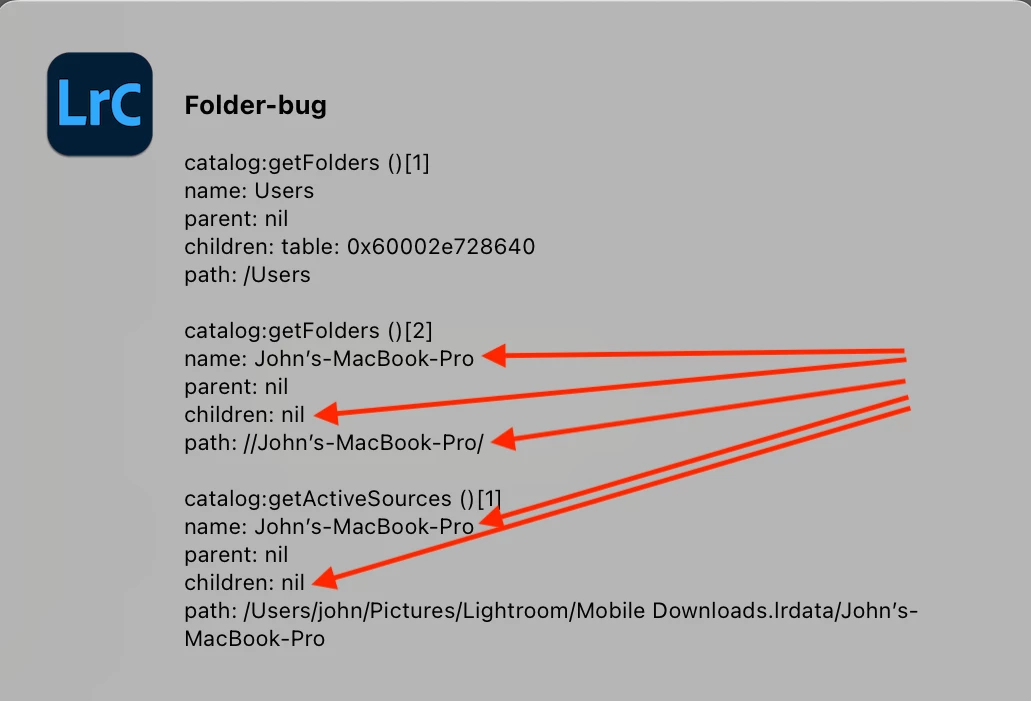
The LrFolders representing what's displayed as "Imported Photos" in the Folders panel are very confused:
- catalog:getFolders ()[2] doesn't have the right name, its children are nil rather than the empty array {}, and its path is a bogus, non-existent file path.
- catalog:getActiveSources ()[1] doesn't have the right name, its children are nil rather than the empty array {} (but it's path is correct).


 AdChoices