

johnrellis
Legend
March 2, 2023

P: SDK: photo:getDevelopSettings() sometimes returns nil for Temperature and Tint

  • March 2, 2023
  • 20 replies
  • 1975 views

photo:getDevelopSettings() sometimes returns nil for Temperature and Tint.   Tested in LR 12.2 and 10.4 on Mac OS 12.6.1.


To reproduce:


1. Download and unzip this catalog folder ("Temperature"):

https://www.dropbox.com/s/z527z9to4ie46vx/Temperature.2023.03.02.zip?dl=0


2. Copy the file "get-temperature.lua" from the catalog folder to the User Scripts folder.


3. Open the Temperature catalog.


4. Select the one photo and go to Develop.


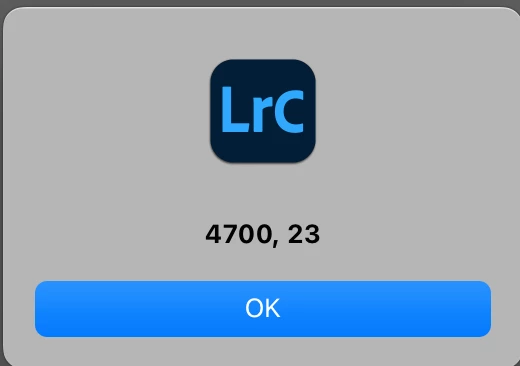
5. Go to Library and do Scripts > get-temperature. Observe the temperature and tint are correctly displayed:
 

6. Do Quick Develop > Reset All.


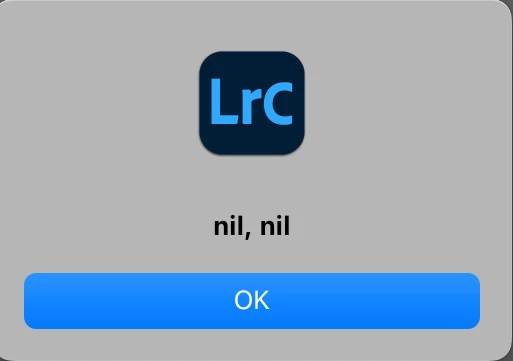
7. Do Scripts > get-temperature and observe that temperature and tint are incorrectly nil:


This topic has been closed for replies.

20 replies

C.Cella
Legend
October 27, 2023

@johnrellis In my test catalog, no matter the version ofLrCC, I haveDNGss that appear with Temperature and Tint "nil"


I already shared one of those files (which is not mine) in one of my previous replies above: AWilliamsFam00400.dng (for some reason now I can't attach files when I reply)


The bug doesn't seem to be in the  photogetDevelopSettingss() but rather in the files themselves that, for some reason, do not have Temperature nor Tint at all.


In the mentioned file theSDKK tells me there is no temperature at all (and theUII also shows ZERO Temperature)


ExifTool gives me this if I search Temperature


.


johnrellis
Legend
October 26, 2023

I can't reproduce the precise bug recipe in LR 13.0.1 using this version of the test catalog upgrade to LR 13:

https://www.dropbox.com/scl/fi/8cqymzcvhrm0kl9nb27t6/Temperature-13.2023.10.26.zip?rlkey=rou0f7m8snhovd840ooidbmpq&dl=0


The correct values for Temperature and Tint are always returned. 


@C.Cella, what do you observe when you execute the steps of the recipe using the upgraded LR 13 test catalog?

johnrellis
Legend
October 26, 2023

"If the fields return nil, check for IncrementalTemperature & IncrementalTint. It should work."


The problem with this purported workaround is that the settings IncrementalTemperature/Tint represent the Temp and Tint sliders for non-raws, with values in [-100..100]. Whereas the settings Temperature/Tint represent the Temp and Tint sliders for raws, with values in [2000..50,000] and [-150..150] respectively.


So when examining a raw, if you observe Temperature is nil and IncrementalTemperature non-nil, that is by definition a bug.


You can verify the meaning of these settings three different ways:


1. Opening .xmp sidecars for raws in a text editor and using Exiftool to examine the XMP metadata of non-raws, or

2. Creating two presets with White Balance selected, one from a raw and one from a JPEG, and opening the presets in a text editor.

3. Using the Show Catalog Metadata plugin, which displays the results of photo:getDevelopSettings().


In addition, I repeated the bug recipe with LR 12.5 using the modified "get-temperature.lua" script below, and it never returns non-nil values for IncrementalTemperature/Tint when Temperature/Tint are nil, contradicting Engineering's claim:


import "LrTasks".startAsyncTask (function ()
    local s = import "LrApplication".activeCatalog ():
        getTargetPhoto ():getDevelopSettings ()
    import "LrDialogs".message ("Results", string.format (
        "Temperature, Tint:\n%s, %s\n" ..
        "IncrementalTemperature, IncrementalTint:\n%s, %s",
        s.Temperature, s.Tint,
        s.IncrementalTemperature, s.IncrementalTint))
    end)


C.Cella
Legend
October 26, 2023

@Rikk Flohr: Photography 


Problem with the suggested solution is that getting IncrementalTemperature and IncrementalTint return, predictably so, nil value for RAW files that usually return Temperature and Tint correctly.


.Seems to me that for some RAW files or DNGs, Temperature and Tint don't exist and instead IncrementalTemperature/Tint are used...that's why the SDK can't return them.


EDIT.


I have DNGs affected in my test catalog AND I suppose something went wrong when they were created/converted form the RAW.

C.Cella
Legend
October 26, 2023


@johnrellis 


I have created a second scrip based on your own and and used IncrementalTemperature & IncrementalTint and indeed it returns the Temperature and Tint even for Raw Files that could not return Temperature and Tint.


.

Rikk Flohr_Photography
Community Manager
October 26, 2023

From engineering: "If the fields return nil, check for IncrementalTemperature & IncrementalTint.
It should work."

Rikk Flohr: Adobe Photography Org
Rikk Flohr_Photography
Community Manager
September 8, 2023

I am moving this thread back to discussions.

The engineers have provided this script to illustrate how this should be called.

import "LrTasks".startAsyncTask (function ()
     --local s = import "LrApplication".activeCatalog ():
     --getTargetPhoto ():getDevelopSettings ()


local s = import "LrDevelopController"
local temp = s.getValue( "Temperature" )
local tint = s.getValue( "Tint" )


    import "LrDialogs".message (
          --tostring (s.Temperature) .. ", " .. tostring (s.Tint))
          tostring (temp) .. ", " .. tostring (tint))
          end)


The previous bug has been closed as "Not a bug"

Let me know if you have any more questions.


Rikk Flohr: Adobe Photography Org
johnrellis
Legend
September 23, 2023

@Rikk Flohr: Photography: I reported misbehavior with LrPhoto's photo:getDevelopSettings() but the team responds with a non sequitur, an unworkable workaround using LrDevelopController.  How does that show the behavior of photo:getDevelopSettings() is "not a bug"?   


The two calls are not interchangeable. LrPhoto's photo:getDevelopSettings() can be called on any photo, with any module selected (Library, Map, Develop, ...), at a rate of more than 1000 photos/sec.  LrDevelopController can only be called when the current module is Develop, returning results for the current photo.


For example, my very popular Any Filter plugin allows users to search potentially hundreds of thousands of photos' develop settings by calling photo:getDevelopSettings(), at more than 1000 photos/sec.  It could theoretically use LrDevelopController  to retrieve Temperature and Tint by taking each photo into Develop in turn, at about 1 photo/sec, but no user would wait that long to search thousands of photos.


Please ask the developers to reopen this obvious bug.

C.Cella
Legend
September 23, 2023

@johnrellis I followed your steps to reproduce the bug with your catalog but at least on my Mac M1 the values are returned.

photo:getDevelopSettings() seems to work on that RAW


This said after using script on other images I found cases in which Temperature an Tint are not returned.

Here's one with files shared by another user of this community time ago.


Also I found out that I get "nil, nil" 100% of the times for TIFF and JPEGs even if they have Temp and Tint applied in LrC

I also used Show Catalog Metadata on these non RAW files and nothing: the SDK doens't return Tint and Temperature for non RAWs  but all the others settings are returned.


So the bug is 100% happneing  for non RAW files edited in LrC and is unpredictably happening for RAW/DNG files.


P.S.

Love the script, pretty neat!

I often just needed to check WB in library and this does the trick...if it was usable on multiple images simultaneously it would be perfect 😉

Known Participant
March 3, 2023

Thanks for adding your experience and escalating this John.

Yes, I had tried using code to toggle to the Develop module and grabbing the slider values that way - but, as you said, it's very klutzy and quite slow. However, I can't think of any other ways around this bug so I will revisit it to see if it will satisfy as a temporary workaround.

Rikk Flohr_Photography
Community Manager
March 3, 2023

Adding bug number and setting status

Rikk Flohr: Adobe Photography Org
Known Participant
March 2, 2023

I've hit an edge case in my plugin development and could use some help. Essentially, I'm unable to access a photo's white balance settings of 'Temperature' and 'Tint' from the Grid module if Lightroom Classic hasn't initialized them. If I open the Develop module on the same photo and then go back to the Grid and try again - they are accessible. But otherwise they remain nil initially (and I need to grab them to perform relative operations on them!).


Here are some basic steps to reproduce the issue, all done from the Grid view:

  1. Select a photo
  2. Right-click photo -> Develop Settings -> Reset
  3. Run my plugin on the selected photo, from File -> Plugin Extras -> Name of My Function
  4. When trying to access the white balance values of 'Temperature' and 'Tint' from my code (see following code for the basics), they are nil:


local currentDevelopSettings = currentPhoto:getDevelopSettings()
local currentTemp = currentDevelopSettings["Temperature"]​
local currentTint = currentDevelopSettings["Tint"]


Is there a best practice for initializing these values via code so that I can go on to work with them? I've tried a few things, but have hit wall after wall and am looking for fresh ideas.

TheDigitalDog
Inspiring
March 2, 2023

Here's the first problem: 

http://digitaldog.net/files/CCTandRaw.jpg


Author “Color Management for Photographers" & "Photoshop CC Color Management/pluralsight"
Known Participant
March 2, 2023

Hi thedigitaldog - what exactly am I looking at in this image?


I'm not sure I understand how this relates to Lightroom Classic loading the initial white balance values for an image, but it's entirely possible I'm missing something.