
P: Set default Develop Settings not applied at import unless Lightroom is restarted
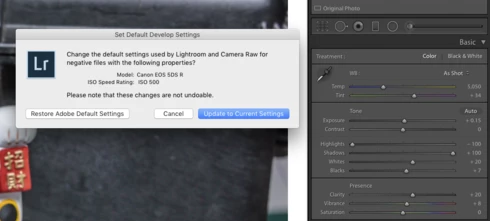
Step 1: In order to apply my standard changes by Camera and ISO to imported raw files I first set up one image carefully in the develop module and then hit Option+Update to Current Settings. (screen print) Step2: I then perform an import from that Camera and ISO however none of the changes that I established in step 1 are applied. (this used to work in LR 6). Nothing happens to the imported raw files, no edits are applied. I shut down LR, restart it and then I see the edits. I reported this on another post but just discovered restarting LR allowed me to view the edits - none were applied on the initial import. No idea why.
Screen Print


 AdChoices