
Participating Frequently
February 1, 2017

P: Small text/UI in email dialog

  • February 1, 2017
  • 16 replies
  • 529 views

I've upgraded to a new Aspire V17 nitro 4K Ultra HD.
I've had trouble with small text in Lr CC (fully updated) on the Aspire.
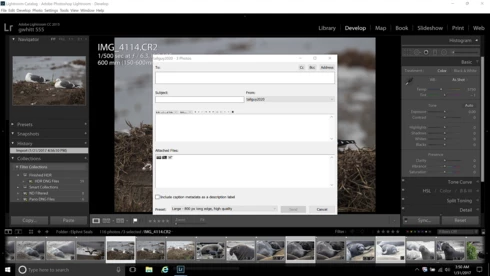
I got around some of the small font size using Windows 10 settings. But still a problem is in the dialog box that opens when emailing photos from Lr directly. The photos appear so tiny they're not discernible. The icons for setting text appearance in the  message area of the email are tiny as well and appears partially blocked out by the upper left portion of the box where text is written. Also the pointer actuated tools in Develop mode are tiny and barely discernable.  I hope I made that understandable enough. This is not a problem in my old Toshiba Satellite laptop that has Lr CC as well. Enclosed screen shot of the email dialog box.
This topic has been closed for replies.

16 replies

Participating Frequently
February 1, 2017
Your input is greatly appreciated. I'm thinking it might have to do with the 4K screen as well but still looking for resolution.
Inspiring
February 1, 2017
I met you ont the LR forum. Until now, I have no solution. To my point of view the problem may linked to the graphic card or the screen itslef
Participating Frequently
February 1, 2017
I have found this article and others concerning Photoshop. This does not help with the use of Lightroom. I have tried all available font size adjustments in Lr. No effect on the Aspire.
Inspiring
February 1, 2017
so try to find your way here: https://forums.adobe.com/thread/1705046 
Participating Frequently
February 1, 2017
Yes it is a 4K screen
Inspiring
February 1, 2017
May it has to do with your screen resolution! Just look at technical data for the Aspire compare to your old computer. As far as I understand, the Aspire screen is a 4k screen...