

johnrellis
Legend
May 21, 2023

P: Smart collection "Caption contains words <word> <word>" not working

  • May 21, 2023
  • 3 replies
  • 561 views

A smart collection with the criterion "Caption contains words <word> <word>" won't match a photo whose caption contains "<word> <word>".


To reproduce, open this test catalog:

https://www.dropbox.com/s/4cox1uzkg4bs3ps/contains-words-bug.2023.05.21.zip?dl=0 


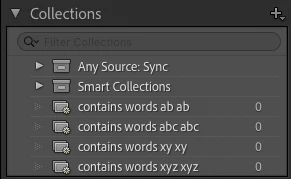
which contains four photos with the captions "ab ab", "abc abc", "xy xy", and "xyz xyz". Observe that the four smart collections with criteria "contains words ab ab", "contains words abc abc", "contains words xy xy", and "contains words xyz xyz" aren't matching the corresponding photos:


Tested on LR 12.3, on Mac OS 13.4 and Windows 11.


See here for the motivating use case:

https://www.lightroomqueen.com/community/threads/detecting-duplicated-specific-text-in-a-caption.47765/


3 replies

Rikk Flohr_Photography
Community Manager
August 5, 2025

The team has reproduced and generated a bug for this. Thanks for the additional information @johnrellis & @drtonyb 

Rikk Flohr: Adobe Photography Org
johnrellis
Legend
May 10, 2025

@Rikk Flohr: Photography, please consider moving this to Bugs. I just verified the bug is still present in LR 14.3.1.

Rikk Flohr_Photography
Community Manager
June 6, 2025

@johnrellis  We are not able to reproduce this outside of the catalog you've submitted. Can you verify this occurs on a different catalog as well?

Rikk Flohr: Adobe Photography Org
johnrellis
Legend
June 7, 2025

@Rikk Flohr: Photography: "Can you verify this occurs on a different catalog as well?"


It still occurs in LR 14.3.1 / Mac OS 15.5 if you create the smart collection first, then import a photo and set its caption:


1. Create a new catalog.


2. Create a smart collection "Caption contains words ab ab".


3. Import a JPEG with no caption in its metadata.


4. In the Metadata panel, set Caption to "ab ab".


5. Observe that the smart collection doesn't contain the photo.


6. Click All Photographs and observe the smart collection still doesn't contain the photo.


7. Restart LR.


8. Observe that the smart collection still doesn't contain the photo.

johnrellis
Legend
May 21, 2023

And yes,  even if "contains words xyz xyz" worked correctly, it wouldn't solve the problem from the original use case. That's because "contains words w1 w2 ... wn" is equivalent to: "contains words w1" and "contains words w2" ... and "contains words wn".  So if smart collections were working correctly, "Caption contains xyz xyz" would match the caption "xyz".