



johnrellis
Genius
October 11, 2023

P: Tools > Point Color has wrong TranslatedStrings shortcut entry

  • October 11, 2023
  • 4 replies
  • 2054 views

The menu command Tools > Point Color incorrectly uses the same TranslatedStrings keyboard shortcut entry as Tools > Fringe Color Selector, likely a copy/paste error. To reproduce:


1. Add this line to TranslatedStrings_Lr_en_US.txt:


"$$$/AgDevelop/Menu/View/DefringeColorSelector/Key=Cmd+y"


2. Observe that ⌘Y appears as the shortcut for both menu commands:
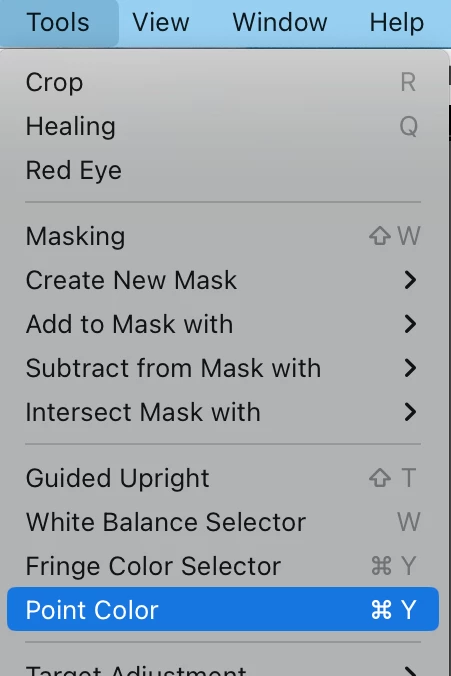
 

Tested on LR 13.0 / Mac OS 13.5.1.


This topic has been closed for replies.

4 replies

johnrellis
Genius
October 13, 2023

Excellent, I confirmed it's fixed and updated the Any Shortcut plugin to let users assign the shortcut.


The developers should remember to add this line to all TranslatedStrings files:

"$$$/AgDevelop/Menu/View/PointColorSelector/Key="

in line with all the other menu commands with unassigned shortcuts.

Rikk Flohr_Photography
Community Manager
Community Manager
October 13, 2023

Marking status as "Fixed"

Rikk Flohr: Adobe Photography Org
Smit K
Community Manager
Community Manager
October 13, 2023

Greetings All,

Lightroom Classic v13.0.1 is released. This update contain a fix for this issue. 


If you do not see the update in your Creative Cloud Application, you can refresh it by hitting [Ctrl/Cmd]+[Alt/Opt]+[ R ].

Smit | Lightroom Team
Rikk Flohr_Photography
Community Manager
Community Manager
October 11, 2023

Bug opened

Rikk Flohr: Adobe Photography Org