



P: Transform Text Consistency and behavior in Copy dialog
[This post contains formatting and embedded images that don't appear in email. View the post in your Web browser.]
@Rikk Flohr: Photography, while the functionality of the checking the sub-settings of Transform and Crop now works again, there are still two small bugs in the Copy Settings / Sync Settings / Create Preset window:
1. "Manual Transform" should be "Manual Transforms". (There are eight manual-transform settings visible in the UI.) Or "Upright Transforms" should be "Upright Transform". But it's sloppy to use the singular for one and the plural for the other.
2. The Transform checkbox isn't getting properly changed from "-" to a check after you check all its subsettings. To reproduce:
a. Click Check None.
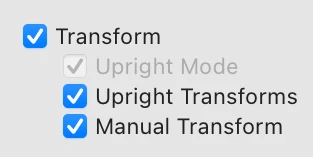
b. Check Upright Mode, Upright Transforms (sic), and Manual Transform (sic) in that order, and observe that Transform is correctly checked:
c. Click Check None.
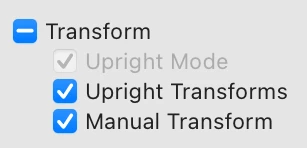
d. Check Manual Transform (sic) and Upright Transforms (sic) in that order, and observe that Transform has a "-" rather than check:
 AdChoices