
Bob Somrak
Legend
April 27, 2018

P: Turning OFF B & W Panel with switch does not disable the Black & White Mix sliders

  • April 27, 2018
  • 5 replies
  • 294 views

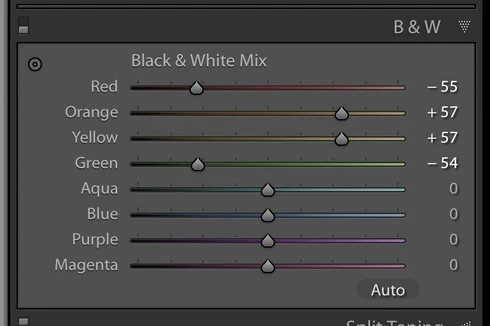
In Lightroom 7.3.1 and OSX 10.13.4, clicking the switch to turn OFF the B&W panel does not disable the Black & White Mix sliders.   The photo changes to reflect that the panel has been turned off by showing the photo as if the sliders were zeroed.    Unfortunately the sliders can be moved with no change to the photo but when the switch is turned back ON the changes made while the switch was off and the sliders were supposed to be disabled are applied to the photo.  If you don't notice the switch is off you can really mess up your settings.

Screen clip showing sliders enabled with the switch OFF

I reset my preferences and the behavior was the same.  This happens on all file types.

This topic has been closed for replies.

5 replies

Rikk Flohr_Photography
Community Manager
August 22, 2018
Lightroom Classic CC 7.5 was released today and should address this issue.  If you don’t see the update in your Creative Cloud App, hit the [Ctrl/Cmd]+ [Alt/Opt]+[R] to force a refresh. 

Give the new version a try and let us know if it solves the issue. 
Rikk Flohr: Adobe Photography Org
Bob Somrak
Legend
April 28, 2018
Venkatesh
 
As you have requested on other issues I have created a bug report on this. LRD-4198013   
M4 Pro Mac Mini. 48GB
Adobe Employee
April 28, 2018
We are able to reproduce this issue. We will look into this. Thank you!
Venkatesh PenjuriAdobe Lightroom Team
Inspiring
April 28, 2018
No problem with Lr Classic CC 7.3.1 on macOS 10.13.4
Yves Crausaz, Suisse, retraité actif dans le monde de la photo et des arts graphiques.
Inspiring
April 27, 2018
Same behavior here with Lr Classic CC 7.3.1 on Win10.