

johnrellis
Genius
November 8, 2022

P: Two "User Presets" groups displayed in Presets panel when in a language other than English

  • November 8, 2022
  • 3 replies
  • 1250 views

LR can display two "User Presets" groups in the Presets panel when running in other languages.  To reproduce:


1. Start LR in German.


2. Create a preset, putting it in the group "Test Group".


3. Right-click the newly clicked preset and do Verschieben (Move), selecting Benutzer-Presets (User Presets).


4. Observe there are now two groups named Benutzer-Presets:
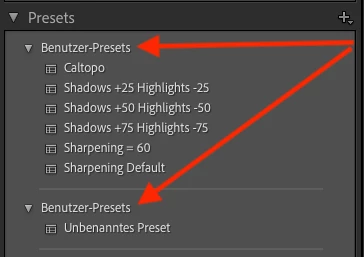
 

I observe similar results for Norwegian but not English. (I didn't test the other 13 languages.)  Most likely, some code path is testing a group name against the English "User Presets" rather than the translation of "User Presets".


Tested on LR 12.0.1 / Mac OS 12.6.1.


This topic has been closed for replies.

3 replies

Rikk Flohr_Photography
Community Manager
Community Manager
February 14, 2023

Greetings all,


Updates for Adobe Photography products have been released.  The February 2023  updates contain a fix for this issue. 

If you do not see the update in your Creative Cloud Application, you can refresh it by hitting [Ctrl/Cmd]+[Alt/Opt]+[ R ].

Note: It may take up to 24 hours for your update to be available in your Creative Cloud app.


Thank you for your patience.

Rikk Flohr: Adobe Photography Org
Rikk Flohr_Photography
Community Manager
Community Manager
January 13, 2023

updating missing status

Rikk Flohr: Adobe Photography Org
JohanElzenga
Community Expert
Community Expert
November 8, 2022

I have seen the same thing in Dutch.


-- Johan W. Elzenga