Inspiring
June 23, 2018

P: Unable to import presentation template

  • June 23, 2018
  • 5 replies
  • 261 views

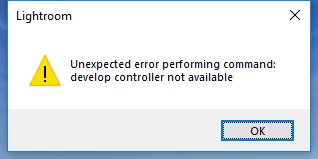
I tried to load a presentation template, but I keep getting an error message (rebooted, all software up-to-date): Unexpected error performing command: develop controller not available.

This topic has been closed for replies.

5 replies

Rikk Flohr_Photography
Community Manager
August 22, 2018
Lightroom Classic CC 7.5 was released today and should address this issue.  If you don’t see the update in your Creative Cloud App, hit the [Ctrl/Cmd]+ [Alt/Opt]+[R] to force a refresh. 

Give the new version a try and let us know if it solves the issue. 
Rikk Flohr: Adobe Photography Org
EPICDirector
Known Participant
July 7, 2018


When trying to import a user template in Slideshow module of Lightroom Classic CC I get an error message "Unexpected error performing command: develop controller not available"
johnrellis
Legend
June 27, 2018
See the suggested workarounds previously posted in the merged topic.
Inspiring
June 27, 2018


In the new Lightroom Classic release 7.4 you cannot import presets for Slideshows.  The previous version allowed for it which enabled me to create awesome time lapses without having to export all the photos.  Big time saver and efficient.  Can that feature please be brought back?
Adobe Employee
June 25, 2018
Thanks for reporting this issue Peter. We are able to reproduce it and a bug is already logged.

There are couple of workarounds you can use for now.
 
Workaround 1: If the folder you are trying to import to already has some templates, you can right-click on any of those templates and invoke import from there. That should work.

Workaround 2: You can try coping the template files directly to the Slideshow templates folder on the filesystem.

On Win:  C:\Users\[user name]\AppData\Roaming\Adobe\Lightroom\"Slideshow Templates"

On Mac: /Users/[user name]/Library/Application Support/Adobe/Lightroom/"Slideshow Templates"

Inside these either create a new folder or copy these templates to an existing folder and restart Lightroom.

Thanks,
Chinoy