
Participating Frequently
October 16, 2018

P: Update to current process gives unexpected error if process is already updated

  • October 16, 2018
  • 6 replies
  • 310 views

LR CC Classic Version 8: When you use menu "Picture" - "Develop settings" - "Update to current process version" in library view on a photo, which has already the current process 5, it gives an unexpected error (maybee the menu's are labeled a bit different - i have the german verison installed), see picture below:
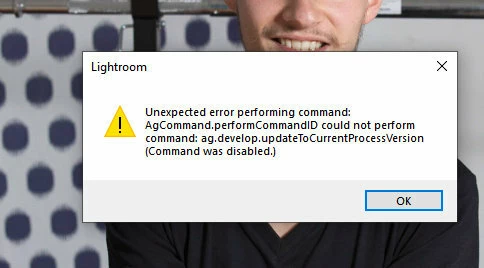


The error does not occur, if the process is older.

This topic has been closed for replies.

6 replies

Legend
December 11, 2018
Rikk, confirming that this probem has been corrected in Lr Classic 8.1.
Rikk Flohr_Photography
Community Manager
December 11, 2018
Updates to the Lightroom CC Ecosystem and Lightroom Classic CC were released earlier today. Please update your software and let us know if you are still experiencing this issue. 
Rikk Flohr: Adobe Photography Org
3008reniAuthor
Participating Frequently
October 17, 2018
perfect. Yes excactly as Anthony "translated" - thanks 🙂
Adobe Employee
October 17, 2018
Thanks for reporting this Renato and Anthony. I am able to reproduce this issue. We will file a bug for this and investigate.

Thanks,
Chinoy
Legend
October 17, 2018
Rikk, I think Renato is referring to Photo->Develop Settings->Update to Current Process in the Library module's menu.

If you ave an image selected that has the current process version, then this option is enabled and if clicked, it produces the error Renato has reported.

If you are in the Develop module, then the menu option Settings->Update to Current Process is disabled if the image is already updated and so it can't be selected. The Library menu option should be the same - disabled if the selected image is already updated.
Rikk Flohr_Photography
Community Manager
October 16, 2018
Can you show us a screen capture of the menu option? I am not sure where you are looking. 
Rikk Flohr: Adobe Photography Org