


Known Participant
August 13, 2025

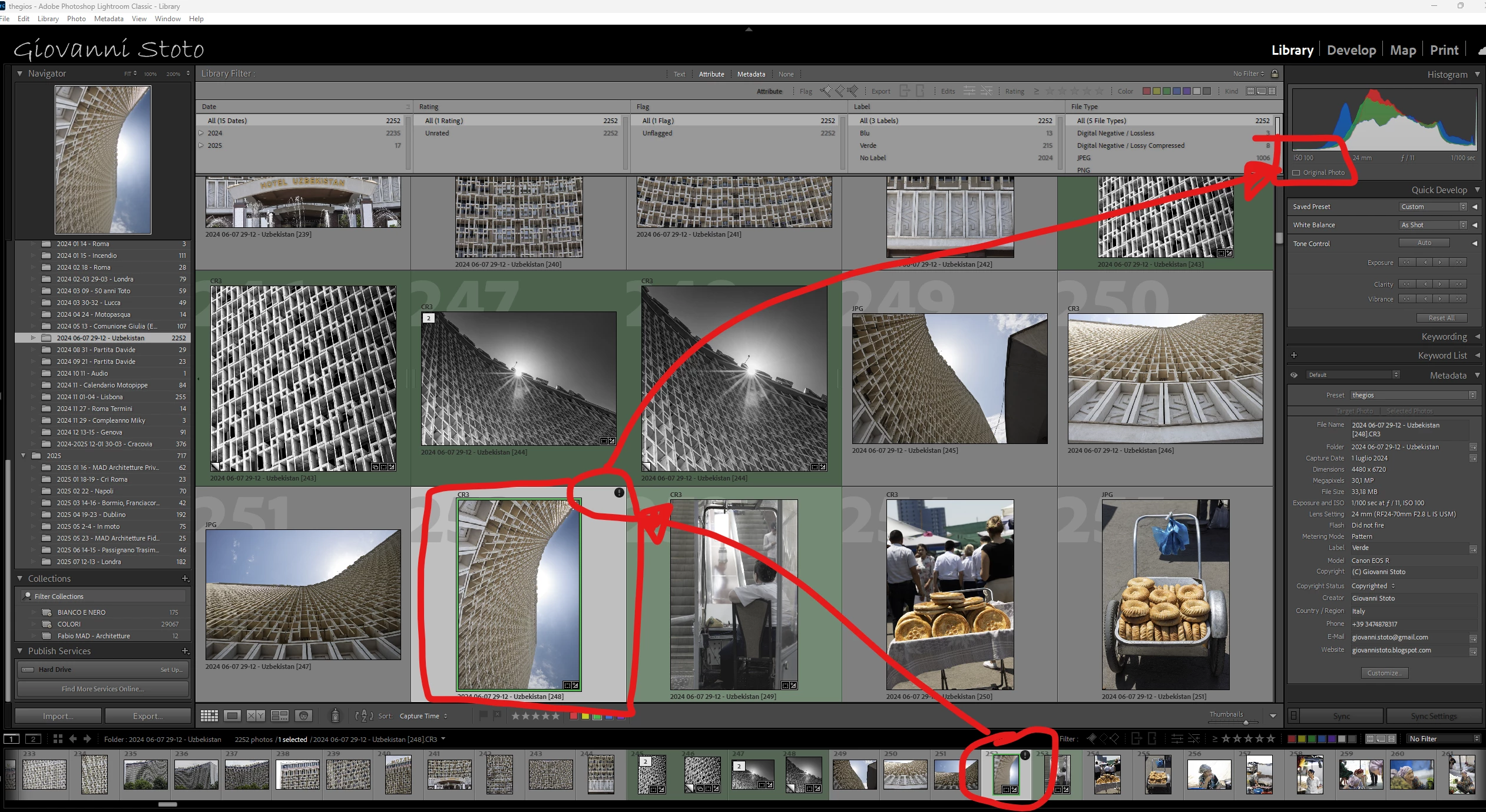
P: v14.5 Lightroom has encountered problems reading this photo | Round circle ‘!’ warning on Images

  • August 13, 2025
  • 78 replies
  • 6406 views

OS: Windows 11
LrC VERSION: 14.5

A couple of days ago I upgrade to v14.5.
As for every update, I regurlay empty cache, optimise catalog, remove all previews and generate new standard ones (also, I wanted to test how was was the new option to use GPU for generating previews).
Never had a problem with this workflow.
After previews generation process was completed (1h 30m for 29.000 files, 23.000 jpegs and 6.000 raws) I got an error: for 21 RAWs the preview could not be generated. Looking in the catalog at those files, I realised they have an exclamation mark on a dark circle: this is not the missing photo mark. If I click on the exclamation mark, I see error "Lightroom has encountered problems reading this photo, you are not allowed to edit this image. "

Yet, I can still enter develop module and edit the photos without any problem: the editing history is there, I can zoom in at 100% (generating the 1:1 preview), I can change sliders, export... Everything... (PS: I do not use smart previews).


The 21 problematic photos are in different folders and have different dates.
The files can be opened by any other program, including Fast raw Viewer.

For a couple of problematic photos, I tried deleting the photos from file explorer, and the square light missing photo question mark replaced the round dark question mark.
I restored the files from three sources:
1- the original file
2- a backup from a second HD
3- a backup from Amazon Photos


In all three cases above the black round exclamation mark came back: this should prove that it's not a problem of corrupted files, I instead believe it's an issue in LrC.
78 replies

Known Participant
November 16, 2025

in LrC15.0.1, Issue still exists. 'opmize catalog' nothing helps me.

M4MBA,24GB,macOS26.1

jm68902488
Known Participant
November 16, 2025
Yes the issue is still present in vs. 15

<>
Virus-free.www.avg.com
<>
<#DAB4FAD8-2DD7-40BB-A1B8-4E2AA1F9FDF2>
Bob Somrak
Legend
November 9, 2025

@Giovanni Stoto 


The Nov 8 import was the first time it happened but I know to keep watching for it now!!

M4 Pro Mac Mini. 48GB
Known Participant
November 9, 2025

I am the one who discovered this and reported here for the first time: for me the problem has disappeared.


Now, as senior IT professional I can state that THIS IS NOT A GRAOHIC CARD ISSUE BUT AN ADOBE ONE: if version X of a software works and suddenly, with no other changes, version X+1 does not, then it's a software problem, probably yes related to the graphic card but still a problem of the developer.

adamw31442428
Participant
November 9, 2025

..another though.  becouse the problem is appering randomly   I checked also the Tuning options of Graphic card & disabled  the +200Mhz  automaticly tuning  that has worked well for last 18 Months 
>>>  mayby there is kind of instability since Lightroom utilise more & more Graphic card power ???


adamw31442428
Participant
November 9, 2025

this Annoiyng  issue apper on my system randomly on HDR Images only   if Graphic Card Support is activated
>>  afte rdeactivation both of options  iot seem to work
>> must e bug in graphic driver 

newes WINDOWS and neest drivers

Bob Somrak
Legend
November 8, 2025

I finally had a 12 photo import that had the first photo with the ! in the black circle.   Odd bug 

M4 Pro Mac Mini. 48GB
Bob321
Known Participant
November 7, 2025

I have updated my version to
  Lightroom Classic version: 15.0 [ 202510171722-44f87028 ]
  with Internal Camera Raw version: 18.0 [ 2389 ]
on 02.11.2025 and the problem did not reappear so far.

Known Participant
November 6, 2025

Mmmmmhhhhh interesting...

I have been editings a few pictures with intersecting masks and no issues so far

jm68902488
Known Participant
November 8, 2025
it seems to be an issue with one of my catalogues vs. some of the other
ones. I have optimized the catalog a few times since but still being an
issue on the one catalog

<>
Virus-free.www.avg.com
<>
<#DAB4FAD8-2DD7-40BB-A1B8-4E2AA1F9FDF2>
Known Participant
October 28, 2025

I have confirmed already issue is solved 😁

Sameer K
Community Manager
Community Manager
October 28, 2025

I read the conversation yesterday, and I had to hold off on celebrating too early. I'm glad to know & share that it's fixed! 

Best, 
Sameer K

jm68902488
Known Participant
November 6, 2025
I downloaded version 15 of Lightroom and am still getting the error
warning. So it is not fixed.!!!

Lightroom has encountered problems reading this photo. You will not be
able to make adjustments to the photo with the explanation mark on the
photos.


<>
Virus-free.www.avg.com
<>
<#DAB4FAD8-2DD7-40BB-A1B8-4E2AA1F9FDF2>
Sameer K
Community Manager
Community Manager
October 28, 2025

Hello everyone,


An update for Adobe Photography products has been released as part of the MAX cycle. This update addresses the reported issue.


If you don’t see the update in your Creative Cloud app, refresh it using [Ctrl/Cmd] + [Alt/Opt] + [R].

Please note: It may take up to 24 hours for the update to appear.


Thank you for your continued patience.