


Known Participant
August 13, 2025
Released

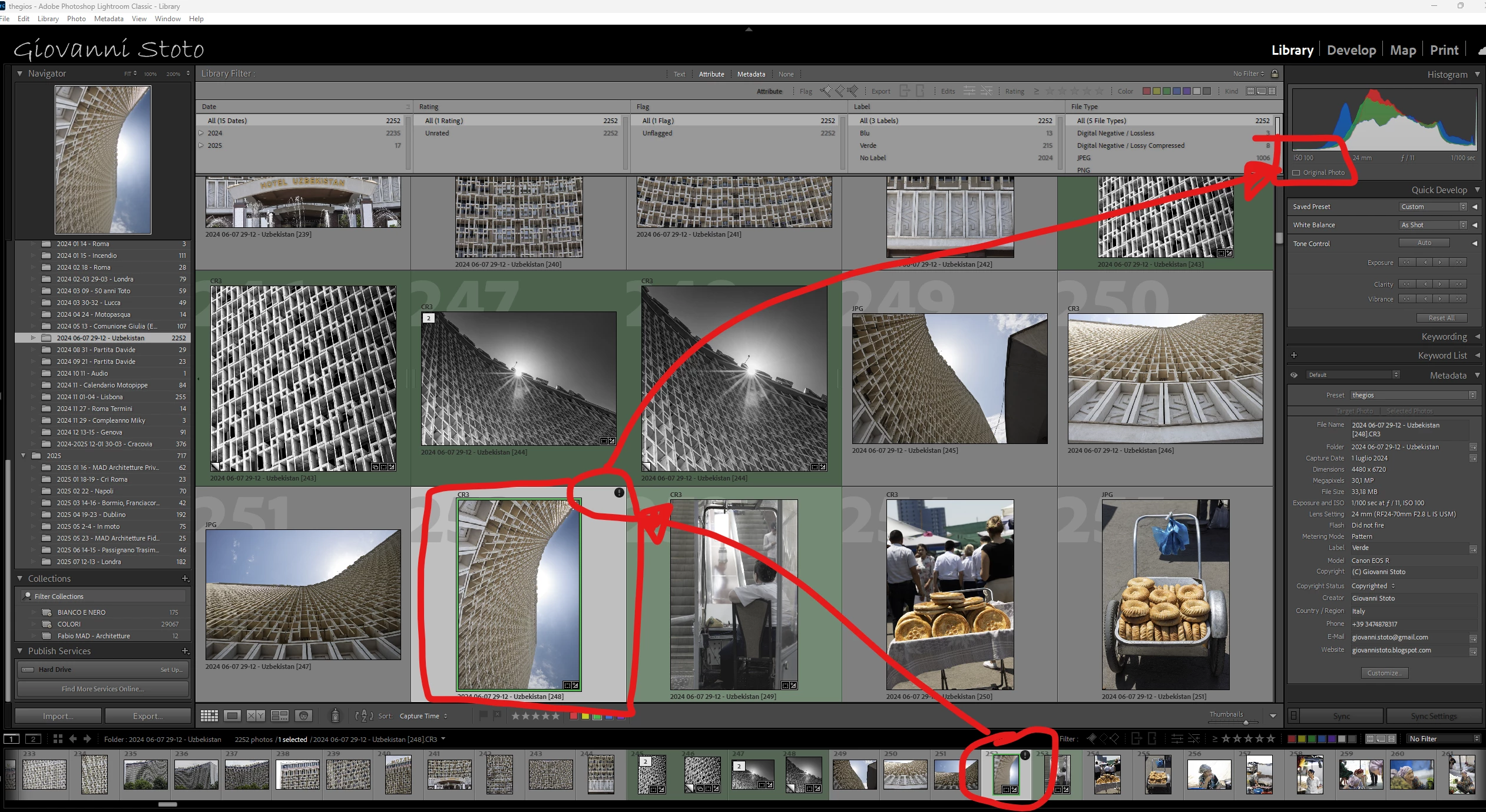
P: v14.5 Lightroom has encountered problems reading this photo | Round circle ‘!’ warning on Images

OS: Windows 11
LrC VERSION: 14.5

A couple of days ago I upgrade to v14.5.
As for every update, I regurlay empty cache, optimise catalog, remove all previews and generate new standard ones (also, I wanted to test how was was the new option to use GPU for generating previews).
Never had a problem with this workflow.
After previews generation process was completed (1h 30m for 29.000 files, 23.000 jpegs and 6.000 raws) I got an error: for 21 RAWs the preview could not be generated. Looking in the catalog at those files, I realised they have an exclamation mark on a dark circle: this is not the missing photo mark. If I click on the exclamation mark, I see error "Lightroom has encountered problems reading this photo, you are not allowed to edit this image. "

Yet, I can still enter develop module and edit the photos without any problem: the editing history is there, I can zoom in at 100% (generating the 1:1 preview), I can change sliders, export... Everything... (PS: I do not use smart previews).


The 21 problematic photos are in different folders and have different dates.
The files can be opened by any other program, including Fast raw Viewer.

For a couple of problematic photos, I tried deleting the photos from file explorer, and the square light missing photo question mark replaced the round dark question mark.
I restored the files from three sources:
1- the original file
2- a backup from a second HD
3- a backup from Amazon Photos


In all three cases above the black round exclamation mark came back: this should prove that it's not a problem of corrupted files, I instead believe it's an issue in LrC.
137 replies

Participant
October 17, 2026

“adobe is working on it”


thank god, i thought it was gonna be years before it was fixed!  whoops, it has been!  😦

Translate
nik.m
Community Manager
Community Manager
October 19, 2026

Hi, thanks for reaching out! You've posted in an old thread, and the fix for this issue was released in Lightroom Classic version 15.2.

If you're facing this issue or something similar, could you share more details? Like the version of Lightroom Classic and your computer's operating system.


Thanks,
Nikunj

Translate
Participant
October 20, 2026

lr classic ver 15.3 under windows 11


what is the current thread to follow?   thanks nikunj.

Translate
Participant
July 17, 2026

I have the same problem.  LRC release 15.4.1.  Suddenly LRC can not read photos that I have been editing.  Round black circle with exclamation point appears.  Any solutions?  

Translate
Participant
July 17, 2026

Having the same issue… any solutions? I was sooo close to finishing editing this catalog and now I can’t do anything. I need to finish it asap! Very frustrating.

Translate
Participant
July 14, 2026

I just encountered this on 15.4.1 Release, Camera Raw 18.4 Build [202606201310-b9f148a4].

It was the very last mask I’d added to the edit - a brush mask. If I copied the development settings to any other file it caused the same issue. If I copied all BUT that last mask or if I simply ‘hid’ that last mask, all is fine.

Translate
Inspiring
May 8, 2026

Was there ever a solution for this? I just encountered it on 15.3 (Mac Tahoe 26.4.1).

It is clearly not a corrupted file issue, as I can edit and export. I also replaced the files in question from my camera’s second SD card, with no change. Also, I imported the problem files into another catalog, which reads them just fine.

Translate
Rikk Flohr-Retired
Adobe Employee
February 20, 2026

Greetings all,  


A new update for the Adobe Photography products has been released.  The February update contains an update regarding this issue. 

If you do not see the update in your Creative Cloud Application, you can refresh it by pressing  [Ctrl/Cmd]+[Alt/Opt]+[ R ].

Note: It may take up to 24 hours for your update to be available in your Creative Cloud app.


Thank you for being so patient.  

Translate
Rikk Flohr: Adobe Photography Org
Twistedtree
Participant
February 20, 2026

V 15.2 showed up in CC and I installed it.  No difference.  I still get the “!” in the thumbnail and “Lightroom has encountered problems reading this photo” error.


The problem is only in the Library view.  I have a very grainy preview and the “!”.  If I select the thumbnail in Library view and then switch to Develop, the image opens fine in full resolution.   If I then switch back to Library View, that one image is now clear and full res, but the “!” is still there.


Translate
Twistedtree
Participant
February 19, 2026

I’m running Lightroom Classic V 15.1.1 on a Mac and this problem is NOT fixed.  From LR I can right click and Edit the file in Preview and it opens fine.   I can also right click and Open in Reference View, and that opens the file just fine.  If I then return to Library for the catalog, the image now open to full resolution, however the ! mark is still present on the thumbnail.


Come on guys, this really needs to be fixed.

Translate
johnrellis
Legend
February 20, 2026


[View this post in your web browser. It contains formatting and images that don't appear in email.]


​@Twistedtree this really needs to be fixed.

Others who reported these symptoms in LR 14.5 confirmed that LR 15.0 fixed the issue for them. So you may be running into a variant of the bug that wasn’t fixed or a completely different bug with the same symptoms.


I recommend you start a new bug report:

Be sure to include precise steps for reproducing the problem -- if Adobe can’t reproduce the problem, they won’t file the bug report internally.  In this case, also select the problem photo, do Metadata > Save Metadata To File, and then attach both the raw file and its .xmp sidecar to your post.  

Translate
remov_b4_flight
Known Participant
November 16, 2025

in LrC15.0.1, Issue still exists. 'opmize catalog' nothing helps me.

M4MBA,24GB,macOS26.1

Translate
jm68902488
Known Participant
November 16, 2025
Yes the issue is still present in vs. 15

<>
Virus-free.www.avg.com
<>
<#DAB4FAD8-2DD7-40BB-A1B8-4E2AA1F9FDF2>
Translate
Bob Somrak
Legend
November 9, 2025

@Giovanni Stoto 


The Nov 8 import was the first time it happened but I know to keep watching for it now!!

Translate
M4 Pro Mac Mini. 48GB
Known Participant
November 9, 2025

I am the one who discovered this and reported here for the first time: for me the problem has disappeared.


Now, as senior IT professional I can state that THIS IS NOT A GRAOHIC CARD ISSUE BUT AN ADOBE ONE: if version X of a software works and suddenly, with no other changes, version X+1 does not, then it's a software problem, probably yes related to the graphic card but still a problem of the developer.

Translate