
P: VRAM usage - impact Photoshop performance
I have an issue with LR using almost all GPU memory, impacting Photoshop performance. Once I switch to LR Developer module, VRAM usage goes through the roof and the PS interface becomes sluggish. For instance, opening a new document in PS is slow - and the new empty document will shortly show a part of the photograph I've opened previously. Zooming is slow and opening a filter like NIK becomes extremely slow. During the slow performance PS is even briefly showing status 'Is not responding' in the process list.
LR and PS constantly up to data via Creative Cloud. Windows 10 up to date, use constantly latest NVIDIA Studio drivers and have no errors or messages in event logs. No other issues. Screenshot of VRAM usage:
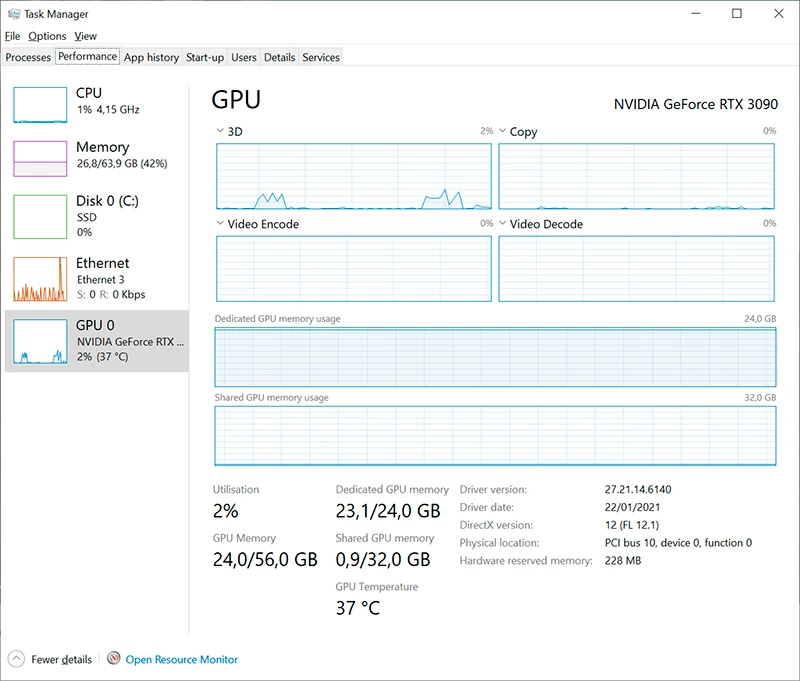
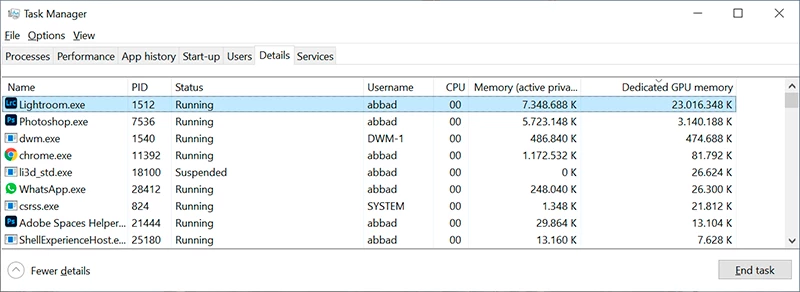
LR uses 22GB of the GPU memory. This amount seems rather unnecessary: LR performed about the same with my previous 8GB graphics card (of which LR used about 7GB, of course, and impacted PS performance the same way):
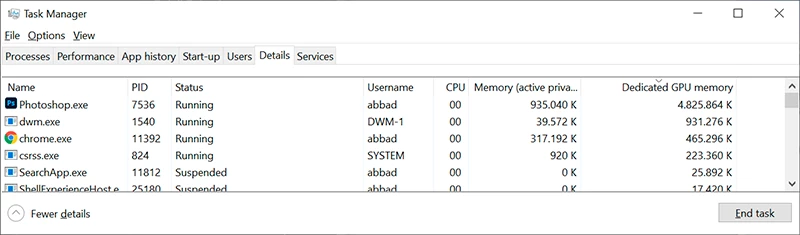
By closing LR, after some time of inactivity of LR or a sleep/wake cycle of the computer, VRAM is freed up and PS immediately uses more VRAM and all performance issues are gone:
Is there any possible solution - besides disabling GPU acceleration in LR or PS - to stop LR from hogging all the VRAM and impacting PS performance? I've checked the NVIDIA driver settings for relevant option, but there aren't any it seems.
I'm only using one GPU and one screen (4k).
Thanks in advance!


 AdChoices