Inspiring
Apr 17, 2026 12:59 PM UTC
Released

P: (Win ARM-only) Book Module - Text is rotated 90 degrees

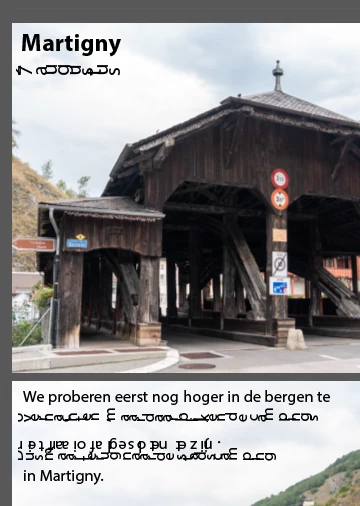
Letters in texts added in books in Book module are rotated in LrC 15.3. The rotation seems to happen per line as displayed (not per carriage return). Switching back to 15.2.1 put the letters correctly again, and upgrading to 15.3 rotates the letters.

Attached two screenshots of the same page in a book in 15.2.1 and 15.3.
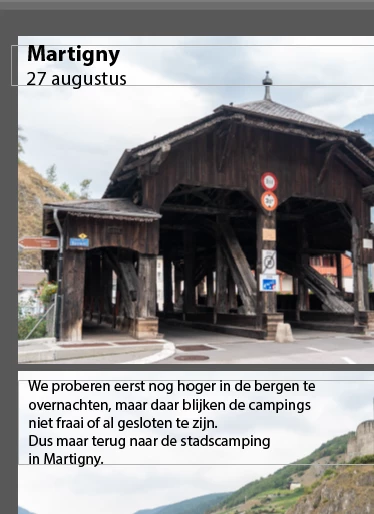
15.2.1
15.3

The letters are also rotated for a new book created in 15.3.

    Pinned Reply By Rikk Flohr-Retired

    Greetings all,  
     
    A new update for the Adobe Photography products has been released.  The August release (x.5) contains an update regarding this issue.  

If you do not see the update in your Creative Cloud Application, you can refresh it by pressing  [Ctrl/Cmd]+[Alt/Opt]+[ R ]. 

Note: It may take up to 24 hours for your update to be available in your Creative Cloud app.
     
    Thank you for being so patient.  

    9 replies

    Inspiring
    Oct 5, 2026 3:36 PM UTC

    In 15.6 this issue is now back in a slightly different form. All text is rotated 90 degrees clockwise:


    As before: WinARM machine (up to date w.r.t. Windows) now using Lightroom Classic 15.6.

    Above screenshot is in book created anew in 15.6. Also existing books have the same issue, example as above (no edits, just opened):


    Translate
    nik.m
    Community Manager
    Community Manager
    Oct 6, 2026 6:50 PM UTC

    Hi, we're sorry you're still experiencing issues.

    Just to test, could you try this in a new catalog? This might help us narrow things down.


    Thanks,
    Nikunj

    Translate
    Inspiring
    Oct 7, 2026 9:33 AM UTC

    Also in a new catalog this issue is present.

    Note: in 15.5 it was resolved, in 15.6 it is back in a different form. Earlier text rotated with every new line, now all text is rotated 90 degrees. So, it is a different issue (although similar/related).

    Translate
    Rikk Flohr-Retired
    Adobe Employee
    Aug 4, 2026 1:01 PM UTC

    Greetings all,  
     
    A new update for the Adobe Photography products has been released.  The August release (x.5) contains an update regarding this issue.  

If you do not see the update in your Creative Cloud Application, you can refresh it by pressing  [Ctrl/Cmd]+[Alt/Opt]+[ R ]. 

Note: It may take up to 24 hours for your update to be available in your Creative Cloud app.
     
    Thank you for being so patient.  

    Translate
    Rikk Flohr: Adobe Photography Org
    Inspiring
    Aug 5, 2026 2:25 PM UTC

    Indeed 15.5 solves this issue. It makes reading the text much easier :-).

    Thanks for the update (both this reply and in 15.5).

    Translate
    Rikk Flohr-Retired
    Adobe Employee
    Apr 17, 2026 3:08 PM UTC

    That was the missing piece. It is Windows ARM-specific. I cannot repro Mac or Win, but can on Win Arm. I will get a bug logged!

    Translate
    Rikk Flohr: Adobe Photography Org
    Rikk Flohr-Retired
    Adobe Employee
    Apr 17, 2026 2:07 PM UTC

    I have checked a variety of books in my catalog, and none of them exhibit any rotated text in 15.3.

    It may be font-specific or OS Specific.

    Can you provide more information?

    Translate
    Rikk Flohr: Adobe Photography Org
    Inspiring
    Apr 17, 2026 2:53 PM UTC

    Tried with a series of fonts all have the same behaviour.

    The OS in Windows 11(current version) on ARM device Microsoft Surface Pro 11th Edition.

    The rotation happens per entered character. In these screenshots 1, 2, 3 and 4 are typed. The characters are rotating 90, 180, 270 and 360 (0) degrees. Entering 5, 6, 7 and 8 will continue this behaviour.

    1
    12
    123
    1234

    Older books not touched for years have the same issue. It happens on both native screen and attached.

    Exporting the book to jpeg (and a 5 added) gives this page:
     

    So, it seems not be display only.

    Translate