
Participant
June 20, 2021

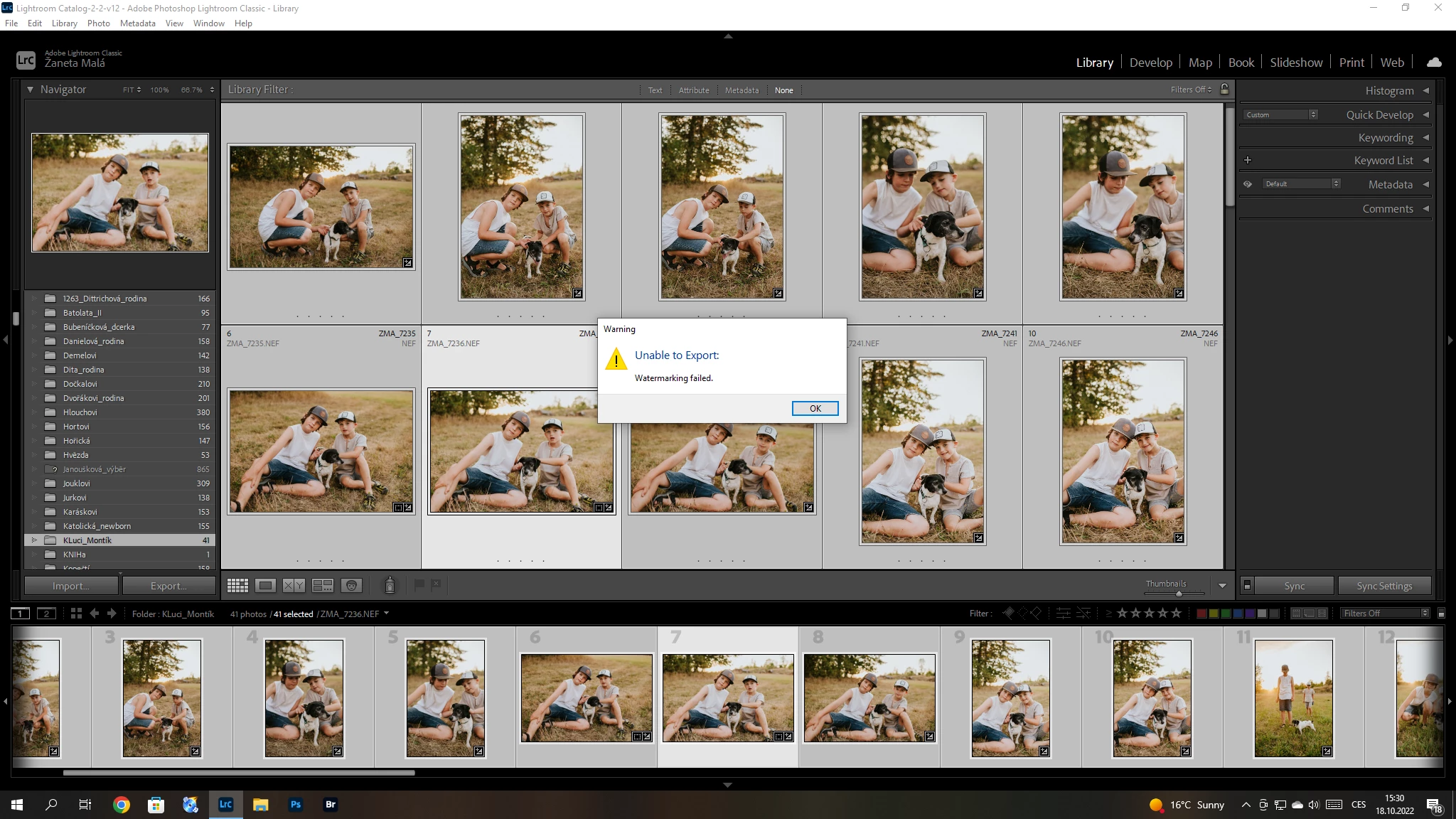
P: (Win/Mac) Lightroom Classic 12.0 Unable to export: Watermarking Failed
  • June 20, 2021
  • 170 replies
  • 38849 views

Hello, I have a problem with export my pictures after update Adobe Lightroom classic catalog. I´m not using watermark. So, I can´t understand this failer error. Can anybody help me please? 


{Title updated by moderator}

170 replies

Participating Frequently
October 18, 2022

If I understand what they are, I don't have any.

Participating Frequently
October 18, 2022

Do all of you have diacritical marks somewhere in the file path? 


Participating Frequently
October 18, 2022

The problem is in the export watermark.
If there is no check mark watermark does not export. Maybe it's a version bug, not like that.
If you check the watermark and don't want a watermark, you create an empty text one and so the export starts.

Sameer K
Community Manager
Community Manager
October 18, 2022

Hi David,


Thanks for reaching out with the screenshots. Could you please share the System info from Lightroom > Help > System Info with a couple of sample RAW images & also record your screen while the issue occurs with me via direct message?


Thanks!

Sameer K

Participant
October 18, 2022

My reply has disappeared. I've the same problem using the same settings as previous versions which obviously worked well. 

I use Sony raw file and export to the same folder of the originals in my hard drive. I've tried your suggestions but nothing seems to work for me.


Participant
October 18, 2022

Hi, same here:

I don't even have watermark selected, don't know what to do. I've downgraded to the previous version and it's ok. Same settings. Any help appreciated thanks

Sameer K
Community Manager
Community Manager
October 18, 2022

Hi Giovanni,


We're interested to know more about your workflow.

Could you please provide the information I have asked for above & also record your screen while the issue occurs & how do you bypass it & share it with us?


We hope to hear from you soon.
Thanks!
Sameer K

Participating Frequently
October 18, 2022

I was able to bypass the problem. I didn't solve it, I just deceived it.
Virtually having no watermark in the export gives me an error, so I put a blank one and deceived him.

Frank DeBonis
Inspiring
October 18, 2022

I just installed LRC 12.0 and now I can't export images. The message I get it "Unable to Export: Watermarking failed." I can export from the new Photoshop. Any ideas?

Lightroom Classic version: 12.0 [ 202210031128-9cb7185d ]

License: Creative Cloud
Language setting: en
Operating system: Windows 10 - Business Edition
Version: 10.0.19043
Application architecture: x64

Sameer K
Community Manager
Community Manager
October 18, 2022

Welcome to the Lightroom Community. I'll need more info to help you with this.


Where are the original images stored & where are you exporting to? Does export work when destined to the internal drive?

Please share a screenshot of the export settings you are using.


Does this only happen with NEF Raw images?


Please try the export operation with the following suggestions.

  1. Go to Lightroom Classic > Preferences > Performance > Use Graphics Processor > Set to 'Custom' > Select 'Use GPU for Export'


You can test export with the GPU & without the GPU (Disable the GPU altogether by setting 'Use Graphics Processor' to OFF from Custom or Auto)


Let me know how it goes,

Thanks!
Sameer K


Participant
June 20, 2021

Lightrooom all of a sudden unable to export files. Very frustrating as I’m on deadline!

Got the LRC message today “Unable to export: You have not chosen an application to open the files” – won’t export any files whether jpeg or raw. The Plug-in manager click- box shows the file is enabled and version is version … -8dc50eb4   - error message capture below

LRC won’t export any files including images previously-exported 10 days ago without any issues.

LRC has had latest updates via CreativeClud and showing up to date, windows 10, I Have checked and all images are in the designated folder (my workflow is good). Exporting worked fine as recently as 48 hours ago  – have never seen this message before

What ‘s going on? How do I fix it?

KR Seals
Community Expert
Community Expert
June 20, 2021

At the bottom of the Export dialog box in the Post Processing panel, is "Do Nothing" selected? Or something else that would require an application to be involved?

Ken Seals - Nikon Z 9, Z 8, 14mm-800mm. Computer Win 11 Pro, I7-14700K, 64GB, RTX3070TI. Travel machine: 2021 MacBook Pro M1 MAX 64GB. All Adobe apps.
Participant
June 20, 2021

Kenneth the screenshot of the error message and the plug-in manager lin are attached below. here's no indication of what to do