Participating Frequently
October 16, 2023

P: ( Windows) Crash (ID 8881269)

  • October 16, 2023
  • 8 replies
  • 1010 views

Getting the below error then lightroom just shuts down, i have uninstalled the app and reinstalled still happen, any help would be greatly apprecaited?
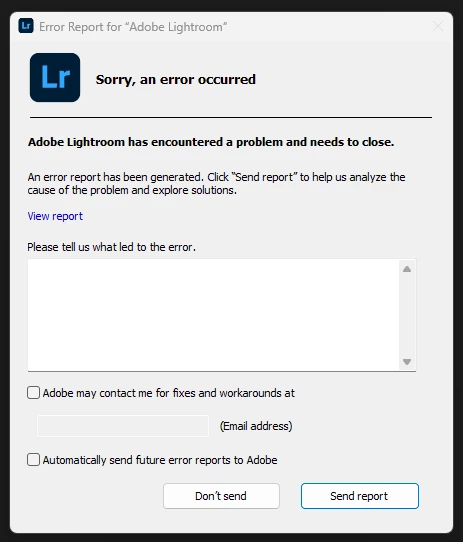

 

This topic has been closed for replies.

8 replies

Participating Frequently
October 18, 2023

Is there any Adobe support looking at this?

Participating Frequently
October 17, 2023

Any update on a resolution?

Participating Frequently
October 17, 2023

Hi Team any update on this one? Also yes this is a laptop and have been using lightroom and PS on it for the last 6 months with no issues. Thanks for your help Troy

GoldingD
Legend
October 16, 2023
Processor speed: 1.1GHz

'Is that correctly reported? Seems like an odd speed, and I would think LrC would not install with a CPU so far under minimum required specs.


Built-in memory: 7879.7 MB

Ok, at minimum required specs, but can it be upgraded? Or is this a laptop?


Graphics Processor Info: 
DirectX: Intel(R) UHD Graphics (26.20.100.7926)
Init State: GPU for Display supported by default
User Preference: Auto

So likely a laptop. But point being very limited graphics. Advanced capabilities in LrC may not work, AI anything for one.


Library Path: C:\Users\c_l_m\OneDrive\Pictures\Lightroom\Lightroom Catalog.lrcat

This one I often wonder about. That bit about OneDrive in the path. Does that mean the catalog is on the cloud? Or does it mean it is on a physical hard drive that gets synced to the cloud? I avoid OneDrive like the plague.


Rikk Flohr_Photography
Community Manager
October 16, 2023

I've found your crash report and we've a bug logged for this crash already. Connecting thread and bug - updating status. 

Thank you for your report. 

Rikk Flohr: Adobe Photography Org
alexskunz
Inspiring
October 16, 2023

Are you certain that you're using Lightroom Classic? Your screenshot says "Lightroom" (without Classic) and the icon in it is the one for Lightroom (Cloud version).

GoldingD
Legend
October 16, 2023

Please post your System Information as Lightroom Classic (LrC) reports it. In LrC click on Help, then System Info, then Copy. Paste that information into a reply. Please present all information from first line down to and including Plug-in Info. Info after Plug-in info can be cut as that is just so much dead space to us non-Techs.

Participating Frequently
October 16, 2023

I have sent the report again to Adobe, I am unable to post my system information as i cant access the Help section in LrC as it shuts down before i can access this


GoldingD
Legend
October 16, 2023

So, did you fill in some description of what led to the error. Did you click on the button to allow Adobe to contact you? Did you then provide your e-mail address (hopefully the same e-mail address you use to subscribe to your Adobe Plan). Did you then send the report?


Incidentally, you might consider adding the info as to what led to the error in a reply in your posting (this posting). That way you can insert a link to this posting in that box, using this posting as the info of what led to the error. That way you can have two approaches to getting aid, and might trigger Adobe to read this post.


Also, P.S. in this post, in a reply, include your system information as LrC reports it. I will place my SOP in the next reply. You can get ahead of the forthcoming inquiry's that may occur that way. And Adobe will want it.


Participating Frequently
October 16, 2023

Yes i did all of that and have not heard from Adobe, i sent this through on Friday but still nothing

GoldingD
Legend
October 16, 2023

Friday? Perhaps late in the day? Adobe might not be at work till tommorow.