Arnold-Norway
Inspiring
May 20, 2015

P: Wrong numbering when using Export JPEG Slideshow from Slideshow

  • May 20, 2015
  • 45 replies
  • 1082 views

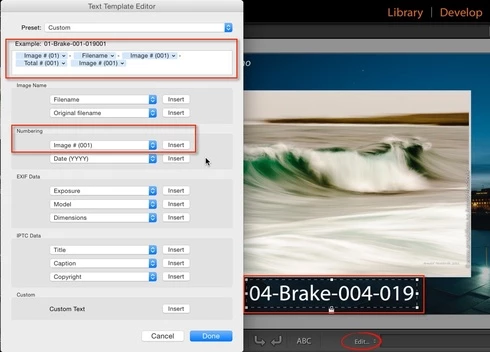
In the Slideshow module, I select Add Text Overlay from the Slideshow menu. Underneath the photo, I select Edit to customize the text overlay. I add theese fields: Image # (01)-Filename-Image # (001)-Total # (001).

The Text Overlay is correct on screen, but when I export the Slideshow from the menu Slideshow, Export JPEG Slideshow, all fields show the same data - total numbers of photos in the slideshow.

This topic has been closed for replies.

45 replies

Participant
October 5, 2015
As a non CC user in the UK I was bewildered as to where to find the update to 6.2? Everywhere I look is just labelled as CC.
Under 'updates' in the Help tab it shows Lightroom CC(2015).
Unsure what to think I tried checking the 'What's New' where it says the update contains revisions to both CC and Lightroom 6.
So went for the update - and it works!
Would never have gone there without Thomas Frank's post above as a basis to persevere so thank you!

Why is it Adobe have to make everything so totally CC focused - a most frustrated purchaser of Lightroom 6 NC
d.velte@comcast.net
Participant
October 5, 2015
Yep, the problem is fixed with LR CC 2015.2 on Windows 10.
Thanks Adobe! And thanks John R. Ellis for the heads-up.
Mithrandir_tf
Participant
October 5, 2015
Hi,

Hooray! Finally!

I can confirm, that non-Cloud users with a paid-up LR-6 license get this update too. LR-6 shows after the update a changed splash screen and version 6.2. The bug in the slideshow generation is fixed.

Thanks and regards,

Thomas.
Participant
October 5, 2015
Hooray!! This problem appears to have been fixed in the latest update

Mike Taylor
johnrellis
Legend
October 5, 2015
The release notes say this is fixed in LR CC 2015.2: http://blogs.adobe.com/lightroomjourn...
d.velte@comcast.net
Participant
October 2, 2015
Same issue with Windows 10. Please, please, please fix this bug!
Participant
September 27, 2015


With the latest CC Lightroom/Windows 10 installation, there's a problem exporting JPEG's from Slideshow. If I add captions (by any method) and then use the Alt/export to JPEG button (or go through the menu long method) then all the slides have the same caption - the one attached to the last slide in the series. Two long sessions with customer service have failed to resolve this, so I assume there's a bug developed in the program. Does Adobe have a solution in the works?
Inspiring
September 27, 2015


When exporting jpegs from slideshow, all photos have the caption of the last slide. (LR 6.1.1) Each of 96 photos in my slide show have a different caption but when exporting jpegs all have the caption of the last slide. This worked fine in LR 5.7. Please fix this bug!!
Inspiring
September 27, 2015


Hi,

Steps to reproduce:

1. Create a slideshow and insert Title and Caption in each picture.

2. Export JPEG Slideshow...

3. All jpeg pictures in the slideshow have the Title and Caption of the last image.

The problem is not there when exporting a PDF slideshow.

This kind of bug is a good indicator of the time spent to test LR6, which is the worst x.0 version that we have ever seen.
--Patrick
Participant
September 26, 2015
Has anyone found a work around for this? I really need to produce JPEG slideshows with with text overlay from the IPTC title and caption fields. It is clear this is a very low priority for the Adobe LR support. Obviously the effort has gone in to unreliable facial recognition and useless HDR and Pano tools. We need to find another software resource for getting this basic slideshow function done.