



Sony A7V Lightroom Colour Clipping
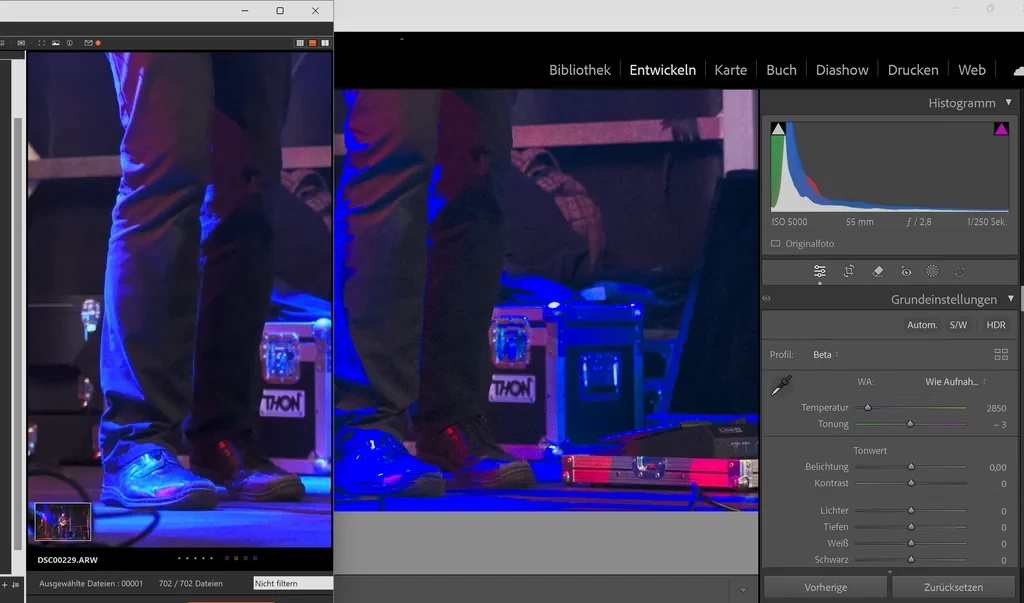
Yesterday I took my first photos with my Sony Alpha 7 V, and before importing them into Lightroom, the images still looked normal—just as I had seen them in the camera. After the import, I noticed blue clipping. I then opened the image in Sony’s Image Edge software, and the RAW files do not show this clipping there. I’ve attached a screenshot—one from the Sony program and one from Lightroom using the beta profile. Could I have overlooked some setting, or could this actually be caused by the beta profile?
On the left side, the image is opened as a RAW file in Image Edge, and on the right side is the latest version of Lightroom using the beta profile. Both images are unedited.
Node: These are Not Highlight/Shadow clippings. Its the Harsh Blue thats overlaping and somehow not showing correctly.
Node2: The Raw File when looking at it in the Sony A7V is looking fine colourwise!
 AdChoices