

Windows SDK: Transparent PNG overlays do not composite correctly in overlapping layouts
Environment
-
Adobe Lightroom Classic 15.3
-
Lightroom SDK
-
Windows 11
-
Standalone Lua script attached
Summary
Transparent PNG images displayed in an overlapping layout do not reveal the underlying image on Windows.
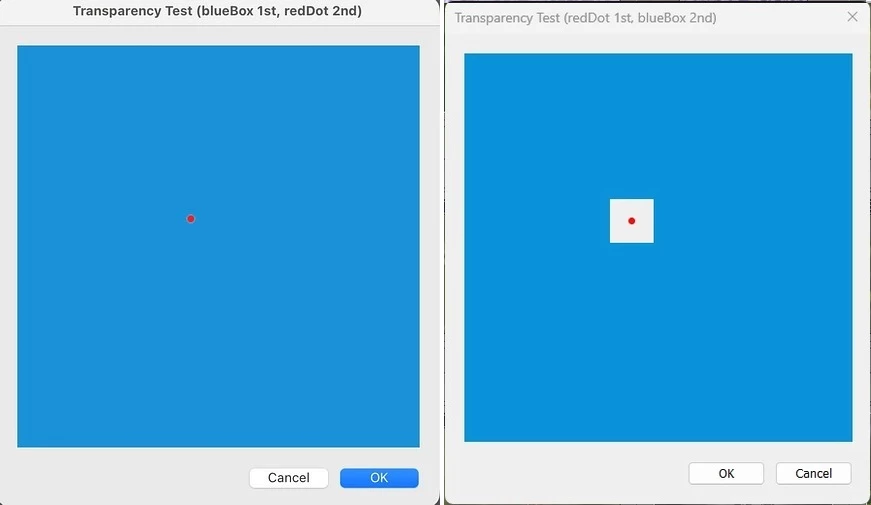
Instead, transparent pixels are rendered using the Lightroom dialog background color, resulting in visible rectangular artifacts around the overlay image.
The same code behaves correctly on macOS.
Steps to Reproduce
-
Create an overlapping view (
place = "overlapping"). -
Add a background image (blue PNG).
-
Add a second image consisting of a 45×45 RGBA PNG containing a single red pixel and otherwise fully transparent pixels.
-
Position the overlay image using a child container (
f:rowwith margins). -
Display the dialog.
A complete standalone reproducer is attached.
Expected Result
Only the red pixel should be visible.
The transparent pixels of the overlay image should reveal the underlying blue image.
Actual Result on Windows
A visible 45×45 rectangle appears around the red pixel.
The transparent pixels are rendered using the Lightroom dialog background color instead of revealing the underlying image.
Additional Information
-
The overlay PNG is a valid RGBA image with a true alpha channel.
-
The issue is reproducible with a single red pixel surrounded by fully transparent pixels.
-
The issue is independent of
catalog_photo()and can be reproduced using only standardf:picturecontrols. -
The same code behaves correctly on macOS.
-
The attached screenshot shows the actual result observed on Windows.
Impact
This prevents the use of transparent graphical overlays on top of images in Lightroom dialogs on Windows. A common use case is displaying focus points, crop guides, annotations, or other graphical markers over a photo.
Attachments
Standalone reproducer script TransparencyIssue.lua with PNG files.
Expected result (status quo on MAC) vs actual result (status quo on WIN):
 AdChoices