


Participant
September 13, 2022

Sampler Export to Painter issue (Does not operate properly.)
  • September 13, 2022
  • 7 replies
  • 1417 views


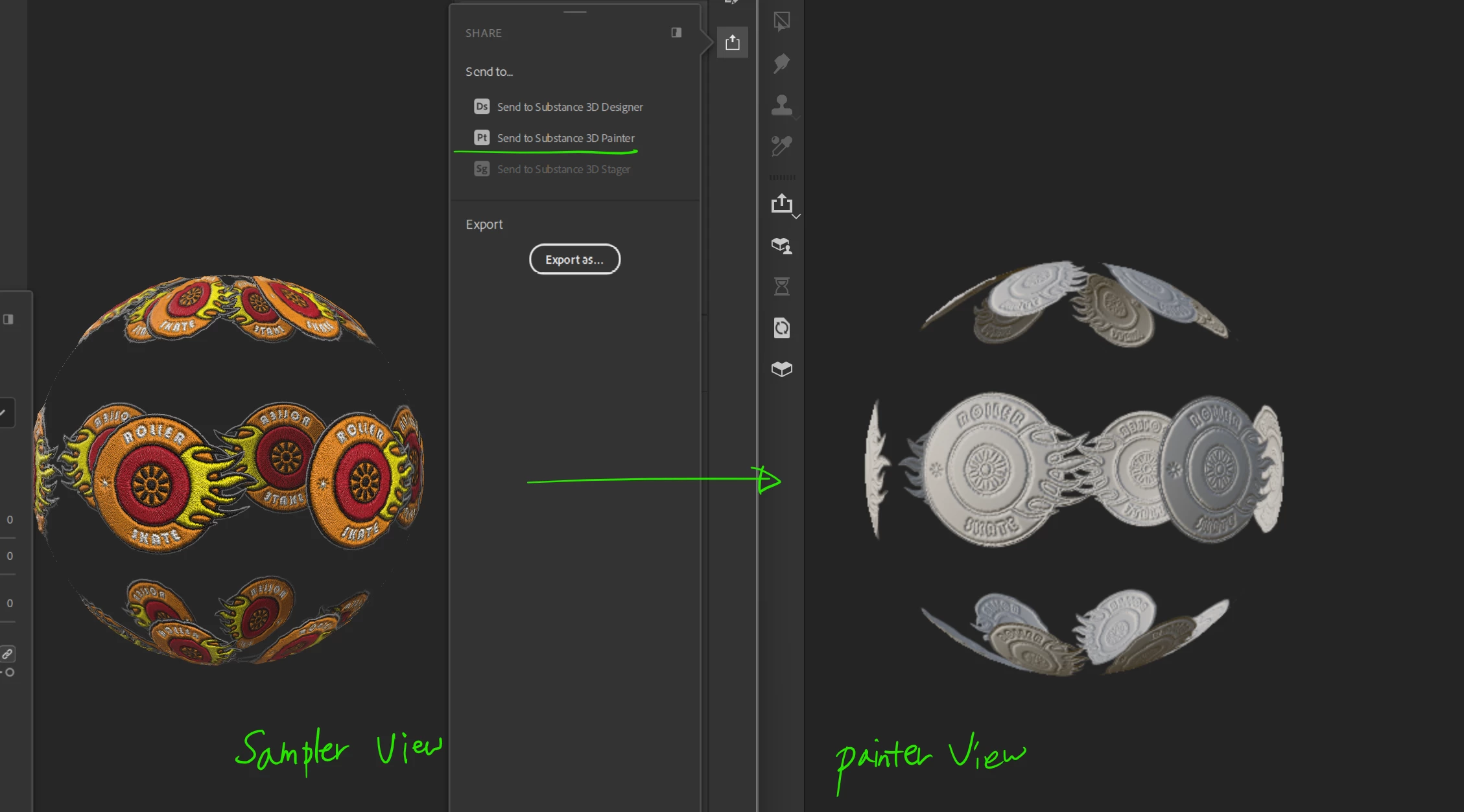
I am new to Substance Sampler, but when I Exported to Substance Painter it did not do it correctly as shown in the image.

And I am using the latest version.


Does anyone know how to solve this?
 

This topic has been closed for replies.

7 replies

edit59419880
Participant
October 3, 2022

hi @Baptiste_Substance_3D, can you please read this thread and see if you might know why are we having issues when sending to painter? 

Participant
October 1, 2022

Hello, I do have the same issue, and I did change to Color Mode as a work around, but still it looks like it is exporting less maps, because in painter the embroidery effect is completely gone.

Thanks for any support!

edit59419880
Participant
September 28, 2022

Hi, I just installed Substance Sampler for the first time to use apply the embroidery filter to a logo. I go through the process and everything looks great, but when I send it to Painter, it looks incorrect, as if it didn't have the normal pass and OC pass?Just flat. I tried the same thing but sending it to substance designer and same result.... 

This is what Substance Sampler shows:


and this is what Designer and Painter shows:


Designer shows the following error in the console: 


I also tried to export the passes as images and that works fine, the normal map shows correctly... so it is something to do with the send to substance designer and/or painter.


Any ideas?

Thanks!

Fabio   

yonyon40Author
Participant
September 15, 2022

Hello, thank you for investigating this issue.


I set the Color Mode parameter in Embroidery Layer to Color Image with the same result.


I have checked using the "Sampler_FirstSteps_Files.rar" data from the tutorial page in the link below as is.
https://substance3d.adobe.com/tutorials/courses/First-Steps-with-Substance-3D-Sampler/youtube-mdjKy6JlQRs

It was possible to export the texture map and use it in SubstancePainter.


Also when using HeightBlend, I could not see the same result in Substance Painter as the Substance Sampler view result of Offset in BasicParameters.
Something may have gone wrong when exporting to SBSAR?


I'd appreciate it if you could check them together when you take up the matter.

Baptiste_Substance_3D
Community Manager
Community Manager
September 14, 2022

Hello,

As a workaround, you can switch the Color Mode parameter in the Embroidery Layer to Color Image.

We're investigating the issue.

yonyon40Author
Participant
September 14, 2022

Hi, thank you for your reply.
I also tried import sbsar from the sampler, but it was same results as the attached image.

Ares Hovhannesyan
Community Expert
Community Expert
September 13, 2022

Did you try to export sbsar from Sampler and import into Painer?