
Kornelos_PL
Participant
April 17, 2026

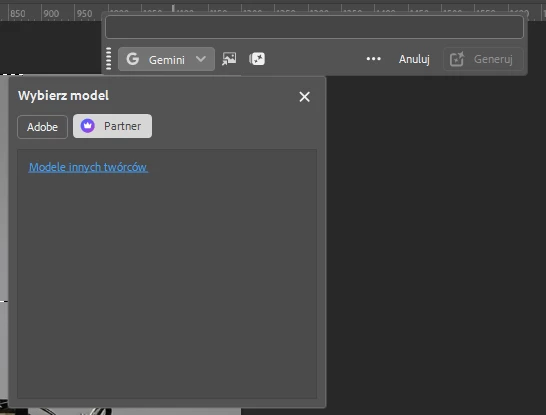
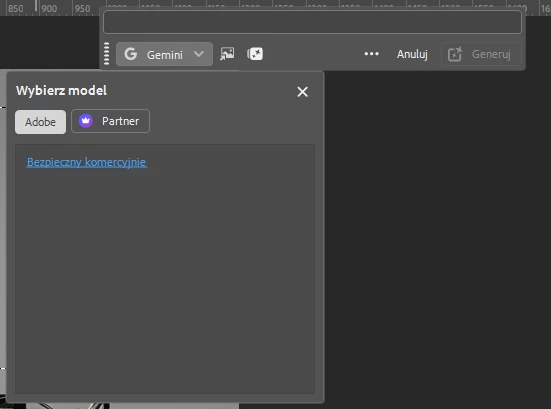
After the update, it’s not possible to select the generative AI engine because they are not visible.
  • April 17, 2026
  • 7 replies
  • 71 views

After the update, it’s not possible to select the generative AI engine because they are not visible.


    7 replies

    CShubert
    Community Manager
    Community Manager
    April 17, 2026

    Hi all, the teams are aware of this and the workaround is to roll back to 27.6. There will be a new build on Monday which has the fix in so please update Monday and let us know if things are back.


    Thanks,

    Cory - Photoshop Product Manager

    Mellygggg
    Participant
    April 17, 2026

    I NEED HELP PLEASE


    TAKE COME BACK THE FIREFLY IMAGE 3 OPTION

    Bobslaing
    Participant
    April 17, 2026
    No way of choosing the generative model, default is Gemini 3 which costs more credits. I can’t even select the Adobe models.


    onazole
    Known Participant
    April 17, 2026

    Furthermore, if I click the icon to view generative credits, it reappears every time I try to open a new file, even without me touching it. I have to close Photoshop for it to stop.

    Known Participant
    April 17, 2026

    Same on Mac os latest Photoshop Beat version

    onazole
    Known Participant
    April 17, 2026

    Appears in the Beta version (27.7) which I updated yesterday, in the last 27.6 (3501) it did not happen.

    Kornelos_PL
    Participant
    April 17, 2026

    This bug only appears in the Beta version (27.7). The official version (27.5) works properly.

    Known Participant
    April 17, 2026

    time to fix it