
Channel Options Focus problem
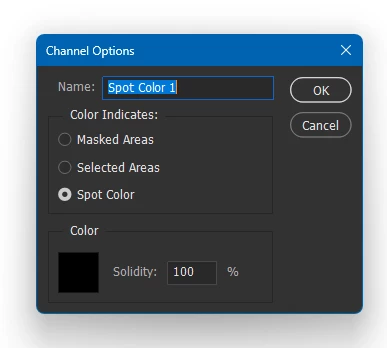
If you go into the channels, double click a channel and get this pop box for options. The way it used to work was, when the box popped up, you could press tab and it would move focus to the next section, “Color Indicates”. When it landed in that section, it would automatically select the first option, “Masked Area”. Using the down arrow key, it would select the next option, then the next. So you could move through this dialog very quickly, without using the mouse. It worked like that for decades. In the last 5 or 6 years, You double click the channel, you press tab, it jumps to the “Color Indicates” section, but does not automatically select the first option, it just sort of hi lights it. At that point, you could press the spacebar to make a selection. Then you could use the up/down arrow to hi light an option, then spacebar to select it. That worked well enough that I didn’t complain. It used to move through the options as fast as I pressed keys. Then, it got slow. I press arrow key, it hi lights option, I press spacebar but it does not make selection. I have to move more slowly. But now, it’s fully broken. Double click a channel to get this pop up, press tab and it hi lights an option. Press spacebar and it does not select it. Now, the only way to select an option is to use the mouse. Also, if you use the mouse and click back and forth through Masked Areas, Selected Areas, and Spot Color, it hi lights the “Name” section almost randomly. I would guess that it should only hi light the “Name” section if you are actually choosing that section. Over the past 10 years this has gotten progressively worse until now it only works with mouse.
 AdChoices