
Colour issue with mixed SDR/HDR monitors
Sorry to hijack your thread, what started as a simple reply became me finding the cause of the issue for myself, which may be related to your situation, or not…
---------------------
Yup, even worse is that they pushed the bug into the release version of photoshop. The colour picker shows just how bad it is, where #00FF00 looks almost yellow. So many reports, but been waiting for quite some time for the issue to get fixed.
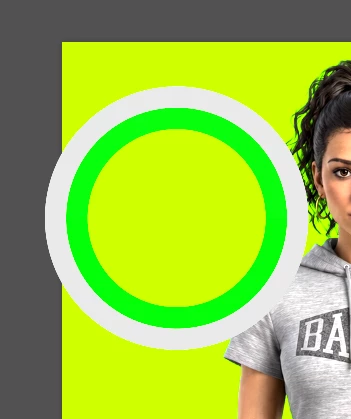
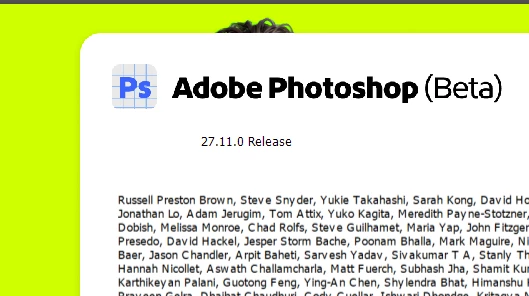
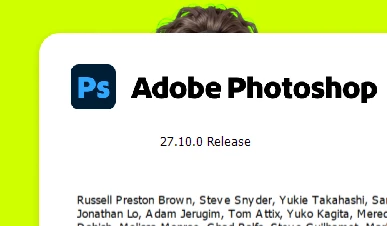
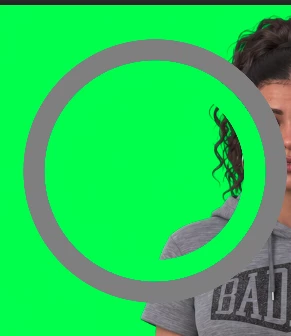
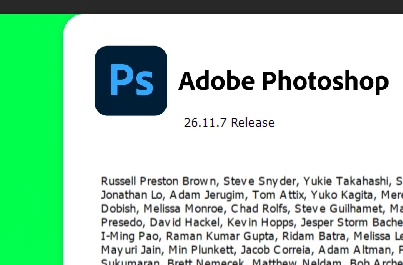
Just realized I also had 26.11.7 installed which doesn’t have the issue, but missing the new features sadly, specifically generative upscaling which I wanted to use…
One relevant thing that I don’t know if the situation is the same for yourself, but I have dual monitors, and it only happens on the one monitor, the laptops primary display (which Photoshop identifies as SDR) and doesn’t happen on the secondary display (which Photoshop identifies as HDR). If I disable HDR on the second monitor, it also displays the colors incorrectly just like the primary display.
THATS IT! I Just fixed it, kind of… I disabled HDR on the second monitor, closed photoshop, opened it again, and now the Beta photoshop color is correct!
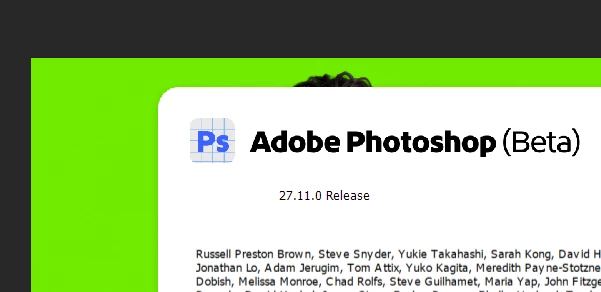
So, at least in my case, the problem is a mixed SDR/HDR monitor arrangement.
Below is a cleaner report based on my testing:
Photoshop 27.10 / Beta 27.11 GPU colour issue with mixed SDR/HDR monitors – display state appears stale/incorrect
I have been able to reproduce and narrow down a colour-rendering issue affecting both Photoshop 27.10 final and Photoshop Beta 27.11 involving GPU acceleration and a two-monitor setup where one display is SDR and the other is HDR.
The same computer and monitor configuration works correctly in Photoshop 26.11.7.
Changing the HDR state while Photoshop is running also suggests that Photoshop may be retaining or misapplying per-display HDR/dynamic-range information.
I am attaching a text file containing System Info outputs from the main test configurations described below.
Versions tested
Works correctly
-
Adobe Photoshop 26.11.7
-
26.11.7 20260815.r.290 509ee74 x64 (final, Release)
Affected
-
Adobe Photoshop 27.10.0
-
27.10.0 20260824.r.26 9d9635d x64 (final, Release)
Affected
-
Adobe Photoshop Beta 27.11.0
-
27.11.0 20260902.m.3662 8045dad x64 (beta, PublicBeta)
Photoshop 27.10 final shows the same problem and responds to the same workarounds as the 27.11 Beta.
This therefore does not appear to be Beta-specific. Based on the versions I have tested, the regression appears to have been introduced sometime between 26.11.7 and 27.10.0.
System
OS
-
Windows 11 64-bit
-
10.0.26200.9278
GPU
-
NVIDIA GeForce RTX 3070 Ti Laptop GPU
-
NVIDIA driver: 32.0.16.1088
-
Intel Iris Xe Graphics is also present
-
Both physical displays are attached to the NVIDIA GPU
-
Photoshop GPU acceleration and OpenCL are normally enabled
Monitor 1 – Primary display
-
2560 × 1600
-
125% scaling
-
SDR
-
Photoshop display profile:
Wide viewing angle & High density FlexView Display
Monitor 2
-
2560 × 1440
-
100% scaling
-
Normally operated with Windows HDR enabled
Normal configuration
My normal Windows configuration is:
-
Monitor 1 = SDR
-
Monitor 2 = HDR
-
Photoshop is normally used on Monitor 1
-
GPU acceleration = ON
Photoshop 26.11.7 works correctly in this exact configuration.
Its System Info reports:
Monitor 1Display Type: SDRDynamic range: (0 1)
Monitor 2Display Type: HDRDisplay Profile: sRGB IEC61966-2.1Dynamic range: (0 1.61197)
There is no colour problem in Photoshop 26.11.7.
Problem in Photoshop 27.10 and Beta 27.11
If either Photoshop 27.10 final or Photoshop Beta 27.11 is launched while Windows is in the same mixed SDR/HDR configuration:
-
Monitor 1 = SDR
-
Monitor 2 = HDR
-
GPU acceleration = ON
the image colours are incorrect when Photoshop is displayed on Monitor 1.
The important point is that Monitor 2 itself displays Photoshop correctly while operating in HDR mode.
I can move the Photoshop window between the displays and see:
-
Monitor 1 (SDR): incorrect colour
-
Monitor 2 (HDR): correct colour
-
Move back to Monitor 1: incorrect again
Workaround: disable “Use Graphics Processor”
Disabling:
Preferences > Performance > Use Graphics Processor
fixes the colour problem.
With GPU acceleration disabled:
-
Monitor 1 displays correctly
-
Monitor 2 remains in HDR
-
The mixed SDR/HDR Windows configuration does not need to be changed
I have confirmed this in Photoshop 27.10, and this was also one of the suggested troubleshooting steps.
However, it is not a practical permanent workaround because disabling the GPU has a significant negative impact on Photoshop performance and disables/reduces GPU-dependent functionality.
The fact that disabling only Use Graphics Processor corrects the display while leaving the same monitors, HDR state, profiles, GPU driver and Windows configuration in place also strongly suggests that the issue is in Photoshop's GPU rendering/display path rather than the underlying image data or monitor hardware.
Test: “Precise Color Management for HDR Display”
In Photoshop Beta I also tested:
Precise Color Management for HDR Display
I disabled this option and restarted Photoshop while keeping:
-
Monitor 1 = SDR
-
Monitor 2 = HDR
-
GPU acceleration = ON
The colour problem on Monitor 1 remained.
Therefore disabling Precise Color Management for HDR Display does not resolve the issue.
Test: disable Windows HDR on Monitor 2
With Photoshop still running, I disabled Windows HDR on Monitor 2.
Before restarting Photoshop:
-
Monitor 1 still had the incorrect appearance.
-
Monitor 2, which had previously displayed Photoshop correctly in HDR, now also displayed the image incorrectly.
I then completely quit and restarted Photoshop with both displays in SDR mode.
After restarting:
-
Monitor 1 displayed correctly.
-
Monitor 2 displayed correctly.
-
GPU acceleration was still ON.
-
No Photoshop GPU settings had otherwise been changed.
Photoshop System Info now reported:
Monitor 1Display Type: SDRDynamic range: (0 1)
Monitor 2Display Type: SDRDisplay Profile: LEN41B0_DefaultDynamic range: (0 1)
So changing Monitor 2 from HDR to SDR and restarting Photoshop causes the original colour problem on Monitor 1 to disappear.
The same HDR-off/restart workaround also fixes the issue in Photoshop 27.10 final.
Reverse test: turn HDR back ON without restarting Photoshop
I then performed the reverse test.
Starting from the working state:
-
Monitor 1 = SDR
-
Monitor 2 = SDR
-
Photoshop had been restarted in this all-SDR configuration
-
GPU acceleration = ON
-
Both displays looked correct
I turned Windows HDR back ON on Monitor 2 without restarting Photoshop.
After doing this:
-
Monitor 1 remained correct
-
Monitor 2 became noticeably too dark when displaying Photoshop
This appears consistent with Photoshop continuing to render Monitor 2 according to the SDR state/dynamic range that existed when Photoshop was launched.
I then generated Photoshop System Info again after Windows HDR had been turned back on, but without restarting Photoshop.
Photoshop still reported Monitor 2 as:
Display Type: SDRDisplay Profile: LEN41B0_DefaultDynamic range: (0 1)
even though Windows was actually running Monitor 2 in HDR mode at that point.
The Photoshop launch count was unchanged, confirming this was the same Photoshop session.
So Photoshop's reported display configuration did not update when Windows changed Monitor 2 from SDR back to HDR.
Visually, this matches what I see: Monitor 1 continues to look correct, while Photoshop on Monitor 2 becomes too dark, as though Photoshop is still using the SDR display state established when the application launched.
Behaviour summary
Photoshop 26.11.7
-
Monitor 1 SDR + Monitor 2 HDR
-
GPU ON
-
Both displays correct
Photoshop 27.10 final / Beta 27.11
-
Monitor 1 SDR + Monitor 2 HDR
-
GPU ON
-
Monitor 1: incorrect colour
-
Monitor 2: correct
Disable Use Graphics Processor
-
Monitor 1: correct
-
Monitor 2: correct
-
HDR can remain enabled
-
Performance is significantly reduced
Disable “Precise Color Management for HDR Display”
-
Does not fix the issue
Disable Windows HDR on Monitor 2 without restarting Photoshop
-
Monitor 2 also begins displaying incorrectly
-
Photoshop does not appear to adapt correctly to the changed display state
Restart Photoshop with both monitors SDR
-
Monitor 1: correct
-
Monitor 2: correct
-
GPU remains ON
Re-enable Windows HDR on Monitor 2 without restarting Photoshop
-
Monitor 1: remains correct
-
Monitor 2: becomes too dark
-
Photoshop System Info still identifies Monitor 2 as SDR with dynamic range
(0 1)
Expected behaviour
Photoshop should render colour correctly on each monitor according to that monitor's current SDR/HDR state.
A mixed SDR/HDR desktop should not cause the SDR display to receive an incorrect colour/display transform.
If Windows changes a monitor between SDR and HDR while Photoshop is running, Photoshop should update its per-display rendering state accordingly.
Photoshop 26.11.7 already handles my normal SDR + HDR configuration correctly with GPU acceleration enabled.
Current workarounds
I have found two reliable workarounds in Photoshop 27.10 / Beta 27.11:
-
Disable Preferences > Performance > Use Graphics Processor
-
Disable Windows HDR on Monitor 2 and restart Photoshop
Neither is a practical permanent solution.
Disabling Use Graphics Processor fixes the colour without changing the displays, but the loss of GPU acceleration hurts Photoshop performance too much for normal use.
Disabling HDR allows GPU acceleration to remain enabled, but makes Monitor 2 significantly darker and is also not acceptable for normal use.
Photoshop 26.11.7 remains usable with both GPU acceleration and HDR enabled.
Possible area to investigate
I cannot determine the underlying implementation issue from the outside, but the results appear consistent with a regression in Photoshop's GPU canvas/display colour-management path in a mixed SDR/HDR multi-monitor configuration.
The most useful clues may be:
-
Photoshop 26.11.7 works correctly, while Photoshop 27.10 final and Beta 27.11 both fail in the same way. This may help narrow down when the regression was introduced.
-
When Photoshop is launched with one SDR and one HDR display, the GPU-rendered canvas on the SDR display has incorrect colour even though the HDR display itself renders correctly.
-
Disabling Use Graphics Processor fixes the problem while leaving Windows HDR enabled and the monitor configuration unchanged.
-
Disabling Photoshop's Precise Color Management for HDR Display does not resolve the issue.
-
Disabling Windows HDR on the second monitor and restarting Photoshop fixes the SDR monitor while GPU acceleration remains enabled.
-
When Windows changes a monitor between SDR and HDR while Photoshop is already running, Photoshop does not appear to refresh that display's state. System Info continues to report the previous display type, profile and dynamic range until Photoshop is restarted.
I have attached a text document containing the main System Info outputs from the tested configurations so the GPU, display profiles, display types and reported dynamic ranges can be compared directly.
I have not included an additional System Info dump from the GPU-disabled test because the behaviour seems sufficiently isolated, but I can provide it if useful.
Please let me know if there are any additional logs, test files, settings, builds or reproduction steps I can provide.


 AdChoices