

Gixxxa75
Inspiring
August 24, 2023

P: Error 54 crop tool fill:content aware fill option

  • August 24, 2023
  • 9 replies
  • 2542 views

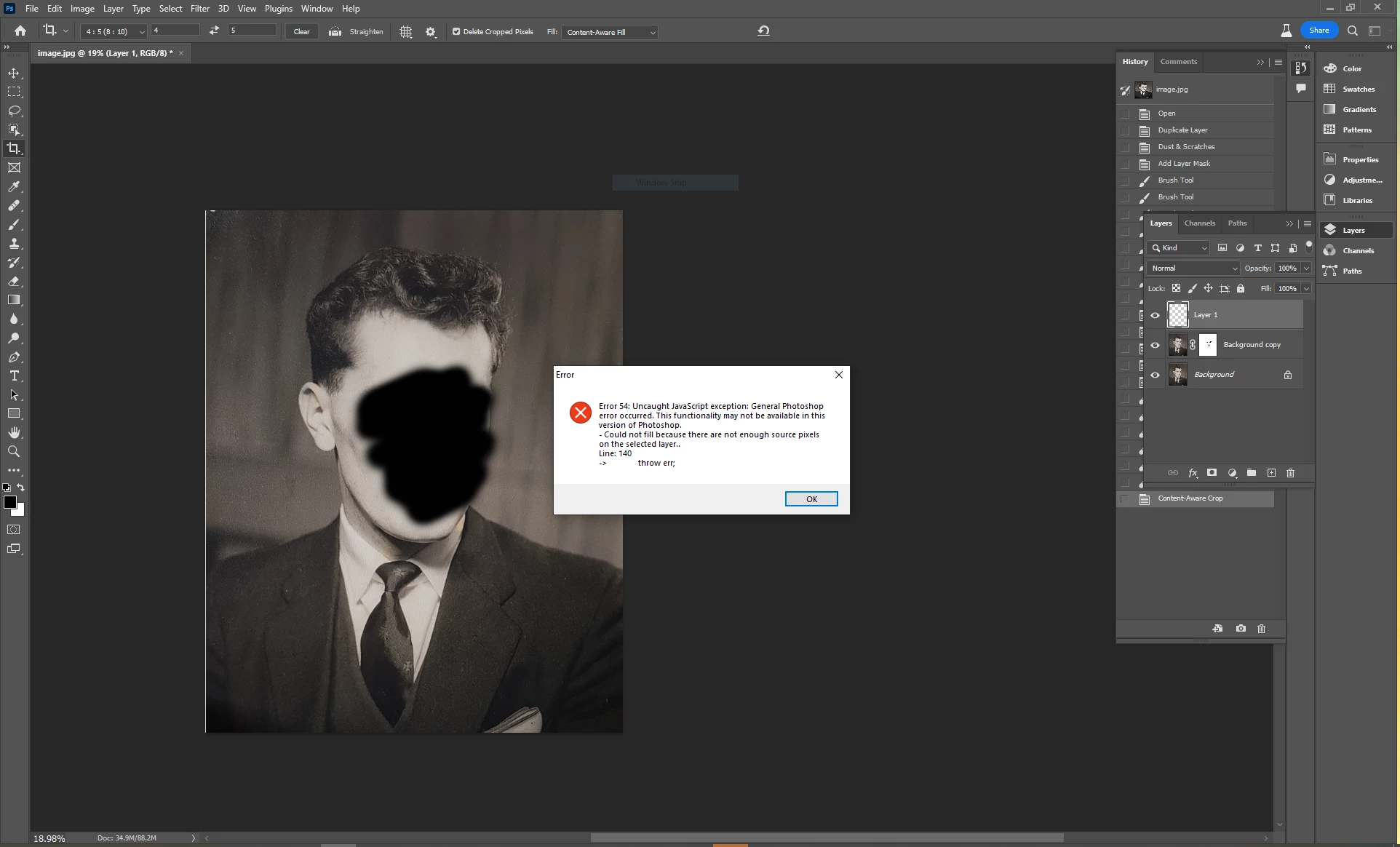
Just had Error 54 pop up while using the crop tool with content aware fill set as fill option.

Not sure if bug or if its meant to be like this, the selected layer  didnt have a lot in it.

Only did it once, couldnt get it to repeat. (Have blacked out face on screenshot)
Adobe Photoshop Version: 25.0.0 20230820.m.2296 c61c3a5 x64
Number of Launches: 14
Operating System: Windows 10 64-bit

9 replies

Participant
September 1, 2024

Updated photoshop beta and now when I try to use Generative Expand I get error 54 uncaught java script.

Participant
April 23, 2024

I was using GF in photoshop just fine until a couple of days ago. Now I keep getting error 54 and the image shrinks to postage stamp size. I just installed the upgrade to the latest version of PS and am opening the image directly in photoshop (i.e. not LR or Bridge). I am using a Windows 10 PC - latest upgrades installed.

BISS Gausel
Participant
January 5, 2024

I can't delete my previous post but as soon as I pressed post, I realised the issue.  I was trying to crop an adjustment layer - though I don't remember that being an issue before

BISS Gausel
Participant
January 5, 2024

I just got the message today.  Installed Photoshop 25.3.1 on a new machine and am getting error 54 when I am trying to do a content aware fill crop

Participant
November 16, 2023

I have just started getting the Error 54 Uncaught JavaScript exception message when using the crop tool to expand canvas with both Generative Fill and Content Aware Fill - I was with others in the same room today all working on laptops, Mac and Windows machines and most others also received same error mesage - any ideas?

Pete.Green
Community Manager
Community Manager
September 18, 2023

Updating status

Mohit Goyal
Community Manager
Community Manager
September 14, 2023

Hi all,


We are happy to announce the release of Photoshop version 25.0 (public release), which incorporates the resolution for this particular problem. To see the list of all fixed issues, click here


To update Photoshop to 25.0, click "Update" in the Creative Cloud desktop app next to Photoshop. More detailed instructions for updating


Let us know if the update resolves the problem for those affected, and share your feedback.


Thanks,

Mohit

Gixxxa75
Gixxxa75Author
Inspiring
August 24, 2023

Hi Kevin,

Yes am aware there wasnt much in the selected layer, just never had a message about java script pop up before. If its normal expected behaviour please delete thread. Funny thing is does complete the operation on subsiquent goes, just doing a not very good job as expected with little info to work with.

Kevin Stohlmeyer
Community Expert
Community Expert
August 24, 2023

Hi @Gixxxa75 Check your layers panel - you are trying to use Content Aware Fill on a blank layer - there is no pixel data to pull detail from.