We are happy to announce the release of Photoshop version 25.2, which incorporates the resolution for this particular problem. To see the list of all fixed issues, click here
I can testify that after the latest update of Beta the issue seems resolved. I have enabled the GPU acceleration flag back ON - and the images open in a normal aspect.
Just installed the 25.3 update, and it seems to have fixed the error... I have "Use Graphics Processor" turned on, and "Native Canvas" as someone suggested is also on. I'm able to display files normally and scale all directions without issues. Thanks! 🙂
Hi Trevor, and yes, Frode is the name (an old Norse name) 🙂
My laptop is using the Nvidia Quadro T2000 GPU, and it is a 2. 2-generation Lenovo Thinkpad P1. My company is using either ThinkPads or Mac, and since I can't stand the Apple eco-system (no, I'm not trying to start a new discussion here 😉 ) I am stuck with the ThinkPad.
I have to apologize btw, as I said in my initial post, I was using the latest Nvidia drivers. I've found that I was not, and that I was in fact using the previous 537.42 version of the driver. So, in order to confirm things properly I re-enabled the "Use Graphics Processor", and checked that the glitch re-occurred, and it did.
I closed PS, and downloaded and installed the latest (to my knowledge) Nvidia driver, 546.01. Then I launched PS, opened an image, and - yes - the glitch occurred yet again. So I unchecked the "Use Graphics Processor", and the glitch disappeared. So, at least now we know the driver version had nothing to do with the error..
Eager to try out the Creative Ready Driver, I also downloaded the GeForce Experience as it is supposed to also support the Quadro drivers. But - to my disappointment, there are no such option in my version, to set it to Creative Ready.
I do notice though, that it says over the checkmark, that I have the latest "GeForce Game Ready Driver". So, when searching for the Creative Ready Driver, I find that it is a 419 version of the driver, and I am a little hesitant to install such an old driver.. I tried anyway, but the installer aborted itself, saying that it does not support my OS. Which is weird since I am running Windows 10. Maybe because it is an enterprise version?
So, anyways, for now the solution seems to be turning off the "Use Graphics Processor" option.
Thanks again for all tips! It is most appreciated 🙂
Hi Frode (is that your name ?) What GPU does your system have? If it is Nvidia, then are you using the game ready or studio driver? Photoshop doesn't always play nice with the game ready drivers, so try switching to the studio driver. It seems that this is an easy fix
Is your system a laptop? They often have onboard Intel GPU which is good for battery life, and a more discrete GPU which work much better for games and content creation apps like Photoshop. When you went to Preferences Performance, what GPU did it show being used? It might as simple as setting Power Settings to best performance rather than best battery life, or something along those lines.
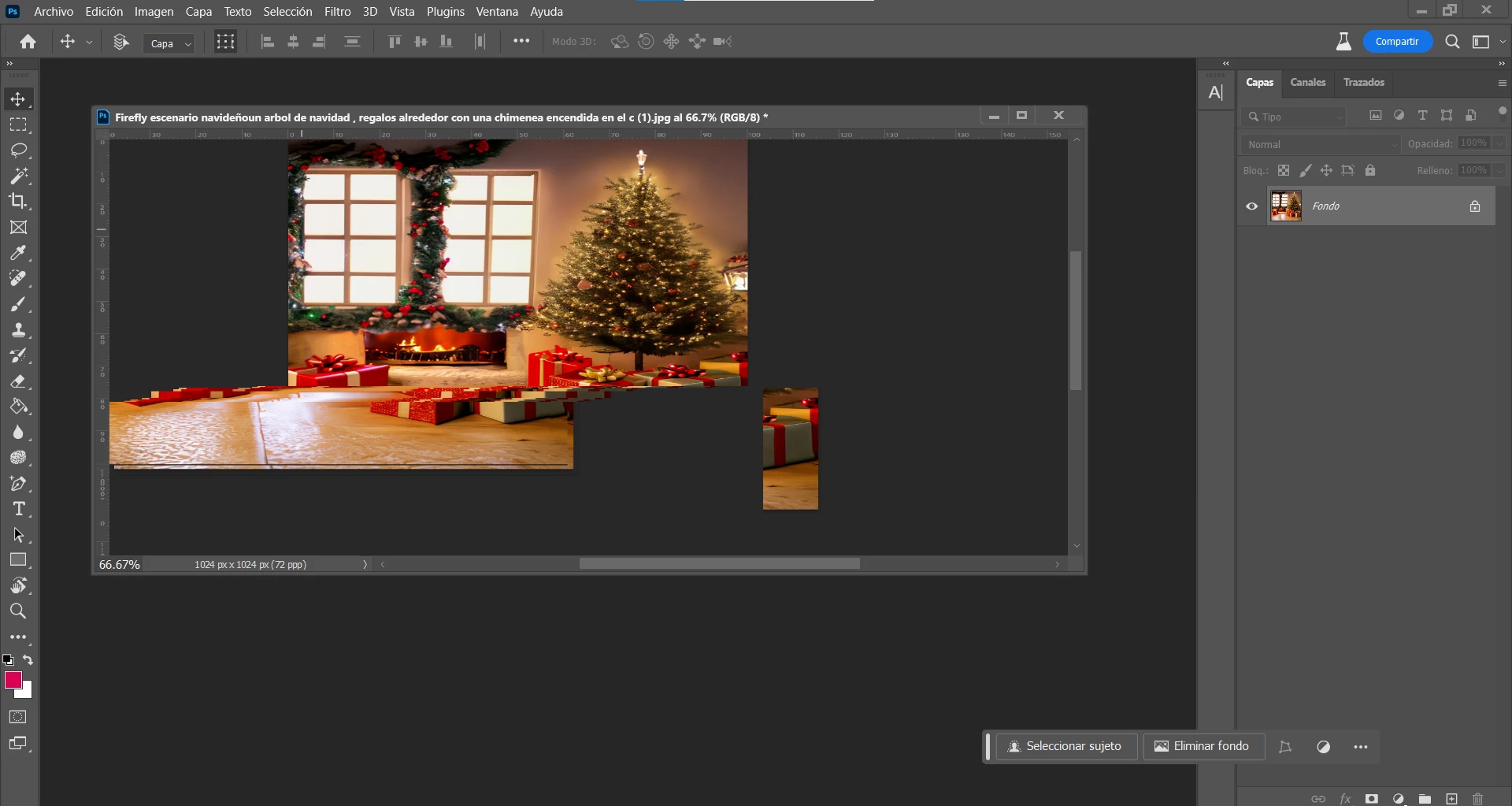
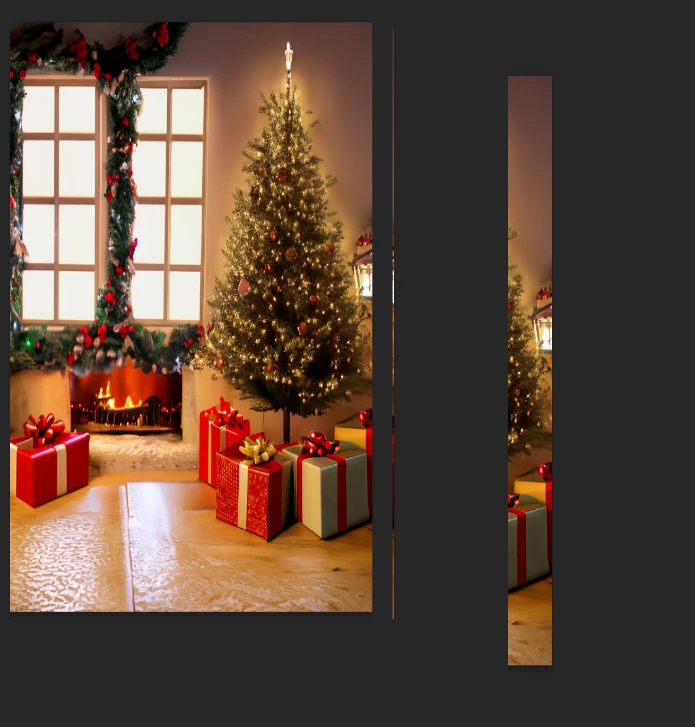
After the latest update of the PS beta to 25.2 m2388 - all of the images i am opening show up squeezed by horizontal proportion. Before the update images showed up correctly. The issue is in the hardware GPU acceleration. It was ON all the time and had no issues up until the update. However after the update I need to turn it OFF in order to handle the "squeezing" issue. The system is Win11 22H2, running on Thinkpad 14s Gen2 AMD with Builtin Radeon gpu/apu. All the drivers are up to date, according to both: Windows update and Lenovo Commercial Vantage scans. Again: running on the same system with GPU acceleration ON in performance settings - previous version of PS beta was running just fine.
Same problem, also on ThinkPad running PS beta 25.2.0.
But I have GPU acceleration OFF already, and images are still opened squeezed... This has been a problem with the two latest Beta versions... In the previous one, it could be fixed by simply minimizing and then restoring the window with the image, but that doesn't work anymore with the latest beta
--------------------------
Pass: OpenGL available
Pass: OpenCL available
Pass: DirectX available
Pass: Direct X feature level 12.1 available, feature level 12.0 required
Pass: Above required VRAM (3949 MB of 1500 MB required)
GPU Detected: NVIDIA Quadro T2000 (NVIDIA)
--------------
[System Summary]
Item Value OS Name Microsoft Windows 10 Enterprise Version 10.0.19045 Build 19045 Other OS Description Not Available OS Manufacturer Microsoft Corporation System Manufacturer LENOVO System Model 20QUS23000 System Type x64-based PC System SKU LENOVO_MT_20QU_BU_Think_FM_ThinkPad P1 Gen 2 Processor Intel(R) Core(TM) i9-9880H CPU @ 2.30GHz, 2304 Mhz, 8 Core(s), 16 Logical Processor(s) BIOS Version/Date LENOVO N2OET50W (1.37 ), 1/7/2021 SMBIOS Version 3.1 Embedded Controller Version 1.22 BIOS Mode UEFI BaseBoard Manufacturer LENOVO BaseBoard Product 20QUS23000 BaseBoard Version SDK0T08861 WIN Platform Role Mobile Secure Boot State On PCR7 Configuration Elevation Required to View Windows Directory C:\Windows System Directory C:\Windows\system32 Boot Device \Device\HarddiskVolume1 Locale United States Hardware Abstraction Layer Version = "10.0.19041.3570" User Name SCHIBSTED\frodel Time Zone W. Europe Standard Time Installed Physical Memory (RAM) 64.0 GB Total Physical Memory 63.7 GB Available Physical Memory 43.2 GB Total Virtual Memory 73.2 GB Available Virtual Memory 45.6 GB Page File Space 9.50 GB Page File C:\pagefile.sys Kernel DMA Protection On Virtualization-based security Running Virtualization-based security Required Security Properties Virtualization-based security Available Security Properties Base Virtualization Support, Secure Boot, DMA Protection, UEFI Code Readonly, SMM Security Mitigations 1.0, Mode Based Execution Control Virtualization-based security Services Configured Virtualization-based security Services Running Device Encryption Support Elevation Required to View A hypervisor has been detected. Features required for Hyper-V will not be displayed.
------------------------------------------
-------------------------------------------
This is most annoying, so please pleaseplease fix it 🙂
I just opened up the new beta and when I resize my artwork window, it shows the display of the art resizing with it although it's not actually changing.



 AdChoices