Participant
May 24, 2023

P: Session ID: 1000 error using generative fill

  • May 24, 2023
  • 67 replies
  • 19055 views

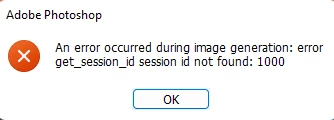
I've successfully used the generative tool on another machine but my current setup when hitting generate it gives me an get session ID error. Reinstalled, rebooted, same results.

This topic has been closed for replies.

67 replies

Participating Frequently
May 30, 2023

It sounds like disbaling the proxy seems to work for those who can do that. In my case, I have no control over the proxy. It is configured by my organization for our internet content filter and it cannot be disabled. If it is something that is being blocked by our filter, it would be beneficial to know exactly where the traffic is tryng to go that is being blocked so that out netwrok administrator can whitelist or unblock it. 

kglad
Community Expert
Community Expert
May 30, 2023

@madesincere 


in the future, to find the best place to post your message, use the list here, https://community.adobe.com/


p.s. i don't think the adobe website, and forums in particular, are easy to navigate, so don't spend a lot of time searching that forum list. do your best and we'll move the post if it helps you get responses.


<moved from using the community>

Participant
May 30, 2023

Hello, the actual way to fix this on a Mac... go to System Preferences - Network - Advanced - Proxies - UNCHECK both Web Proxy (HTTP) and Secure Web Proxy (HTTPS). Now try again. Good Luck!

Participant
May 30, 2023

This is what I get when I clicker generate on the new beta photoshop generative ai feature [An error occurred during image generation: error get_session_id session id not found: 1000 

Participating Frequently
May 30, 2023

I suspect the issue does have something to do with network connections or Proxies or internet filtering somehow. I experience the session ID error on my desktop (PC) but not my laptop (Macbook). Both are on my work network. The Macbook does not appear to have any Proxy settings enabled, but my PC desktop has a Proxy script enabled. I cannot turn this off as it is managed by our organization and I cannot make changes to the settings. I also cannot test through a VPN as VPNs are blocked on our work network. 


I know this feature is cloud based and requires an internet connection, so I suspect it is trying to connect to a resource on the internet that is being blocked by my network or internet filter. I wonder if Adobe can provide some addresses that can be whitelisted on our internet filter?

Participant
May 30, 2023

On the desktop PC - in general, everything works fine. On a laptop only via VPN.
Both on Windows 11.
Both on the same router. Laptop via Wi-Fi. Desktop - Ethernet.
Marvel 🙂

Participant
May 30, 2023

It works fine for me only through F-secure Freedom VRN.

Through seed4.me it doesn't work.

HektorJ
Participant
May 30, 2023

Another thing, using same conection (home), it works with my laptop via wifi but no with my desktop pc, wifi or ethernet, doesn't matter. Both computers uses windows 11.

HektorJ
Participant
May 30, 2023

I just tried a VPN with ProtonVPN but still get the error, seems like the error is related to conexion stuff, proxy, vpn... but there's no a right fix, so random

Participant
May 30, 2023

Hi! I just turned on the VPN - the error was fixed. I turned off the VPN - the error appeared again. Without VPN - an error. VPN is enabled - everything works fine. Fabulous Adobe!