Participant
May 24, 2023 12:58 PM UTC
Released

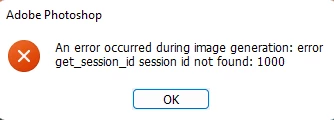
P: Session ID: 1000 error using generative fill

I've successfully used the generative tool on another machine but my current setup when hitting generate it gives me an get session ID error. Reinstalled, rebooted, same results.

This topic is closed to new replies. Start a new post to keep the conversation going.

77 replies

Participating Frequently
May 25, 2023 4:12 PM UTC

I found that by shortening the prompt, it then worked. I'm unsure if that's causation or correlation, but for what it's worth.

Translate
Participating Frequently
May 25, 2023 3:22 PM UTC

Exact same issue! Glad to see someone else experiencing this. I have used the tool successfully on another computer with no problems. But on my main desktop, I cannot get it to work. Same error message. 

I have uninstalled multiple times, with and without removing preferences during uninstall, rebooted, etc. The issue happens every time for the past two days. 


Windows 11 Desktop

Translate
CShubert
Community Manager
Community Manager
May 24, 2023 4:55 PM UTC

The team will look into this.


Translate
CShubert
Community Manager
Community Manager
May 24, 2023 4:33 PM UTC

Thanks @JoshuaOpel so far it seems this error is very random and usually goes away after a few minutes and the app should work again.  Let us know if in fact this goes away and if not, will escalate with the team.


Translate
Participant
May 24, 2023 4:28 PM UTC

Did that, still getting the error.

Translate
Participant
May 24, 2023 3:14 PM UTC

Thanks for the reply, I restarted both ps-beta and my pc, still getting the same error.

Translate
CShubert
Community Manager
Community Manager
May 24, 2023 3:10 PM UTC

Hi @JoshuaOpel please quit Ps beta and restart, does this issue go away?


Try resetting Prefs for the Beta:

/Users/yourname/Library/Preferences/Adobe\ Photoshop\ \(Beta\)\ Settings 

Launch BETA Photoshop While Pressing The Keyboard Shortcut

With Photoshop closed, press and hold Shift+Ctrl+Alt (Win) / Shift+Command+Option (Mac) on your keyboard and then Launch Photoshop the way you normally would.


Translate
Participating Frequently
May 24, 2023 9:17 PM UTC

When I drew a square via the marquee tool, I entered in a prompt. I receieved an error message as a result: An error occured during image generation: error response image not found: 1000


The prompt was a piggy bank next to a stack of dollars.

Translate