

Nicolas Vasquez C
Participating Frequently
September 4, 2023

P: Text Box issue in curves properties

  • September 4, 2023
  • 12 replies
  • 804 views

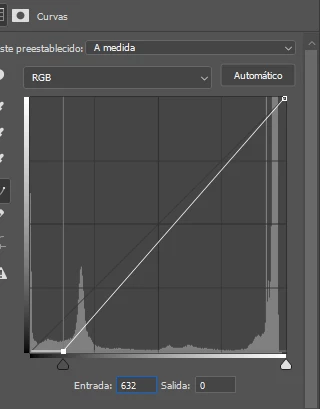
I'm having trouble typing a value into the first text box of the curves modifier. For example, I need to enter the value 236 and the cursor changes place and the written value remains 632 or 623. Can you review it please? Thank you.
 

Desktop W10

Photoshop beta v25.1

This topic has been closed for replies.

12 replies

Nicolas Vasquez C
Participating Frequently
September 6, 2023

Hello. I followed the instructions and it doesn't fix the problem. What could cause this error?

CShubert
Community Manager
Community Manager
September 5, 2023

Hi @Nicolas Vasquez C 


Try resetting Prefs for the Beta:

/Users/yourname/Library/Preferences/ Photoshop Beta Settings (Mac Ventura)

/Users/yourname/Library/Preferences/Adobe\ Photoshop\ \(Beta\)\ Settings (Mac)
C:\Users\user name\AppData\Roaming\Adobe\Adobe Photoshop (Beta)\Adobe Photoshop (Beta) Settings )Win)

Launch BETA Photoshop While Pressing The Keyboard Shortcut

With Photoshop closed, press and hold Shift+Ctrl+Alt (Win) / Shift+Command+Option (Mac) on your keyboard and then Launch Photoshop the way you normally would.

https://helpx.adobe.com/photoshop/using/preferences.html#Manually