Participant
September 15, 2023

P: The color triangle is broken

  • September 15, 2023
  • 39 replies
  • 6888 views

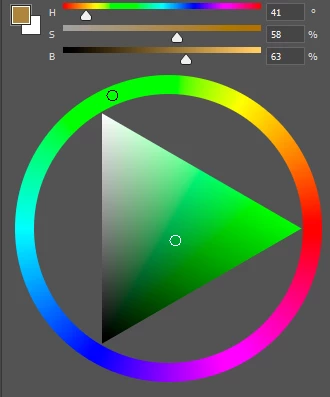
The colour triangle is broken in the new version of photoshop, now it doesn't respond to the pipette colour selection.

 

This topic has been closed for replies.

39 replies

CShubert
Community Manager
Community Manager
November 3, 2023

@jimm7497115 the update went out this am so it is possible it not yet in your area of the world? Testing here shows it working as expected so when the update shows for you, please check and see if it is in fact fixed.


Participating Frequently
November 3, 2023

This is great but the last update available  is 25.1.... I can't see yet : /

jimm7497115
Inspiring
November 3, 2023

He said

'fixed with the release of Adobe Photoshop Version: 25.2.0 20231101.m.2385 38bb2d3 arm64'

I'm not seeing that update available yet, however if you read my other reply above I fixed it by stepping back to a working version and removing one of the preferences. see above.  

CShubert
Community Manager
Community Manager
November 3, 2023

@daniela6C15 as mentioned, please start a new thread and we will look into it.


Participating Frequently
November 3, 2023

I have the updated version and still have the same issue

CShubert
Community Manager
Community Manager
November 3, 2023

This issue has been fixed with the release of Adobe Photoshop Version: 25.2.0 20231101.m.2385 38bb2d3 arm64


If you still are having issues, please start a new thread so we can investigate.


Legend
November 3, 2023

Thanks Ps team, this issue seems to be fixed in the latest beta build.

Participant
November 2, 2023

I am having the same issue with all color windows (HSB, RGB, Hue Cube, etc). This is on-going for the last week for me.

jimm7497115
Inspiring
October 31, 2023

Long story short  I can now select colours and my Colour Pane updates. So,  back your preferences folder, removed the old one following the locations  and instructions on previous page  then restart PS from the CCDesktop then replace all but Adobe Photoshop 2024 Prefs.psp. This is the only thing that's worked for me. To be honest I tried everything I could thik before and even went back to 24.1 so I've tried a lot of things. I'm pretty sure it's the Adobe Photoshop 2024 Prefs.psp file that is the issue. 

Participating Frequently
October 31, 2023

Yes, you are right! I'm thinking to move to clip studio paint XD