Participant
September 15, 2023

P: The color triangle is broken

  • September 15, 2023
  • 39 replies
  • 6891 views

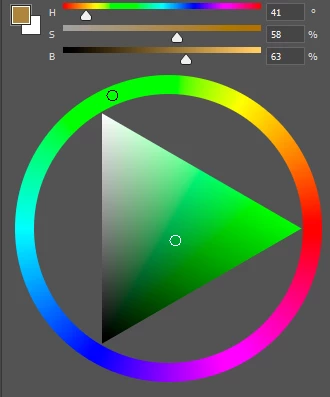
The colour triangle is broken in the new version of photoshop, now it doesn't respond to the pipette colour selection.

 

This topic has been closed for replies.

39 replies

Legend
October 21, 2023

With update 25.2.0 20231018.m.2368 97b8cf1 x64 and over two weeks after being reported, this problem is still not fixed.

Trevor.Dennis
Community Expert
Community Expert
October 19, 2023

We can still pick colours by right clicking, and the swatch at the top left of the Color panel updates, but the main colour panel does not move with the brush.  We can still pick colours directly from the panel.


I'm Windows 11.

Participating Frequently
October 19, 2023

Same here, selecting a color with the eye dropper does not update the hue cube or color wheel

Participant
October 17, 2023

I am having the same issue, maybe it's a bug?

Legend
October 8, 2023

This issue is more than just the Brush color picker.


The Color Panel is broken. In the Color Panel, click the Foreground Color and change color using the color picker, then click OK. The Foregorund Color is changed, but the color panel's Hue Cube or Color Wheel, etc. don't update to the new color.

CShubert
Community Manager
Community Manager
October 7, 2023

Hi all, the team will look into this.


Participant
October 1, 2023

My current version is Photoshop Beta 25.1 and I have windows

When I use the eyedropper tool, it picks up the colour but the colour on the colour pallete doesn't change. It's therefore really hard to change the colour slightly to for example shade something. 

Legend
October 7, 2023

I can reproduce this with the latest PS Beta Version 25.1.0 20231003.m.2350 465661e x64

CShubert
Community Manager
Community Manager
October 6, 2023

Hi @Oleg32253533uqm9 could you share more of the issue you are seeing? What is the workflow you are trying to do where you see this?


Try resetting Prefs for the Beta:

/Users/yourname/Library/Preferences/ Photoshop Beta Settings (Mac Ventura)

/Users/yourname/Library/Preferences/Adobe\ Photoshop\ \(Beta\)\ Settings (Mac)
C:\Users\user name\AppData\Roaming\Adobe\Adobe Photoshop (Beta)\Adobe Photoshop (Beta) Settings )Win)

Launch BETA Photoshop While Pressing The Keyboard Shortcut

With Photoshop closed, press and hold Shift+Ctrl+Alt (Win) / Shift+Command+Option (Mac) on your keyboard and then Launch Photoshop the way you normally would.

https://helpx.adobe.com/photoshop/using/preferences.html#Manually 


It may help if we could see your Photoshop System Info. Launch Photoshop, and select Help >System Info...and copy/paste the text in a reply.  


Participant
September 15, 2023

Após a atualização o cubo matiz parou de funcionar corretamente, o color picker "funciona" mas a cor não é acompanhada no cubo matiz.

CShubert
Community Manager
Community Manager
September 18, 2023

Hi @Adrian Bueno 


Try resetting Prefs for the Beta:

/Users/yourname/Library/Preferences/ Photoshop Beta Settings (Mac Ventura)

/Users/yourname/Library/Preferences/Adobe\ Photoshop\ \(Beta\)\ Settings (Mac)
C:\Users\user name\AppData\Roaming\Adobe\Adobe Photoshop (Beta)\Adobe Photoshop (Beta) Settings )Win)

Launch BETA Photoshop While Pressing The Keyboard Shortcut

With Photoshop closed, press and hold Shift+Ctrl+Alt (Win) / Shift+Command+Option (Mac) on your keyboard and then Launch Photoshop the way you normally would.

https://helpx.adobe.com/photoshop/using/preferences.html#Manually