
Rene Andritsch
Community Expert
Community Expert
May 14, 2025

P: UI Bug in Properties Panel with Dynamic Text

  • May 14, 2025
  • 6 replies
  • 808 views

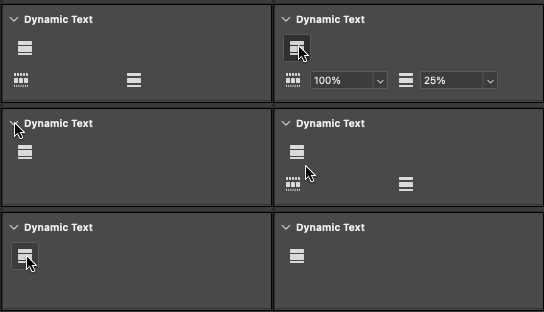
If you twirl down Dynamic Text in the Properties Panel it has some problems showing the word / line spacing without the entry fields if a text layer (non dynamic) is selected.


Also when deactivating Dynamic Text in the Properties Panel the space where the entry fields were stays there, but this should be narrowed down to a smaller height. Like with the “Bullets and Numbering” options.


Photoshop 26.8.0 (Beta), macOS 15.4.1


PS: Sorry, I also posted this first on the regular PS forum.

6 replies

Rene Andritsch
Community Expert
Community Expert
June 2, 2025

@CShubert Thank you I see it now.

CShubert
Community Manager
Community Manager
May 28, 2025

Hi @Rene Andritsch please make sure you have the latest Ps Beta build to solve this issue.


Adobe Photoshop Version: 26.8.0 20250527.m.3089 bb65995 arm64


Thanks,

Cory - Photoshop Product Manager

Rene Andritsch
Community Expert
Community Expert
May 14, 2025

@Pete.Green , correct.

Rene Andritsch
Community Expert
Community Expert
May 14, 2025

@Srishti Bali I’m on a MacBook Pro M3 Max with 64 GB RAM, as of today with macOS 15.5

Pete.Green
Community Manager
Community Manager
May 14, 2025

Thanks for the great report @Rene Andritsch ! We'll investigate this!


There are 2 things here shown in your gif: 

  1. Additional space below block button while dynamic text is disabled (expected: no extra gap)
  2. Expanding and contracting dynamic text section of properties shows wordgap/linegap icons with no editable values (icons should not show if dynamic text isn't currently enabled)


Regards,

PG

Rene Andritsch
Community Expert
Community Expert
May 14, 2025

If you twirl down Dynamic Text in the Properties Panel it has some problems showing the word / line spacing without the entry fields if a text layer (non dynamic) is selected.


Also when deactivating Dynamic Text in the Properties Panel the space where the entry fields were stays there, but this should be narrowed down to a smaller height. Like with the “Bullets and Numbering” options.


Photoshop 26.8.0 macOS 15.4.1


Ged_Traynor
Community Expert
Community Expert
May 14, 2025

@Rene Andritsch Photoshop version 28.8 is still in Beta, you would be better off reporting the issue on the Photoshop Beta forum