



Photoshop 2026: Severe PSD opening delays caused by C2PA metadata (adobe_c2pa.dll) on AMD Zen 3 systems
Photoshop 2026: Severe PSD opening delays caused by C2PA metadata (adobe_c2pa.dll) on AMD Zen 3 systems
Product: Adobe Photoshop 2026
OS: Windows 11
Issue type: Performance / Application not responding
Affected component: C2PA / Content Credentials
Issue description
Photoshop becomes unresponsive for several minutes when opening a relatively small PSD document containing accumulated C2PA metadata.
The problem is reproducible on two different AMD Zen 3 systems, while the same PSD opens quickly on an AMD Zen 4 system running the same Photoshop version.
I investigated the PSD structure and identified approximately 130.6 MiB of C2PA-related metadata stored in ten caiM entries within layer metadata blocks (shmd).
After removing only these caiM entries from a test copy of the PSD, both affected Zen 3 systems open the file quickly, without the previous delays.
This strongly suggests a performance problem in Photoshop's C2PA metadata processing.
Tested hardware
System 1 — Affected
-
AMD Ryzen 7 5800H (Zen 3)
-
64 GB DDR4 RAM
-
NVIDIA RTX 3070 Laptop GPU
-
Lenovo Legion 5
-
Original PSD: approximately 5 minutes to open
-
PSD without
caiM: opens quickly
System 2 — Affected
-
AMD Ryzen 7 5700X (Zen 3)
-
Desktop PC
-
NVIDIA RTX 5060 Ti
-
Original PSD: severe opening delays
-
PSD without
caiM: opens quickly
System 3 — Not affected
-
AMD Ryzen 5 7600X (Zen 4)
-
64 GB DDR5 RAM
-
Original PSD: opens quickly
The same Photoshop version was used during testing.
PSD characteristics
-
Dimensions: 2048 × 2048 pixels
-
RGB, 8 bits/channel
-
18 layers
-
Includes embedded Smart Objects and adjustment layers
-
Original size: approximately 307.1 MiB
-
Cleaned size: approximately 176.4 MiB
-
Removed metadata: 10
caiMentries, totaling approximately 130.6 MiB
Steps to reproduce
-
Open the original PSD containing the accumulated
caiMmetadata on an affected Zen 3 system. -
Photoshop becomes unresponsive during document opening.
-
Wait several minutes. Photoshop eventually completes opening the file.
-
Open a copy of the same PSD with only the
caiMmetadata entries removed. -
The cleaned document opens quickly.
Expected result
Photoshop should open the document without excessive delays, regardless of the presence of C2PA metadata.
Actual result
Photoshop becomes unresponsive for several minutes while processing the original document.
Disabling Multithreaded Compositing does not resolve the issue.
The Content Credentials panel is already disabled, but the embedded C2PA metadata is still present in the PSD.
Diagnostic findings
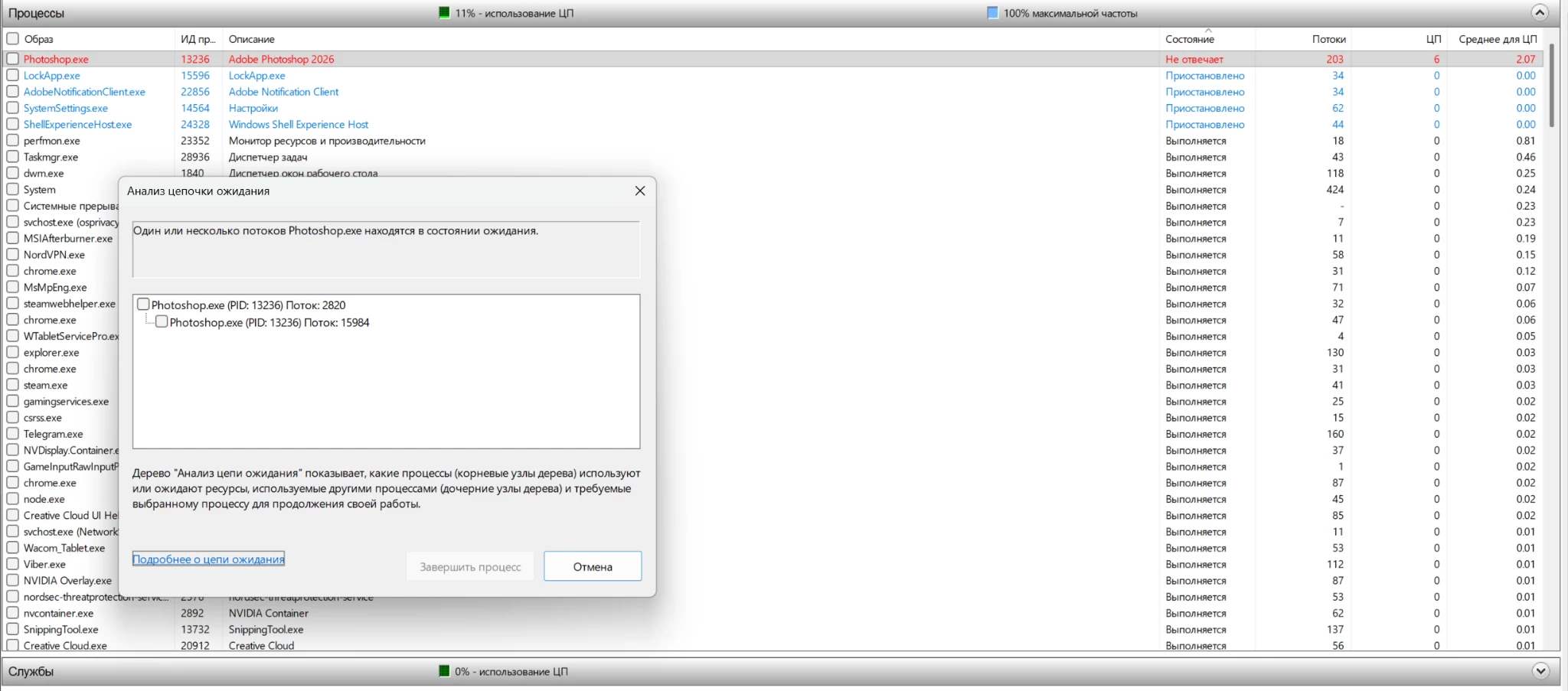
Using Windows Resource Monitor, I identified a Photoshop thread waiting for another thread within the same process.
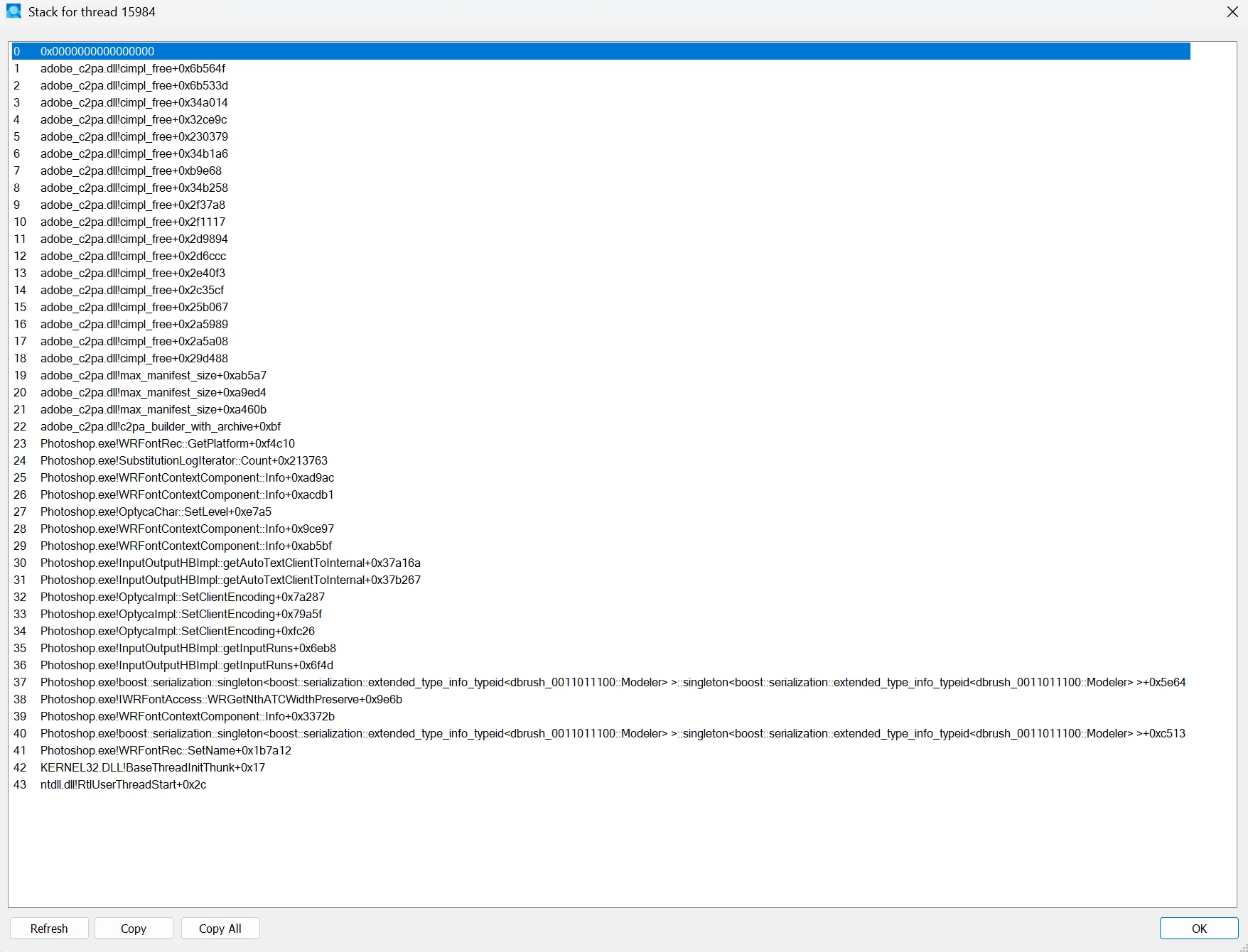
Using Microsoft Sysinternals Process Explorer, I inspected the stack of the thread being waited on.
The stack contains numerous frames inside:
adobe_c2pa.dll
Notable symbols include:
-
adobe_c2pa.dll!c2pa_builder_with_archive+0xbf -
adobe_c2pa.dll!max_manifest_size+... -
adobe_c2pa.dll!cimpl_free+...
These symbols strongly suggest that the delay occurs during processing or construction of C2PA-related data.
Function names and offsets are based on the symbols available to Process Explorer and may require verification using Adobe's internal debug symbols.
Workaround
Removing the caiM records from the PSD layer metadata eliminates the opening delay on both affected systems.
This was tested without intentionally modifying the image pixels, layer structure, or Smart Object content.
Request
Could the Photoshop engineering team investigate the performance of adobe_c2pa.dll when opening PSD documents containing large or repeated C2PA ingredient archives?
In particular:
-
Why does processing the same C2PA metadata take several minutes on the tested Zen 3 systems but complete quickly on Zen 4?
-
Could repeated or nested ingredient archives trigger an inefficient processing path?
-
Could Photoshop provide an option to inspect and remove accumulated C2PA metadata from existing PSD documents?
I can’t provide the original PSD, the cleaned PSD, becouse NDA.
 AdChoices