
Participant
October 9, 2026

The toolbar isn't displaying the other options properly

  • October 9, 2026
  • 2 replies
  • 19 views

Photoshop (Beta) v 28.0
Windows 10

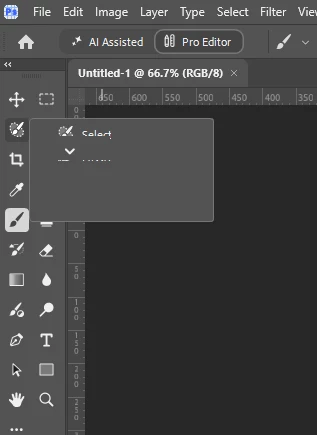
Since the update none of the submenus for the tools display properly and if you mouse over them they scroll directly between the top and bottom options, which you can select, but nothing in-between.
I reverted back to v 27.12 and everything worked fine again. So I updated to v 28.0 once more only for the same issue to occur.


    2 replies

    CShubert
    Community Manager
    Community Manager
    October 9, 2026

    Hi ​@Chris @ Chic thank you for the post.  To make sure we are starting on the same page, could you follow these steps to make sure there are not issues with the latest Ps Beta?

    1. Try resetting Prefs for the Beta:
    /Users/yourname/Library/Preferences/ Photoshop Beta Settings (Mac Ventura)
    /Users/yourname/Library/Preferences/Adobe\ Photoshop\ \(Beta\)\ Settings (Mac)


    C:\Users\user name\AppData\Roaming\Adobe\Adobe Photoshop (Beta)\Adobe Photoshop (Beta) Settings


    Launch BETA Photoshop While Pressing The Keyboard Shortcut
    With Photoshop closed, press and hold Shift+Ctrl+Alt (Win) / Shift+Command+Option (Mac) on your keyboard and then Launch Photoshop the way you normally would.
    https://helpx.adobe.com/photoshop/using/preferences.html#Manually 

    2. It may help if we could see your Photoshop beta System Info. Launch Photoshop beta, and select Help >System Info...and copy/paste the text in a reply.  


    Thanks,

    Cory - Photoshop Product Manager

    Claire H.
    Community Manager
    Community Manager
    October 9, 2026

    Hi @Chris @ Chic, Thanks for reaching out! I have moved your report to the Photoshop (Beta) forum. Follow this article to learn how to reset your tools: https://adobe.ly/4yh3Qbg.

    I hope this helps! ^CH