
Title: Generative Upscale alters embedded text and damages line art
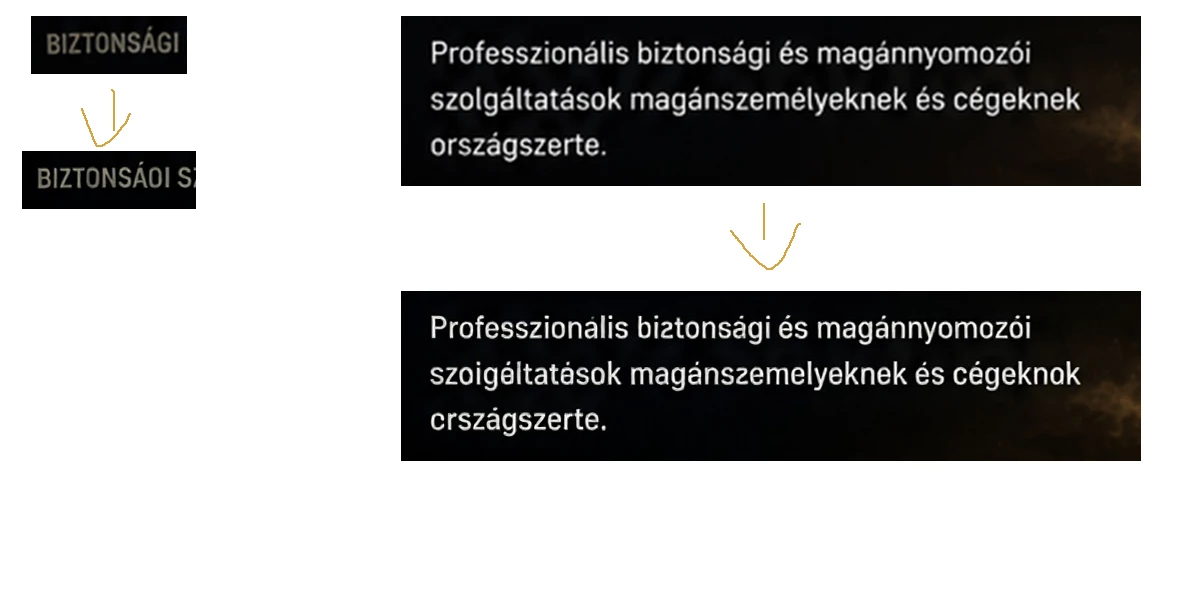
When using Generative Upscale in Photoshop, the feature modifies text that is already embedded in the image and distorts line drawings and other precise graphic elements.
This is not editable text on a separate text layer. The source is an existing flattened PNG file in which the text and line art are part of the image pixels.
During upscaling, Photoshop changes individual letters, makes text unreadable, and redraws some characters incorrectly. Thin lines, outlines, and detailed line-art elements are also distorted or replaced with inaccurate shapes. As a result, the upscaled image is less accurate and often less usable than the original.
Steps to reproduce:
- Open a flattened PNG containing embedded text and line art.
- Run Generative Upscale.
- Compare the result with the original image.
- The text characters and line-art details are altered or distorted.
Expected result:
The original content, letter shapes, line structure, and graphic elements should remain unchanged. The feature should increase resolution and detail without creatively reinterpreting the image.
Actual result:
Generative Upscale changes the original content by recreating text and line art inaccurately.
Please investigate and fix this issue. It would also be useful to have a strict preservation option that prevents Generative Upscale from modifying existing image content.


 AdChoices