
Washed colours when opening any image in Photoshop after updating to 27.9.0 (Beta) Mac release.
PROBLEM : Images have Washed colours when opening any image in Photoshop after updating to 27.9.0 (Beta) Mac release.
SEVERITY : URGENT.
- Ps Preferences > Performance > Use Graphics Processor is Checked.
- Ps Preferences > Technology Previews > Precise colour management for HDR display is Unchecked.
- View > Proof colours Unchecked.
DETAILS :
Opening any image or duplicating any image with an embedded icc profile (jpg, psd png etc.), it appears the embedded icc profile is not read.
Updating seemed to have reset all Custom Color settings.
After update I found Color Management Policies off, Profile Mismatches Ask When Opening UNchecked, and Missing Profiles Ask When Opening Unchecked.
My custom Color Settings were not preserved through the update.
My Saved Custom Color Settings are not found under the pop-up Settings.
Reseting Working space to RGB: Adobe RGB(1998) and Color management Policies to Preserve Embedded Profiles and checking all “Ask When Opening” does not seem to have an affect and colours continue to be washed when opening files.
(Note: desaturate monitor colours by 20 % was and remains unchecked).
EXPECTED RESULT :
icc profile is read and applied, or default Monitor is applied in respect to Custom Colour Profile Choices.
SOLUTION 1 : (Temporary ) Menu select, View > Proof Setup > Monitor. Profile Colours are restored and the image is as expected. But Proof Setup must be selected each and every time for each image opened or duplicated.
SOLUTION 2 : (Temporary ) Menu select, View > Proof Colours. Profile Colours are restored and the image colour is as expected. But Proof Colours must be selected each and every time for each image opened or duplicated.
SOLUTION 3 : (Semi-Permanant) Photoshop Preferences > Performance > Uncheck Use Graphics Processor. Restarting the Photoshop app does not appear to be necessary. All color profile choices appear to be respected. Opening or image duplication respects the Custom Colour Profile Choices. But Photoshop is crippled with this choice and should not be considered a permanent solution.
Why is Photoshop not applying my Custom Colour Profile Choices?
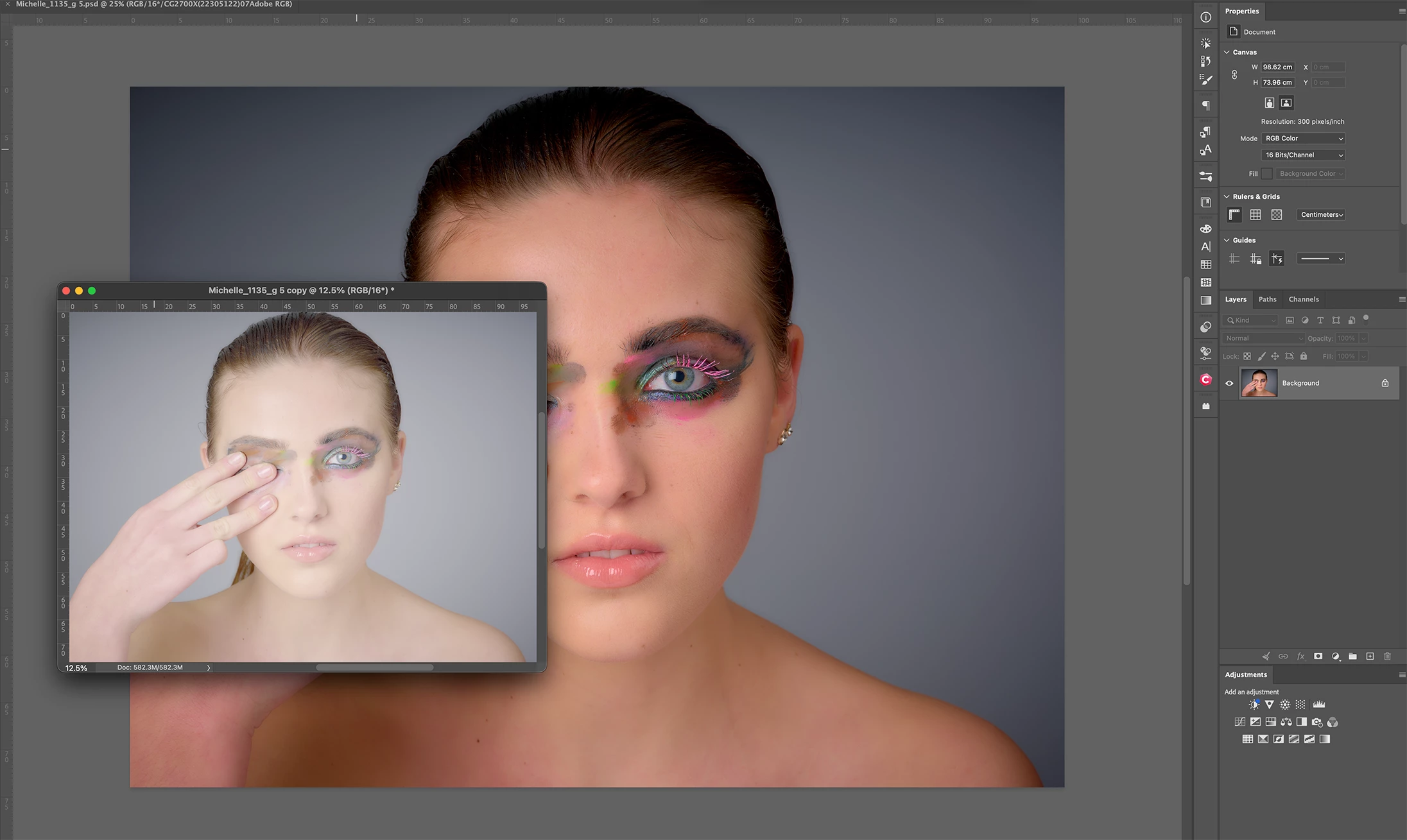
… Attached image has proof colors checked because Monitor (default ) is not respected. Duplicating the image colours get washed out again, the icc profile (adobe RGB) is not respected at all. My monitor profile, an EIZO CG2700x with self calibration and Adobe RGB 1998 are practically indistinguishable.
Thanks in kind for your help in this ===urgent matter.


 AdChoices