
Inspiring
January 27, 2026

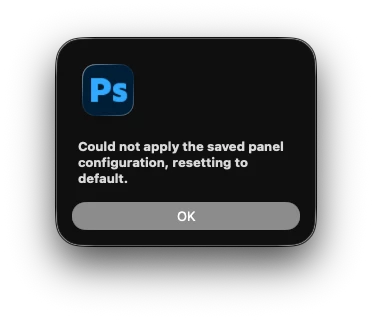
P: Launch Error - Could not apply the saved panel configuration, resetting to default

  • January 27, 2026
  • 9 replies
  • 615 views

When launching Photoshop the following error appears on screen:
“could not apply the saved panel configuration, resetting to default”

After the application starts up, workspace can be restored back to the saved preferred layout and everything function correctly. 

This started with 27.1 and has continued in to 27.3
There was also already a thread on here where Adobe said it was being looked in to and myself and others had submitted error logs to show where it appeared to flagging the error. After the community change here, that previous bug report has disappeared from the link resolving there or finding it via search so adding a new till it gets addressed. 
 

    9 replies

    gener7
    Community Expert
    Community Expert
    April 20, 2026

    Here’s an AI-generated summary of things to try:


    The error "Could not apply the saved panel configuration" typically occurs in Adobe Photoshop when the application's workspace settings or general preferences have become corrupted. 
     
    1. Reset the Active Workspace 
    Often, a simple reset of your workspace layout can clear the error. 
    • Go to the Window menu.
    • Select Workspace.
    • Click Reset [Workspace Name] (e.g., Reset Essentials) to revert to the default layout. 
     
    2. Reset Photoshop Preferences
    If resetting the workspace doesn't work, you may need to clear the main preference file. 
    • The Keyboard Shortcut (Fastest): Hold down Ctrl + Alt + Shift (Windows) or Command + Option + Shift (Mac) while launching Photoshop. A prompt will appear asking to delete the settings file; click Yes.
    • In-App Method: Go to Edit > Preferences > General (Windows) or Photoshop > Preferences > General (Mac). Click Reset Preferences On Quit and restart the application. 
     
    3. Check for Permission or Disk Access Issues 
    The application may fail to save or load configurations if it lacks permission to write to its settings folder. 
    • Administrator Rights: Try right-clicking the Photoshop shortcut and selecting Run as Administrator to see if the configuration can then be saved or applied.
    • Full Disk Access (Mac): Go to System Settings > Privacy & Security > Full Disk Access and ensure Photoshop is toggled On
     
    4. Address Conflicting Cloud Backups
    In some cases, background syncing software (like Dropbox or OneDrive) that backs up your "Documents" or "Desktop" folder can conflict with Photoshop's ability to read/write settings. Try temporarily pausing these services to see if the error persists. 
     
    5. Reinstall or Use the Clean Tool 
    If the error occurs immediately upon launch and prevents the program from opening at all, it may indicate a deeper installation corruption. 
    • Use the Adobe Creative Cloud Cleaner Tool to completely remove old preference artifacts before performing a fresh installation. 
    mv.retouching
    Participant
    February 23, 2026

    Also had this problem, did not get solved by 27.4, but here is the solution for Windows. I guess something bugged on Photoshop’s end and it caused the issue

    Delete this folder completely:

    C:\Users\(USER)\AppData\Roaming\Adobe\Adobe Photoshop 2026\Adobe Photoshop 2026 Settings

    Known Participant
    March 17, 2026

    I tried this and it didn’t work for me.

    paulflong
    Inspiring
    February 17, 2026

    same error


    Gavin at MRP
    Inspiring
    February 4, 2026

    Still unsolved in 27.3.1 Release


    Gavin at MRP
    Inspiring
    January 30, 2026

    The latest Photoshop update (27.3.0) has NOT resolved this issue.


    Known Participant
    April 2, 2026

    Still no fix in today’s update (27.5.0).

    Jeff Arola
    Community Expert
    Community Expert
    January 29, 2026

    Some users including myself have had success solving the issue by trashing the MachinePrefs.psp

    in Macintosh HD/Users/UserName/Library/Preferences/Adobe Photoshop 2026 Settings

    Participating Frequently
    January 29, 2026

    I get the same message but mine doesn’t restore once I select it in the menu bar. I have to constantly remake my workspace. This is getting extremely frustrating.

    paulflong
    Inspiring
    March 18, 2026


    Participant
    January 29, 2026
    Loading

    I have the same problem with the Extended Display mode.

    Community Manager
    January 27, 2026

    Hey ​@clif_CROP Thanks for reaching out! This is a known bug that the team is already investigating, and we’ll have a fix out as soon as possible.
    Thank you so much for your patience!
    Alek


    *(If you mention me with an @, like @Aleke, I’ll get a notification and can respond faster.)*
    rox_020
    Participant
    January 29, 2026

    is there any update on this one?