


Known Participant
November 30, 2020

P: 'Edit Text' field 'enter key' behavior being overridden (JavaScript, Windows)

  • November 30, 2020
  • 15 replies
  • 1128 views

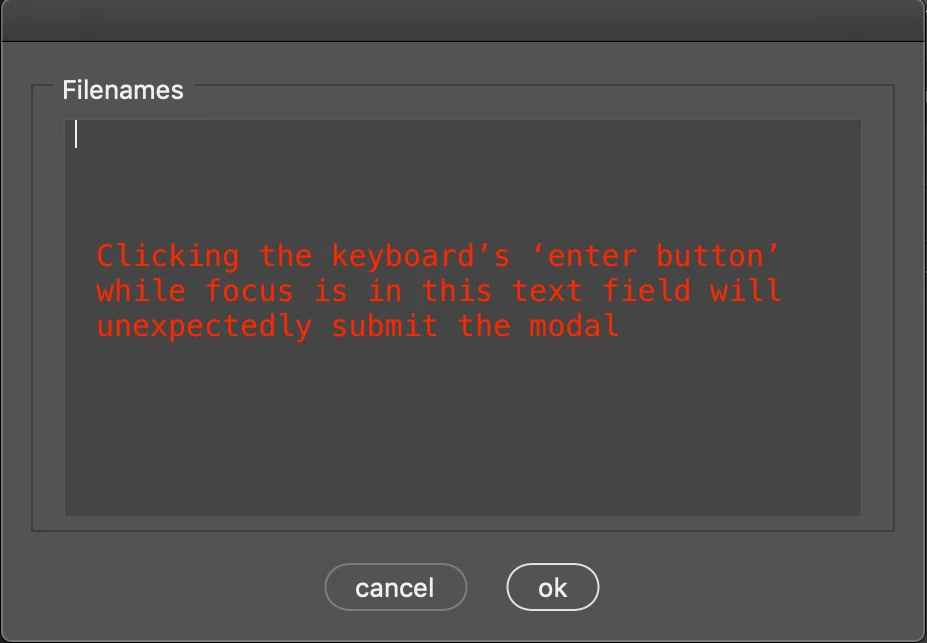
The enter key in the simplified test code below is not allowing users to create a new line within the edit text field (as expected). Instead, the modal is being submitted. The code works properly on OSX but not Windows.


I've mostly tried eventListener related solutions. So enterKey, onEnterKey, onChange, change, etc - then assigning them to different elements in the interface. Haven't been able to get those event listeners to fire, but if I could, would try event.preventDefault() or event.stopPropogation() as well. No luck yet.


var modal = new Window("dialog");
modal = addFilenamesPanel(modal)
/*
Commenting 'addSubmissionButtonsGroup' fixes the issue.
So maybe there is problematic a event listener or 
propogation occurring within the submission buttons.
*/
modal = addSubmissionButtonsGroup(modal)
modal.show();
function addFilenamesPanel(modal) {
    modal.filenamesPanel = modal.add(
        "panel",undefined,"Filenames"
    );
    var panel = modal.filenamesPanel;
    /*
    'enterKeySignalsOnChange' fixes issue
    on OSX but not Windows 10.
    */
    panel.filenamesText = panel.add(
      "EditText",undefined,"",{
            multiline: true,
            enterKeySignalsOnChange: true
        }
    )
    panel.filenamesText.minimumSize = [400,200];
    return modal
}
function addSubmissionButtonsGroup(modal) {
    modal.submissionButtons = modal.add(
        "group", undefined, "submit"
    );
    modal.submissionButtons.cancel = addButton(
        modal.submissionButtons,"cancel",false
    );
    modal.submissionButtons.ok = addButton(
        modal.submissionButtons,"ok",true
    );
    return modal
  function addButton(group,buttonName,response) {
        group.add(
            "button", undefined, buttonName,
            {name: buttonName}
        )
      group.addEventListener( "click", function() {
            return response
        });
        return group
    }
}
 
This topic has been closed for replies.

15 replies

Legend
December 2, 2020

Try this sample:

testWindow = new Window ('palette', 'test', undefined, {closeButton:true});
testWindow.orientation = 'column';
testWindow.alignChildren = ['fill', 'fill'];
testPanel = testWindow.add('panel', undefined, 'Test');
testPanel.orientation = 'column';
testPanel.alignChildren = ['fill', 'top'];
testPanel.margins = [10, 10, 10, 10];
testPanel.etxt = testPanel.add('edittext', undefined, 'Works ok here.', {multiline:true, wantReturn:true});
testPanel.etxt.preferredSize = [200, 100];
testPanel.btn = testPanel.add('button', undefined, 'Click Me');

testPanel.btn. function(){
    testPanel.etxt.text = 'No problem';
    }
testWindow.layout.layout(true);
testWindow.show();

Legend
December 2, 2020

Remove the addEventListener, that's just gumming things up. Use the onClick callback instead. And you can set the Active property to false so it doesn't get keyboard focus.

Zollie135Author
Known Participant
December 2, 2020

Might be narrowing in on the problem. The enter key unexpectedly fires a click event when no click occurs (but the enter button is pressed). Here's the modal with only the ok button in it.

var modal = new Window("dialog");
modal = addSubmissionButtonsGroup(modal)
modal.show();

function addSubmissionButtonsGroup(modal) {
    modal.submissionButtons = modal.add(
        "group", undefined, "submit"
    );
    modal.submissionButtons.ok = addButton(
        modal.submissionButtons,"ok",true
    );
    return modal

    function addButton(group,buttonName,response) {
        group.add(
            "button", undefined, buttonName,
            {name: buttonName, enterKeySignalsOnChange: false}
        )
        group.addEventListener( "click", function(event) {
            // this will print "click" if you press the enter key
            $.writeln("click")
            return response
        });
        return group
    }
}


It's also odd that the modal would close when no close() method has been called.

Legend
December 2, 2020

Buttons already have an event listener, you don't add one. Use the built-in onClick() function.

Legend
December 2, 2020

Thanks. I've asked engineering to take a look.