


Participant
November 7, 2023

P: Photoshop 25.0 Graphics Processor Compatibility Check fails: Unknown GPU

  • November 7, 2023
  • 179 replies
  • 26352 views

Hello, I just updated to Photoshop 2024 but I cannot get it to work with GPU acceleration. When I start Photoshop, I get this error: 


I am running a Windows 10 PC with two Nvidia RTX 3090 video cards and a 5950x CPU. 


So far, I have tried:

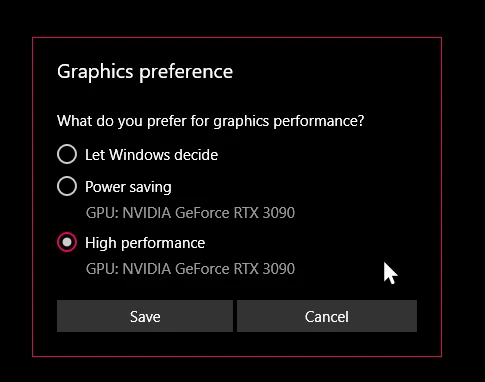
- Setting Photoshop and sniffer.exe to use my, uh, 'high performance 3090' as opposed to my 'power saving' 3090 (excellent work, Windows)  
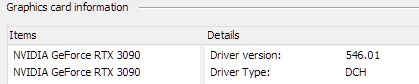
- Updated to the latest Nvidia studio drivers and installed all Windows 10 updates
 

- Removed 'sniffer.exe' from the Photoshop folder as suggested, causes Photoshop to not boot. 

- Enabled "Older GPU Mode" in the Technology Previews, get same error so I disabled it again. 

-  Tried setting the GPU in Nvidia Control Panel, but I don't have a "Preferred GPU" setting like a laptop or PC with integrated graphics. 

- Disabled SLI

- Uninstalled and reinstalled Photoshop 2024

- Manually ran sniffer.exe, it sees the video cards just fine
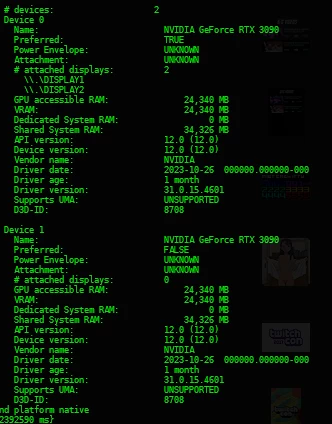
 

Thanks for the update Adobe, it works really well

179 replies

Mark.Dahm
Community Manager
Community Manager
December 7, 2023

Sorry, the build with the patch hasn't been posted yet. I'll ping here when it's available.

Participating Frequently
December 7, 2023

@Mark.Dahm I have installed latest Beta - 25.4 m.2422. Result is still the same - I need to copy old sniffer.exe to be able to get GPU green.

Also - another issue I have with this Beta and retail (not beta) versions is - when I close them - they are still opened in background and I need to kill exe from Task Manager. And those proccess eat my memory. May be this is because of old sniffer, have no idea yet, as I didn't try this with original one. If I open 2 or more times Photoshop ( and closing between sessions) - I will have the same amount of .exe proccess in Task manager. Pfff...

Mark.Dahm
Community Manager
Community Manager
December 7, 2023

Is anyone on this thread using a system that does not have multiple GPUs?


Photoshop does not take advantage of multiple graphics cards. Conflicting drivers may also cause crashes or other problems.


For those that have tried the troubleshooting issues above, we are continuing to work on this, so thanks for your patience.

Mark.Dahm
Community Manager
Community Manager
December 7, 2023

@RealXanathon , the Beta will not install to the same location, so you can have both on the system at the same time. If you use Photoshop together with Lightroom or Bridge, the 'send to' or 'open with' features between the apps will only launch the last version of those apps installed unless you pre-launch the version you want (that means Lighroom could launch the Beta instead of the non Beta version). Also, double clicking files may launch the version you don't want. To eliminate that, you can uninstall the Beta after trying it out.


One thing that we will not have done by Friday, but is on our to do list, is the ability to launch Photoshop without the sniffer at all; we were unhappy to discover this wasn't already the case. The sniffer is designed to sniff out unstable or non GPU systems so that Photoshop can operate with the right information, but it was needed a long time ago when the personal computing hardware had far spottier GPU use. There is a slight danger that eliminating the sniffer may make Photoshop more susceptible to bad drivers or faulty GPU memory states, however with more modern systems, that risk is lower and not a greater inconvenience than refusing to start at all, which is where we seem to be today.


The change we have in place modifies one of our components that did recently change how it interacted with the GPU, so we look forward to seeing whether or not that unblocks your situation. It's a bit of best guess because we have not been able to replicate the problem on a system here to confirm a more absolute guarantee. Thanks for your patiencea and we are sorry for the inconvenience.

RealXanathon
Known Participant
December 7, 2023

I really do not care about "problems downstream", I care about working software.


I did not "eliminate" Sniffer, i dropped in Sniffer from an earlier version of Photoshop and the GPUs were identified correctly. So Sniffer is at least part of the problem.

Can I install the PS beta parallel to the stable branches? I am no friend of beta versions if they potentially mess with my system.

Mark.Dahm
Community Manager
Community Manager
December 7, 2023

@Nik Nastev @RealXanathon , we will be releasing changes in our Beta that are speculative to address this issue; would be great if you had the chance to try it out tommorrow when it comes out.


The sniffer is not causing the issue; eliminating the sniffer removes the signal to Photoshop that the GPU is unstable, and allows Ps to proceed, but with an unstable GPU, problems will occur downstream.

RealXanathon
Known Participant
December 7, 2023

Another question is how long we have to wait to use the new features we pay a considerable amount of money every month for?

Participating Frequently
December 7, 2023

sniffer is not fixed yet. New Photoshop beta update - old sniffer. How many Months you need Adobe, to fix this?

RealXanathon
Known Participant
December 5, 2023

This problem is still not solved in Photoshop 25.2. The error message generated by Sniffer is different (OpenGL is now detected), but it still does not recognize the GPUs.

Known Participant
December 1, 2023

I do not have a integrated graphic, base on the pics attached can you see your graphic card ....


benoit Kapture foto