


Participant
December 11, 2019

P: Starting in v 23.1.1 - keeps nagging me to save to Creative Cloud

  • December 11, 2019
  • 81 replies
  • 34537 views

I've been paying for / using Photoshop for many years (since way back to version 3 in 1996).


I don't use the Creative Cloud for saving files, and don't want to.


However, starting with version 23.1.1 whenever I create new file from an image I've copied to the PC's clipboard and then paste it into the blank PSD and Save, it now prompts me to save the file to the Creative Cloud.


The first time it popped-up (today) I made sure to put a check mark in the "Dont Show Again" box and chose "Save to your computer".


Yet it's still popping-up the "Save to Creative Cloud" prompt every time and still forcing me to make the extra step of choosing "On your computer" , every time. (Screenshot attached).


This is insanely annoying.


At first I thought hmmm... OK maybe just a glitch, so I shut down PhotoShop and restarted my PC. Problem still happens. I can't seem to find any way to change it in the settings.


Has anyone else encountering this bug? Know of a solution?

Many thanks for any input!
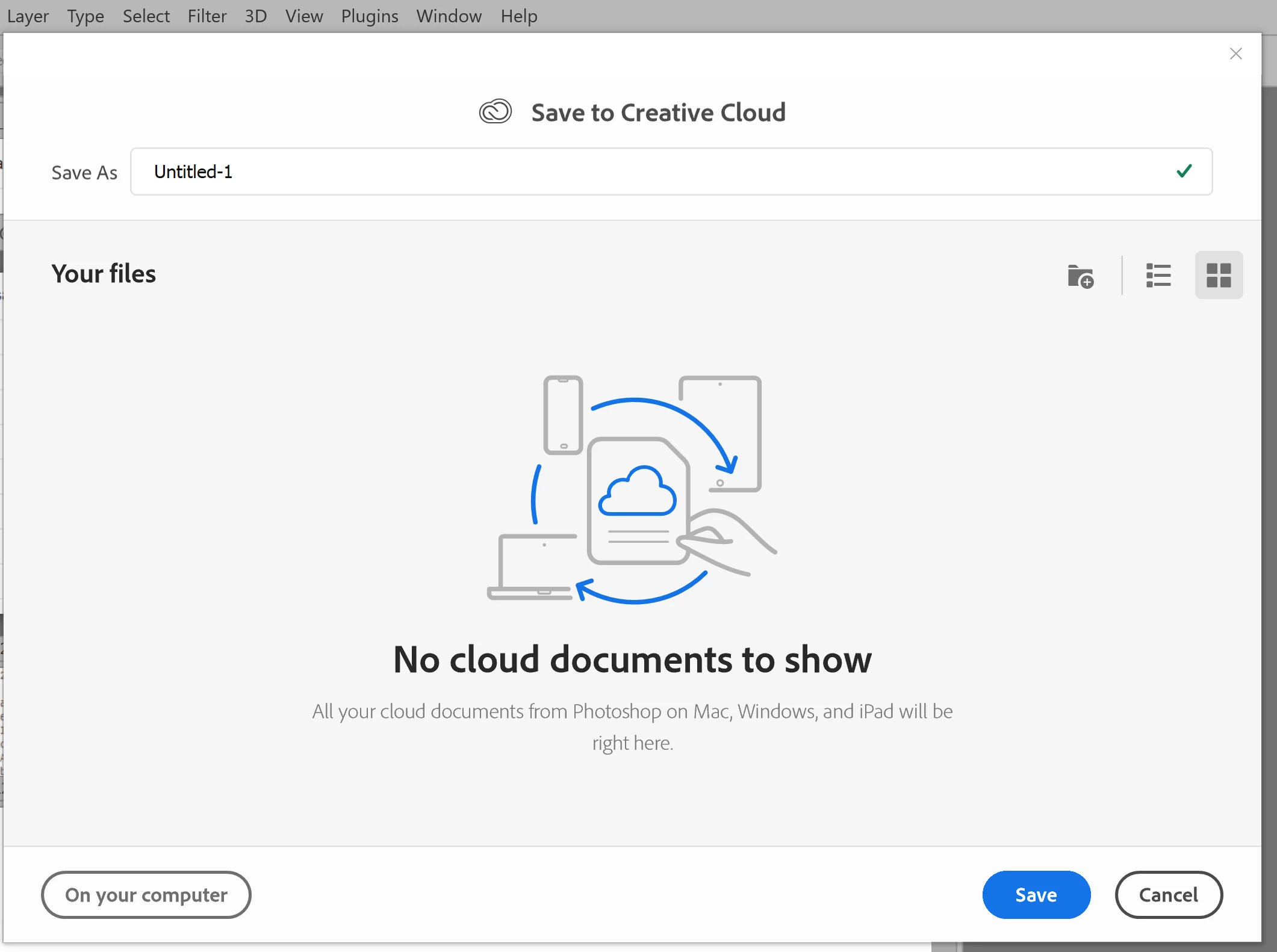


81 replies

Kathy5FFA
Inspiring
November 22, 2022

Can someone tell me how to stop following just this thread? This has been resolved ages ago and I'm getting so many notifications. Thank you.

Participating Frequently
November 22, 2022

I'm laughing too hard... gonna exit this thread. Best wishes fellow Photoshop CC users. Let's hope they figure out how to keep the save to local drive feature working.

Nancy OShea
Community Expert
Community Expert
November 22, 2022

"Or a big corporation... finding itself somehow unable to write the code to manage a preferences file reliably?"

==============

Easy for you to say. 😕😕


Developers have massive time constraints to get new features out by release date.  Failure is not an option.   And while all new features go through rigorous beta testing, sometimes things slip below the radar.  Or upper management says go ahead, we'll take of problems in post-release updates.  Either way, nothing is ever perfect the first time out.  And this is nothing new in the software industry.  It's always been this way for as long as I can remember.  The only things that have changed since the 90's are:

a) frequent release cycles (no more 18 months of waiting between updates),

b) the sophistication of software & complexity of its programming (many, many layers deep),

c) the eagerness of users to immediately jump on new releases and then complain at full volume when those releases don't work as expected.


Loss of hair & sanity can be averted by simply turning off auto updates in CC Desktop app.  Revert to a previous version.   Wait a month or two for bugs to be identified and the incremental updates to roll out.


Nancy O'Shea— Product User & Community Expert
Participating Frequently
November 22, 2022

Let me try one more time just to defuse this thing a bit. Please stop using the word conspiracy theory. That's a very loaded term in today's world. Thank you. Random testing is a real world practice. It's called A/B testing. Amazon uses it. Now consider this, which is more preposterous: A cloud product A/B testing an important feature? Or a big corporation that produces what is arguably the most powerful graphics editing tool on the market finding itself somehow unable to write the code to manage a preferences file reliably? 

D Fosse
Community Expert
Community Expert
November 22, 2022

frontendnerd, conspiracy theories that don't make any sense isn't very helpful to anyone.

Legend
November 22, 2022

Adobe isn't doing blind testing on random users. that's ridiculous, a support nightmare, and not likely to return any usable data. hello. I'm a developer too. Nobody does that. Now, they MIGHT do it in pre-release or beta, with documentation, but you haven't even explained how this would be implemented.

Let's lay off the nonsense that doesn't help solve our problem here.

Participating Frequently
November 22, 2022

I'm glad you acknowledged the reality of feature flags. You've probably heard of A/B testing? Now just consider that real people have control over how these flags are used in production deployments. To label it a conspiracy theory is inappropriate and to use a percentage figure like that is meaningless.

Legend
November 22, 2022

I'm aware of what feature flags are. I seriously doubt that Adobe is doing some sort of secret test with mass distributed software. But 99.9999999% of conspiracy theories are nonsense so...

Participant
November 22, 2022

I am on v24.0.0 and I have the default save location option in my preferences.

Participating Frequently
November 22, 2022

Features flags are a real thing. I have seen them in multiple companies. I'm a software developer. This is precisely the sort of thing that would be behind a feature flag. While it may be one of the many preferences-related issues, it's an interesting idea to consider that, given the way it keeps popping up across versions, that's it's connected to their cloud implementation. Especially since the product managers at Adobe very like prefer users to save on the cloud for many reasons.