thehandbook
Participant
March 26, 2026
Question

Select Subject selection is displaced

  • March 26, 2026
  • 1 reply
  • 23 views

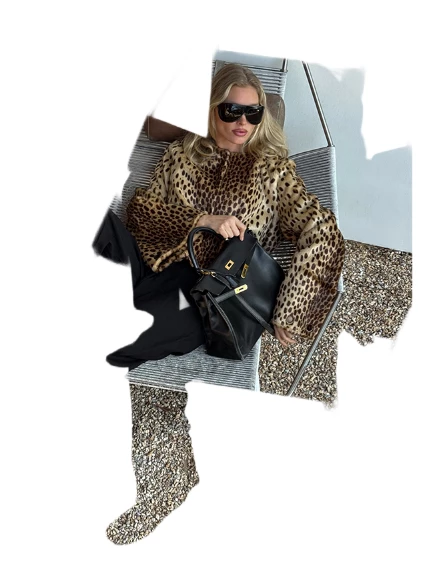
In Photoshop v 27.4 (and even in earlier late 2025-early 2026 versions) there is a bug where, whenever I create a mask and enter the Selection menu, the Select Subject tool selects the borders of the object correctly but displaces it, making the end result something completely different than what was intended. 
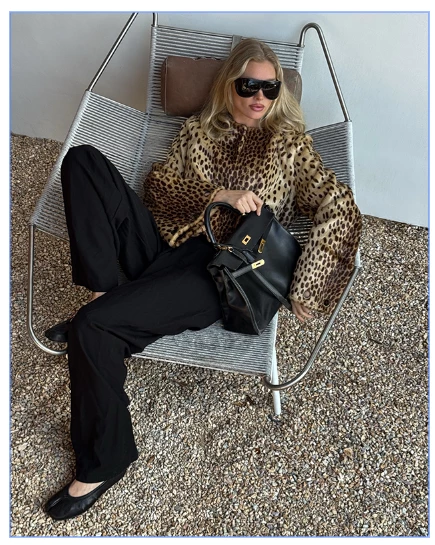
Original image, no selection​​​​
Select Subject result 

I have tried different settings, including using the Cloud and the device to select, and they all arrive to the same result. This didn’t happen in earlier versions of the software. 

    1 reply

    Srishti Bali
    Legend
    March 26, 2026

    Hi ​@thehandbook 


    Thanks for reaching out and taking the time to help narrow it down. I know this kind of issue can be really frustrating. To help us pinpoint what’s going on, could you share the following details:


    1. Please share System Info from the Photoshop Help menu (Help > System Info, copy and paste the full text).

    2. Confirm whether this issue occurs with other images as well, or only with this specific file.

    3. If possible, upload a short screen recording showing the steps from:

      • Opening the file

      • Creating the mask

      • Running Select > Subject

    4. Optionally, attach the sample file if it’s shareable.


    Looking forward your response!


    Regards,

    Srishti