
Cameron W
Known Participant
May 14, 2024

Audio info in timeline only visible if track size blown up several times.

  • May 14, 2024
  • 3 replies
  • 416 views

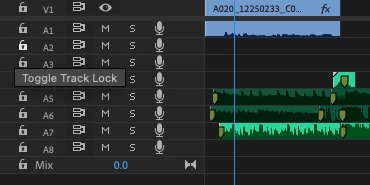
Audio clip info such as clip names, FX icons, and audio type badges aren't visible in the sequence unless multiple levels of timeline track zoom are applied.  In the below images, audio info isn't visible till three levels of zoom to audio tracks is applied.


No Zoom:
 

Zoom x 1
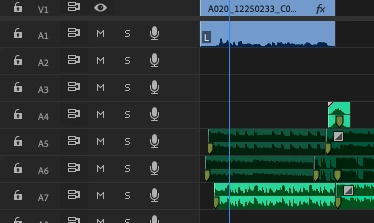
 

Zoom x 2
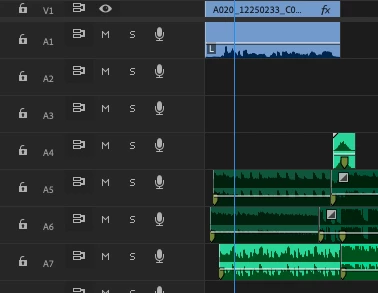
 

Zoom x 3
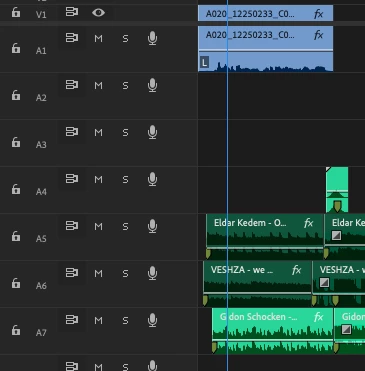
This differes from how info is shown on current (24.3.0 Build 59) and previous releases, and isn't ideal as takes up a too much screen space, especially as video names are visible at defaul (no zoom) level.  


Premiere 24.5.0 BETA (Build 41)

Mac OS Sonoma 14.4.1

MacBook Pro 16 M1 Max, 64GB Ram.


3 replies

Known Participant
July 5, 2024

Thank god this setting was created! I was about to be crazy frustrated. 

Cameron W
Cameron WAuthor
Known Participant
May 14, 2024

HI Machael.


Thanks for that, I've selected it now and it's showing as expeted. Out of curiosity, is there a reason it's unselected by default? I'd think it's info people would want to see, rather than having to know to turn on.


CHeers

Adobe Employee
May 14, 2024

Hi @Cameron W - There's a new preference (Show Audio Clip header on Small Tracks) in the Timeline Display Settings (wrench menu) that will allow you to see the name and badges on those small track heights. Let me know if you have any other questions.