
Known Participant
August 30, 2024

Beta Override Media Color Space Sony S-Gamut3.Cine, Direct PQ (HDR), Rec. 2100 PQ - EXPORT PROBLEM!!

  • August 30, 2024
  • 22 replies
  • 1758 views

Beta Override Media Color Space Sony S-Gamut3.Cine, Direct PQ (HDR), Rec. 2100 PQ - EXPORT PROBLEM!!

Below screenshot shows: Picture in Program Monitor (Right Side: which I spent loads of time editing based on) and a exported frame (Left Side: this is a single frame, but I'm trying to export video too and the whole video looks like this)
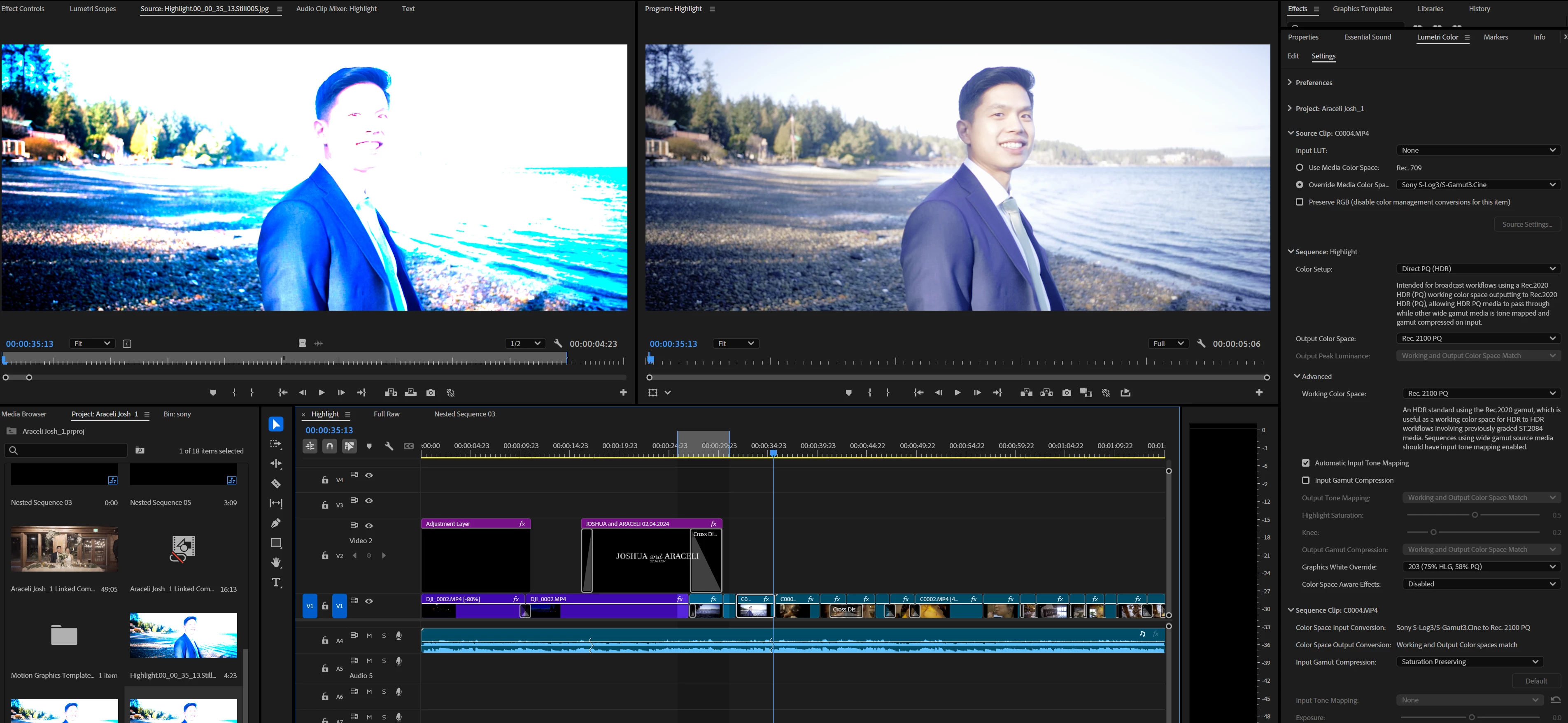

I was thinking the export video option labeled "Match Sequence Settings" would work but, every export option I've tried is producing colors like the one on the left.

I need help please. My last post, I posted 1 thread in the Discussion forum, and one in the Beta forum, and instead of just deleting one or the other thread, BOTH were deleted, even though the email for the reasoning I got was "Just add to one thread, don't create two threads"..... REALLY HOPING this doesn't get deleted.

My client is expecting this project done and I need help ASAP PLEASE.

22 replies

Known Participant
August 31, 2024

I just tested exporting with the effects tab off. The export remains still super blown or clipped.

jamieclarke
Community Manager
Community Manager
August 30, 2024

HI @default6g0k7me9sj4z - On your export settings can you make sure the switch for "Effects" is Off and let us know if that helps your issue.

Known Participant
August 30, 2024

Okay sure I'll send it over now

jamieclarke
Community Manager
Community Manager
August 30, 2024

What build are you working on you can find the information in the about premiere.  Would you be able to send me one of these files and your project, so that I can try and repro.  You can send a link to jamiec@adobe.com 

Known Participant
August 30, 2024

Thanks for reply! I tried turning off plugins and plugin cache. The export issue still just the same as before. Good idea though, as turning off plugins has helped with issues in the past. Just not this particular one.

jamieclarke
Community Manager
Community Manager
August 30, 2024

HI @default6g0k7me9sj4z - Do you have "Loudness Normalization" checked under effects in your export settings?  Also,  I noticed you are using a third party plugin, If you hold down "SHIFT" while opening premiere and select the checkbox "disable third party plugins". Do you get the same result when you export?

Known Participant
August 30, 2024

Made a short video describing the issue a bit better hopefully.

https://youtu.be/o32QMcIKcYY

Known Participant
August 30, 2024

@Alexis Van Hurkman Okay I will try.


When i convert this footage to rec709, the footage does change, but the clip is still WAY off the mark from that other one.


Also, you mentioned "all color adjustments need to be redone" - that's okay, but I should have let you know that in the original clip, nothing lumetri was changed, except adding a lut in the "creative" tab. All the other color adjustments were made using just these settings here in the dropdowns.

I didn't have to mess with exposure, highlights, anything, the footage came out amazing first go and threw a basic lut on top in creative and BAM, got an image I wanted (viewed from the export monitor) but the exported video itself is just horribly clipped.

You also asked my intention, it to simply deliver a finished video to a client, possibly upload it to youtube and facebook also, but mainly just deliver a video in a google box so they can view it on whatever they want.

How can I achieve the look in an exported video to the one I was aiming for? This Rec709 one is way too bright and lowering exposure, highlights, etc, deosn't come close to what I was expecting....

Like, hear me out here. If I open OBS studio, and were to just record the program monitor, that captured video would be very close to what I want to deliver to the client. So why can't adobe just... I just don't understand...

jamieclarke
Community Manager
Community Manager
August 30, 2024

I just merged the thread to here.  Please answer the questions asked by Alexis.

Known Participant
August 30, 2024

@jamieclarke  - it says access denied and I cannot view that link.